Index >> System Utilities >> Launchers & Task Managers >> Seven Classic Start
Report SpywareSeven Classic Start 1.75

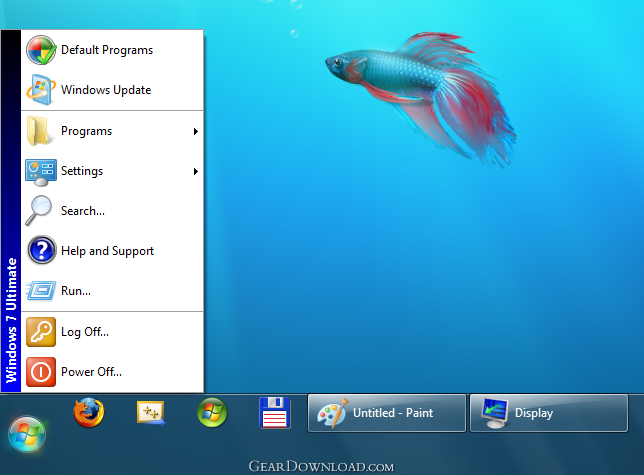 Click to enlarge screenshot
Software Description:
Seven Classic Start - Windows 7 Classic Start menu
Classic Start menu is back to Windows 7! Seven Classic Start returns the familiar Start menu into the newest version of Microsoft Windows, making the switch easier for users of legacy systems. Experienced users and owners of legacy versions of Windows will enjoy the easy upgrade path, while enterprises will benefit from having employees hop onto the new system without retraining.
The innovative Start menu introduced with Microsoft Windows 7 leaves experienced users in the cold. Windows 7 is the first version of Windows to drop the classic, legacy version of the Start menu in favor of the "newer and better" system. The new, controversial Start menu turns away potential users wishing to upgrade to Windows 7 yet reluctant to do so because of the drastic change to one user interface feature that is so frequently used. Attempts to launch a familiar
application turn into a hunt for the right button. For home users this is just a nuisance. For corporations, this is an extra waste of time and possible re-training of employees.
Upgrade to Windows 7 without the hassle of having to learn new tricks! Seven Classic Start returns your familiar classic Start menu back into the Windows 7 interface. Complete with all features of the genuine Start menu, Seven Classic Start is the long-awaited alternative to the new and unwelcome launch system.
Seven Classic Start simplifies and streamlines the upgrade path when upgrading to Windows 7 by eliminating the need to learn the new Start menu. Compatible with Home, Professional, Business, and Ultimate 32 and 64-bit editions of Windows 7.
What's New: Seven Classic Start running under 32-bit Windows works faster now. A few minor bugs have been fixed.
Limitations: 7 Days Trial
Classic Start menu is back to Windows 7! Seven Classic Start returns the familiar Start menu into the newest version of Microsoft Windows, making the switch easier for users of legacy systems. Experienced users and owners of legacy versions of Windows will enjoy the easy upgrade path, while enterprises will benefit from having employees hop onto the new system without retraining.
The innovative Start menu introduced with Microsoft Windows 7 leaves experienced users in the cold. Windows 7 is the first version of Windows to drop the classic, legacy version of the Start menu in favor of the "newer and better" system. The new, controversial Start menu turns away potential users wishing to upgrade to Windows 7 yet reluctant to do so because of the drastic change to one user interface feature that is so frequently used. Attempts to launch a familiar
application turn into a hunt for the right button. For home users this is just a nuisance. For corporations, this is an extra waste of time and possible re-training of employees.
Upgrade to Windows 7 without the hassle of having to learn new tricks! Seven Classic Start returns your familiar classic Start menu back into the Windows 7 interface. Complete with all features of the genuine Start menu, Seven Classic Start is the long-awaited alternative to the new and unwelcome launch system.
Seven Classic Start simplifies and streamlines the upgrade path when upgrading to Windows 7 by eliminating the need to learn the new Start menu. Compatible with Home, Professional, Business, and Ultimate 32 and 64-bit editions of Windows 7.
What's New: Seven Classic Start running under 32-bit Windows works faster now. A few minor bugs have been fixed.
Limitations: 7 Days Trial
Feature List:
- Get all the features of Windows classic Start menu back into Windows 7! Seven Classic Start returns the convenience of Windows original Start menu to Windows 7 users, making the new system easier to master for users of Windows XP and Vista
- Microsoft has removed the original version of Windows Start menu from its latest operating system, Windows 7. Loyal customers of legacy versions of Windows are being left in the cold by Microsoft - but not by Skyshape! Seven Classic Start makes upgrading to Windows 7 painless for experienced users of older versions of Windows, saves the initial shock and smoothes the learning curve of upgrading users
- Thanks to Seven Classic Start, home users will enjoy the familiar Start menu in Windows 7. Enterprise customers will benefit from painless deployment of Windows 7, smoother learning curve, and less re-training time. Employees will be able to use Windows 7 easier and more efficiently without having to learn new tricks during their working hours
- Why Seven Classic Start?
- The innovative, high-tech version of Windows Start menu introduced in Windows 7 is not necessarily welcome by experienced users of previous Windows editions. The lack of choice resulting from Microsoft's removal of classic Start menu from Windows 7 leaves many computer users frustrated. Seven Classic Start enables the familiar look and feel of the classic Start menu found in Windows XP and Vista for users of Windows 7
- Seven Classic Start is fully-featured, implementing all functions of the original Start menu and carefully reproducing its look and feel. Complete with everything that makes the original Start menu beloved by so many users, Seven Classic Start is the first third-party alternative to hi-tech bells and whistles of Windows 7
- Seven Classic Start is compatible with all 32 and 64-bit editions of Windows 7 including Home, Professional, Business, and Ultimate versions
100% Clean:
 Seven Classic Start 1.75 is 100% clean
This download (SevenClassicStart_Setup.exe) was tested thoroughly and was found 100% clean. Click "Report Spyware" link on the top if you found this software contains any form of malware, including but not limited to: spyware, viruses, trojans and backdoors.
Related Software:
- Astatix Launcher 1.63 - Quick start any application in a single click and control Winamp with hotkeys.
- ActiveActions 1.25 - ActiveActions is an launch tool that also acts like hotkey manager.
- eXtended Task Manager 2.15 - Extended windows task manager and performance monitoring tool
- Window Magician 1.1.3 - Small utility that can hide windows, system tray icons or run screensaver
- Program Sleuth 2.0.6 - Find out what is really running on your computer.
- RLauncher 2.3 - RLauncher is an easy to use application launcher.
- Pokki Start Menu 260.11.291 - Pokki Windows 8 Start menu lets you access & search all the stuff on your PC.
- FireDaemon Pro 3.14.2755 - A utility to install and run any application or script as a Windows service
- JetStart Free 4.4 - Launch Start Menu shortcuts faster and easier than ever
- DE Launcher 2.2 - Desktop utility that provides an alternative method of launching applications
top 10 most downloaded


recommended software
-
- AppleXsoft Photo Recovery for Mac
- AppleXsoft Photo Recovery is the comprehensive digital media data rescue software designed for Mac users, it featuring innovative photo recovery algor...

-
- Cacheman
- Memory is one of the most important pieces of computer hardware as it is in constant use no matter what a PC is used for. There is a tremendous number...
