Index >> System Utilities >> Other >> ScratchPad
Report SpywareScratchPad 1.6.1

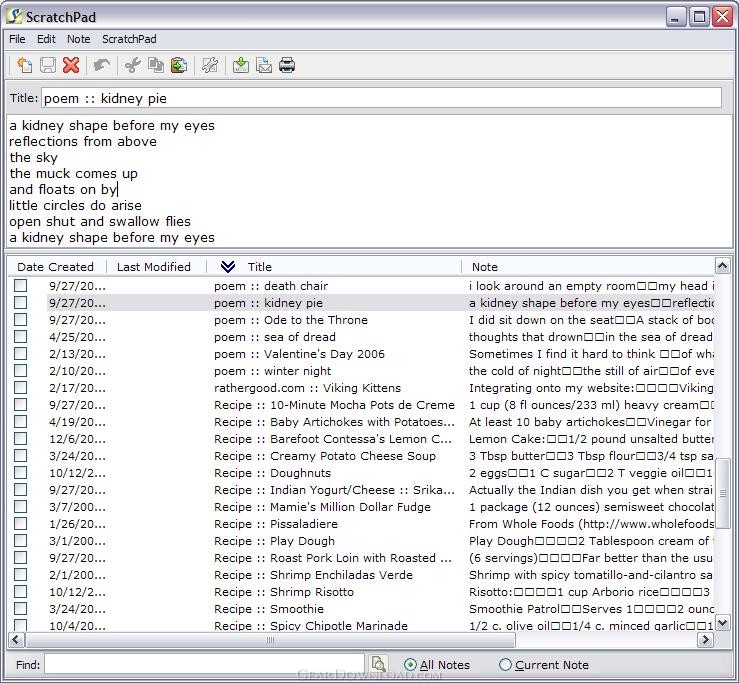 Click to enlarge screenshot
Software Description:
ScratchPad is a a simple yet powerful notes-taking utility.
ScratchPad is a a simple yet powerful notes-taking utility for Windows that resides in your system tray while not in use. ScratchPad is ideal for the heads-down computer user who need to store information in an electronic format, yet want it accessible and fully searchable!
Wtih ScratchPad, you can jot down a piece of information and store it for later use quickly and easily. You can print your notes, save them to an external file or send them via e-mail (an external e-mail application configured for use with an existing account is required).
ScratchPad allows users to capture their notes from web browsing sessions, hyperlinks to the associated website or directions to their favorite restaurant (as well as suggested menu items), to name but a few uses, all w/o having to remember where the item was stored!
After installing ScratchPad, refer to the first note for instructions on how to use ScratchPad.
What's New: Added spell checking functionality and updated menu structure to match industry standard.
Limitations: 10 Uses Trial; Users can enter 10 notes during the trial period.
ScratchPad is a a simple yet powerful notes-taking utility for Windows that resides in your system tray while not in use. ScratchPad is ideal for the heads-down computer user who need to store information in an electronic format, yet want it accessible and fully searchable!
Wtih ScratchPad, you can jot down a piece of information and store it for later use quickly and easily. You can print your notes, save them to an external file or send them via e-mail (an external e-mail application configured for use with an existing account is required).
ScratchPad allows users to capture their notes from web browsing sessions, hyperlinks to the associated website or directions to their favorite restaurant (as well as suggested menu items), to name but a few uses, all w/o having to remember where the item was stored!
After installing ScratchPad, refer to the first note for instructions on how to use ScratchPad.
What's New: Added spell checking functionality and updated menu structure to match industry standard.
Limitations: 10 Uses Trial; Users can enter 10 notes during the trial period.
Feature List:
- Automatically add creation date to your notes
- Sort notes by title, date created, date last modified or the note itself
- The date the note was modified is captured and is sortable
- Print note(s)
- E-mail note
- Save note(s) to external text file for external use
- Minimizes to your system tray when not in use
- Notes can be added even when ScratchPad is minimized to the System Tray
- Search across all notes or within individual note entries
- Active hyperlinks within note bodies allow you to easily browse to websites included in notes
- Hot-keys allow you to enter various date/time information
- Sorting arrows were added to the column headers, providing visual cues as to the sort state
- Help file outlining all the features of ScratchPad
100% Clean:
 ScratchPad 1.6.1 is 100% clean
This download (ScratchPadSetup.exe) was tested thoroughly and was found 100% clean. Click "Report Spyware" link on the top if you found this software contains any form of malware, including but not limited to: spyware, viruses, trojans and backdoors.
Related Software:
- Advanced-Password-Manager 3.0 - Advance Password Manager is a safe & user friendly password management utility.
- FastSum Standard Edition 1.6 - Check the integrity and track changes within your important files
- Acronis True Image Corporate Workstation 8.0 - Data and system backup and restore solution for corporate workstations
- Ashampoo PowerUp 3 3.23 - More protection, more control, faster and easier than ever
- Odbc 4 All 2.3 - Easy connection to ODBC data sources for any application, DOS and scripts too !
- Antechinus eBook Wizard 3.2 - Use eBook Wizard to compile your highly-compressed eBooks easily and in no time.
- O&O DriveLED 2.0 - O&O DriveLED permanently monitors the status of the hard disks in the background
- Unusual Works Utility Pack 1.0 - CD Ejector and Note Manager programs.
- 1-abc.net Surf Trail Washer 7.00 - Tool to delete your internet trail (files, cookies, history, URLs) permanently!
- txt2pdf 10.2 - txt2pdf is a flexible and powerful converter from text files to PDFs
top 10 most downloaded


recommended software
-
- AppleXsoft Photo Recovery for Mac
- AppleXsoft Photo Recovery is the comprehensive digital media data rescue software designed for Mac users, it featuring innovative photo recovery algor...

-
- Cacheman
- Memory is one of the most important pieces of computer hardware as it is in constant use no matter what a PC is used for. There is a tremendous number...
