Index >> System Utilities >> Other >> Run As Service
Report SpywareRun As Service 4.0

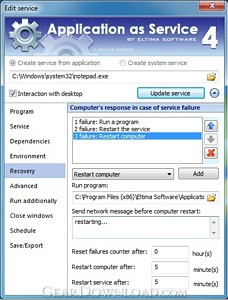 Click to enlarge screenshot
Software Description:
Run program as service (locally or remotely) on PC with Run as Service utility
Run as Service by Eltima Software is a powerful utility which is aimed to let you launch any program as Windows service.
With Run as Service you can run any application as service at system boot not even starting a user session. Run as Service allows you to create, view, edit and manage services on local or remote computers. Moreover, it is possible to handle multiple remote sides simultaneously without the necessity to install Run as Service on remote computer.
Run as Service allows running applications as services interactively (visible to users) or silently. Both, interactively and silently run services can be launched under user accounts. Users can also choose the user session (including RDP) in which interactive service should be started.
Run as Service allows you to schedule the launch of program as service on a specific date or time. All you need to do is set scheduler settings only once and the rest will be done by Run as Service right on time.
Run as Service allows creating services using GUI, command line or XML configuration file.
In case of the crash or power cut your program can be restarted automatically if you have Run as service, thus increasing the uptime of this program.
Run as Service has a very intuitive and friendly interface which is comprehensive even for the beginners. With Run as Service launching any application as Windows service is a child's play!
What's New: Added: choice of user session in which interactive service should be started; start interactive services under vista/7/2008; interactive services can be started under user account; service creation and management over the network: Application as Service is not required on the remote PC
Limitations: 14 Days Trial
Run as Service by Eltima Software is a powerful utility which is aimed to let you launch any program as Windows service.
With Run as Service you can run any application as service at system boot not even starting a user session. Run as Service allows you to create, view, edit and manage services on local or remote computers. Moreover, it is possible to handle multiple remote sides simultaneously without the necessity to install Run as Service on remote computer.
Run as Service allows running applications as services interactively (visible to users) or silently. Both, interactively and silently run services can be launched under user accounts. Users can also choose the user session (including RDP) in which interactive service should be started.
Run as Service allows you to schedule the launch of program as service on a specific date or time. All you need to do is set scheduler settings only once and the rest will be done by Run as Service right on time.
Run as Service allows creating services using GUI, command line or XML configuration file.
In case of the crash or power cut your program can be restarted automatically if you have Run as service, thus increasing the uptime of this program.
Run as Service has a very intuitive and friendly interface which is comprehensive even for the beginners. With Run as Service launching any application as Windows service is a child's play!
What's New: Added: choice of user session in which interactive service should be started; start interactive services under vista/7/2008; interactive services can be started under user account; service creation and management over the network: Application as Service is not required on the remote PC
Limitations: 14 Days Trial
100% Clean:
 Run As Service 4.0 is 100% clean
This download (application_service.exe) was tested thoroughly and was found 100% clean. Click "Report Spyware" link on the top if you found this software contains any form of malware, including but not limited to: spyware, viruses, trojans and backdoors.
Related Software:
- Serial to Ethernet Connector 7.0 - Benefit from serial over network solution by Eltima Software.
- USB to Ethernet Connector for Mac 4.0 - USB over Network for Mac lets you share USB devices over network.
- Virtual Serial Port Driver 8.0 - Virtual Serial Port Driver allows creating virtual serial port pairs on PC
- Advanced-Password-Manager 3.0 - Advance Password Manager is a safe & user friendly password management utility.
- FastSum Standard Edition 1.6 - Check the integrity and track changes within your important files
- Acronis True Image Corporate Workstation 8.0 - Data and system backup and restore solution for corporate workstations
- Ashampoo PowerUp 3 3.23 - More protection, more control, faster and easier than ever
- Odbc 4 All 2.3 - Easy connection to ODBC data sources for any application, DOS and scripts too !
- Antechinus eBook Wizard 3.2 - Use eBook Wizard to compile your highly-compressed eBooks easily and in no time.
- O&O DriveLED 2.0 - O&O DriveLED permanently monitors the status of the hard disks in the background
top 10 most downloaded


recommended software
-
- AppleXsoft Photo Recovery for Mac
- AppleXsoft Photo Recovery is the comprehensive digital media data rescue software designed for Mac users, it featuring innovative photo recovery algor...

-
- Cacheman
- Memory is one of the most important pieces of computer hardware as it is in constant use no matter what a PC is used for. There is a tremendous number...
