Index >> System Utilities >> File & Disk Management >> Recovery Toolbox for Access
Report SpywareRecovery Toolbox for Access 2.0.1

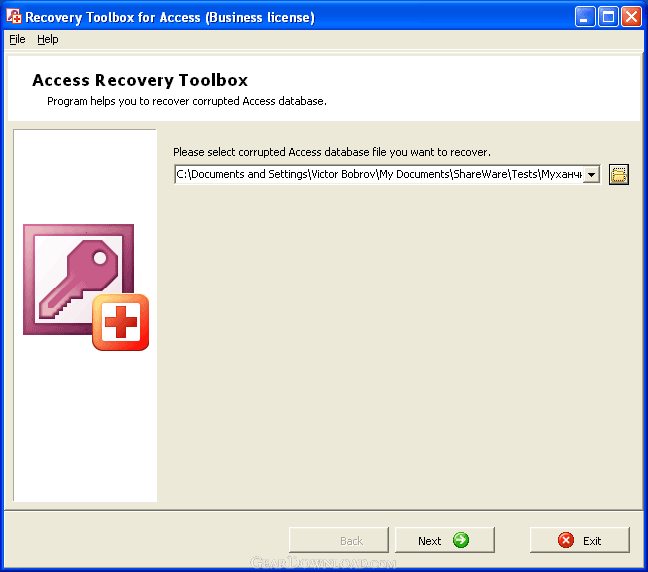 Click to enlarge screenshot
Software Description:
Recovery Toolbox for Access - Utility for quick and intelligent database recovery in Microsoft Access format
Recovery Toolbox for Access is the easiest solution for mdb restore that you have ever seen. Besides, this program guarantees the privacy of confidential information because all mdb recovery activities are performed on the workstation that is selected for Microsoft Excel repair. However, it may sound too good to be true from your point of view? Check it out and get free version of Recovery Toolbox for Access from the website of software developer. Thanks to the small size of this utility, it does not take a lot of time, the program is ready for work in a minute. You should not worry about compatibility issues, it can be installed on virtually all computers, running Microsoft Windows.
Unlike other services, Recovery Toolbox for Access is safe, all operations are executed on your PC or any other computer that was selected for this purpose. There are many tools that control the Internet traffic of your PC, turn on any of them and make sure that Recovery Toolbox for Access does not use the Internet connection at all. In the most cases, the recovery of affected mdb files can be performed automatically, it is possible, if the source file system of target media is still usable and your database in mdb format is still seen by Windows. If it is really so, the corruption affects mdb files only and you have very good chances to restore database files.
However, you should not lose time, try Recovery Toolbox for Access now and make sure that it can easily solve data corruption problems in Microsoft Access documents. Please note that you have very good chances for the recovery of affected files, if the recovery is applied in time. Do not wait until it is too late, try it now and avoid possible losses and even leakages. The latest version can be downloaded from our website, open the download section of our website and click the link for Recovery Toolbox for Access download, it usually begins shortly. After this you can evaluate Recovery Toolbox for Access.
What's New: Improved with accordance of users feedbacks.
Limitations: Can't save recoverd files.
Recovery Toolbox for Access is the easiest solution for mdb restore that you have ever seen. Besides, this program guarantees the privacy of confidential information because all mdb recovery activities are performed on the workstation that is selected for Microsoft Excel repair. However, it may sound too good to be true from your point of view? Check it out and get free version of Recovery Toolbox for Access from the website of software developer. Thanks to the small size of this utility, it does not take a lot of time, the program is ready for work in a minute. You should not worry about compatibility issues, it can be installed on virtually all computers, running Microsoft Windows.
Unlike other services, Recovery Toolbox for Access is safe, all operations are executed on your PC or any other computer that was selected for this purpose. There are many tools that control the Internet traffic of your PC, turn on any of them and make sure that Recovery Toolbox for Access does not use the Internet connection at all. In the most cases, the recovery of affected mdb files can be performed automatically, it is possible, if the source file system of target media is still usable and your database in mdb format is still seen by Windows. If it is really so, the corruption affects mdb files only and you have very good chances to restore database files.
However, you should not lose time, try Recovery Toolbox for Access now and make sure that it can easily solve data corruption problems in Microsoft Access documents. Please note that you have very good chances for the recovery of affected files, if the recovery is applied in time. Do not wait until it is too late, try it now and avoid possible losses and even leakages. The latest version can be downloaded from our website, open the download section of our website and click the link for Recovery Toolbox for Access download, it usually begins shortly. After this you can evaluate Recovery Toolbox for Access.
What's New: Improved with accordance of users feedbacks.
Limitations: Can't save recoverd files.
Feature List:
- Analysis of the source file and data extraction: the data and the structure of the sys-tem and user’s tables are processed. The software extracts information about queries and relations and analyzes the data that can be recovered. When saving the recovered data, Recovery Toolbox for Access will accurately restore the structure of the original document and the data it managed to recover
- Data analysis: while saving the database according to the data retrieved from the source file, the software restores the structure of user’s tables (indexes, field types and names), relations between tables and the structure of queries (any information used in queries: conditions, table fields and tables themselves, relations between them). Apart from that, data integrity is checked and corresponding error messages are added to the journal
- Saving data: the software prepares a new database file with a name specified by the user. All relations, queries and tables are created on the basis of the data retrieved on the previous analysis stage. Irrecoverable data is not copied to the new file. Table data from the source file is copied to the output file
100% Clean:
 Recovery Toolbox for Access 2.0.1 is 100% clean
This download (RecoveryToolboxForAccessInstall.exe) was tested thoroughly and was found 100% clean. Click "Report Spyware" link on the top if you found this software contains any form of malware, including but not limited to: spyware, viruses, trojans and backdoors.
Related Software:
- Recovery Toolbox for DBF 2.3.11 - The tool repairs database dbf files, it is fast, easy to use and shareware
- Recovery Toolbox for PDF 2.2.5 - Efficient utility for the recovery of pdf documents, quickly repairs pdf files
- Folder Cache 2.6 - Access to the recently used & favorite folders from the Save and Open dialogs.
- O&O Defrag Professional Edition 16.0 - Faster system starts, accelerated programs, and professional settings
- Visual Comparer 1.40 - Visual file compare and merge of the text files with syntax hightlight
- Advanced CATaloguer Pro 2.6 - Professional software for cataloguing on all kinds of media
- EF Duplicate Files Manager 7.10 - Find out duplicate files with same name, same size, same content
- EF Find 8.00 - EF Find is a powerful search program also inside archive files.
- Visual Multitool 4.4 - It is a file viewer, finder and editor with text tools.
- Advanced File Organizer 3.01 - Powerful cataloguer for all kinds of removable media, network drives, hard disk.
top 10 most downloaded


recommended software
-
- AppleXsoft Photo Recovery for Mac
- AppleXsoft Photo Recovery is the comprehensive digital media data rescue software designed for Mac users, it featuring innovative photo recovery algor...

-
- Cacheman
- Memory is one of the most important pieces of computer hardware as it is in constant use no matter what a PC is used for. There is a tremendous number...
