Index >> System Utilities >> File & Disk Management >> Professional Renamer
Report SpywareProfessional Renamer 3.98

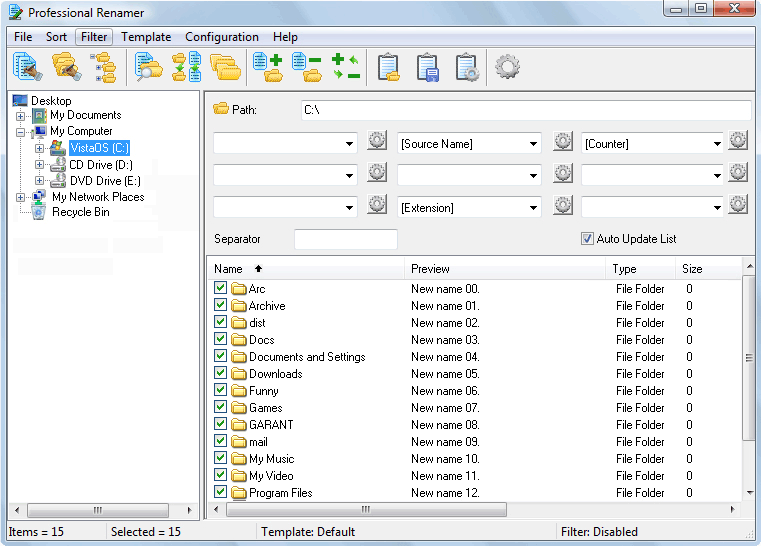 Click to enlarge screenshot
Software Description:
Professional Renamer - Powerful renaming tool to rename multiple filenames at once.
By using MIKLSOFT Professional Renamer software for Windows, you can rename multiple files and folders quickly. Powerful renaming tool to rename multiple filenames at once.
Its user-friendly and intuitive interface allow you to rename files easily. Unique visual templates system will helpfully assist you in renaming. All changes on new name immediately show in the file-list. It perfects for MP3 collectors, digital photographers, Web developers, system administrators and everyone who works with a large number of files.
Unique visual templates system was developed to save your time. The intuitive system based on dialogs. Each template consists of the nine fields, which can accept one of the six values with corresponding options, or simply the text. You can operate with the following kinds of fields: source name, parent folder name, counter, date, time and extension. Without effort, you can save your template, for subsequent use.
MIKLSOFT Professional Renamer features:
- Multiple files and folders were renaming.
- Unique visual templates system.
- Subfolders processing.
- New names preview.
- File sorting and filtering.
- Various usages of the templates (import/export).
System requirements: Windows PC.
Trial limitations: 10-day trial period, nag-screen.
What's New: Fixed: Some minor bugs.
Limitations: 10 Days Trial
TAGS: renamer, professional, renaming, files, name, rename, folders, templates
By using MIKLSOFT Professional Renamer software for Windows, you can rename multiple files and folders quickly. Powerful renaming tool to rename multiple filenames at once.
Its user-friendly and intuitive interface allow you to rename files easily. Unique visual templates system will helpfully assist you in renaming. All changes on new name immediately show in the file-list. It perfects for MP3 collectors, digital photographers, Web developers, system administrators and everyone who works with a large number of files.
Unique visual templates system was developed to save your time. The intuitive system based on dialogs. Each template consists of the nine fields, which can accept one of the six values with corresponding options, or simply the text. You can operate with the following kinds of fields: source name, parent folder name, counter, date, time and extension. Without effort, you can save your template, for subsequent use.
MIKLSOFT Professional Renamer features:
- Multiple files and folders were renaming.
- Unique visual templates system.
- Subfolders processing.
- New names preview.
- File sorting and filtering.
- Various usages of the templates (import/export).
System requirements: Windows PC.
Trial limitations: 10-day trial period, nag-screen.
What's New: Fixed: Some minor bugs.
Limitations: 10 Days Trial
TAGS: renamer, professional, renaming, files, name, rename, folders, templates
Feature List:
- Multiple files and folders renaming
- Subfolders processing
- Unique visual templates system
- New names preview
- Files sorting
- Files filtering
- Multiple usages of the templates (import/export)
100% Clean:
 Professional Renamer 3.98 is 100% clean
This download (profren.zip) was tested thoroughly and was found 100% clean. Click "Report Spyware" link on the top if you found this software contains any form of malware, including but not limited to: spyware, viruses, trojans and backdoors.
Related Software:
- MIKLSOFT Renamer 1.65 - Rename files in the selected folder with MIKLSOFT RENAMER.
- Attribute Manager 5.58 - Modify file and folder attributes in an easy way.
- Folder Cache 2.6 - Access to the recently used & favorite folders from the Save and Open dialogs.
- O&O Defrag Professional Edition 16.0 - Faster system starts, accelerated programs, and professional settings
- Visual Comparer 1.40 - Visual file compare and merge of the text files with syntax hightlight
- Advanced CATaloguer Pro 2.6 - Professional software for cataloguing on all kinds of media
- EF Duplicate Files Manager 7.10 - Find out duplicate files with same name, same size, same content
- EF Find 8.00 - EF Find is a powerful search program also inside archive files.
- Visual Multitool 4.4 - It is a file viewer, finder and editor with text tools.
- Advanced File Organizer 3.01 - Powerful cataloguer for all kinds of removable media, network drives, hard disk.
top 10 most downloaded


recommended software
-
- AppleXsoft Photo Recovery for Mac
- AppleXsoft Photo Recovery is the comprehensive digital media data rescue software designed for Mac users, it featuring innovative photo recovery algor...

-
- Cacheman
- Memory is one of the most important pieces of computer hardware as it is in constant use no matter what a PC is used for. There is a tremendous number...
