Index >> System Utilities >> File Compression >> PowerZip
Report SpywarePowerZip 7.21

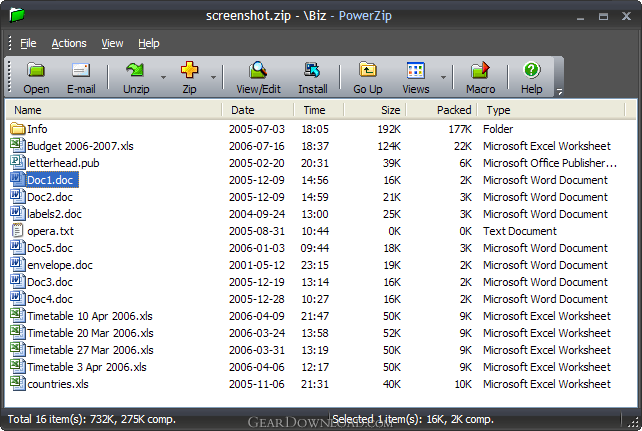 Click to enlarge screenshot
Software Description:
PowerZip: Zip, unzip, split or password-protect (encrypt) files quickly & easily
Unzip downloads, create your own Zip files and password-protect (encrypt) confidential documents with PowerZip - an easy to use file compression & security program.
PowerZip Compression / Extraction Wizards make working with archives (such as Zip files) easy while providing an array of advanced features. The Wizards are quick to use because they have only a small number of steps; some steps can be switched of if not needed, others can be skipped to use default options. Pop-up tooltips explain the purpose of each button or control.
You can use PowerZip's 128-bit & 256-bit AES encryption to create password-protected Zip files to store confidential documents and files or send them through insecure channels, such as e-mail.
PowerZip supports two new compression methods (Deflate64 and BWT) to provide you with a higher level of compression than is normally available in Zip files. Standard Zip compression is also supported for compatibility with other Zip programs.
PowerZip adds itself to the Windows Explorer right-click menu, enabling you to perform common compression tasks (zipping, unzipping, encryption, splitting) directly from Windows Explorer / My Computer.
PowerZip supports 12 types of archives - PowerZip can create & unzip Zip, Cab, Tar, Bz2, Gz, Arj and Ha archives; PowerZip can also unzip Rar, Ace, Jar, Lzh and Z archives.
If you routinely perform compression tasks (such as daily backups), you can automate them by recording PowerZip Macro Files. Macro Files allow you to repeat the recorded compression (or extraction) task with a simple double-click; you can also run PowerZip Macro Files as part of an automated script.
If you need to distribute large files to friends, colleagues or customers who might not have a Zip program, PowerZip allows you to create a self-extracting archive that can be unzipped without requiring a compression program.
Limitations: 45 Days Trial
TAGS: aes, cab, ace, bzip2
Unzip downloads, create your own Zip files and password-protect (encrypt) confidential documents with PowerZip - an easy to use file compression & security program.
PowerZip Compression / Extraction Wizards make working with archives (such as Zip files) easy while providing an array of advanced features. The Wizards are quick to use because they have only a small number of steps; some steps can be switched of if not needed, others can be skipped to use default options. Pop-up tooltips explain the purpose of each button or control.
You can use PowerZip's 128-bit & 256-bit AES encryption to create password-protected Zip files to store confidential documents and files or send them through insecure channels, such as e-mail.
PowerZip supports two new compression methods (Deflate64 and BWT) to provide you with a higher level of compression than is normally available in Zip files. Standard Zip compression is also supported for compatibility with other Zip programs.
PowerZip adds itself to the Windows Explorer right-click menu, enabling you to perform common compression tasks (zipping, unzipping, encryption, splitting) directly from Windows Explorer / My Computer.
PowerZip supports 12 types of archives - PowerZip can create & unzip Zip, Cab, Tar, Bz2, Gz, Arj and Ha archives; PowerZip can also unzip Rar, Ace, Jar, Lzh and Z archives.
If you routinely perform compression tasks (such as daily backups), you can automate them by recording PowerZip Macro Files. Macro Files allow you to repeat the recorded compression (or extraction) task with a simple double-click; you can also run PowerZip Macro Files as part of an automated script.
If you need to distribute large files to friends, colleagues or customers who might not have a Zip program, PowerZip allows you to create a self-extracting archive that can be unzipped without requiring a compression program.
Limitations: 45 Days Trial
TAGS: aes, cab, ace, bzip2
100% Clean:
 PowerZip 7.21 is 100% clean
This download (PowerZipSetup.exe) was tested thoroughly and was found 100% clean. Click "Report Spyware" link on the top if you found this software contains any form of malware, including but not limited to: spyware, viruses, trojans and backdoors.
Related Software:
- StuffIt Standard Edition for Windows 8.5.2 - StuffIt Standard(tm) gives you access to any file on the Internet!
- m9P Zipper XT 1.0 - User-friendly compression (zipping) and decompression (unzipping) tool.
- m9P Zipper X 1.0 - Simple file compression (zipping) and decompression (unzipping) tool.
- AnyZip 1.10 - Windows archiver program for compression and decompress.
- File2Pack 2.0 - A File Packer/Compressor For Archiving Files With Excellent Compression Ratio!
- RAR Recovery Toolbox 1.1.16 - Recovers RAR files despite the reason of CRC errors and other issues
- Advanced Zip Repair 2.0 - A powerful tool to repair corrupted Zip files and self-extracting(SFX) files.
- Advanced RAR Repair 1.2 - Advanced RAR Repair is a powerful tool to repair corrupt RAR or SFX archives.
- WinZip 21.0.22288.0 - Compress, encrypt, manage and share with WinZip, the world's #1 Zip utility.
- WinRAR 4.20 - Complete support for RAR and ZIP, compress 8 to 30 percent better than ZIP!
top 10 most downloaded


recommended software
-
- AppleXsoft Photo Recovery for Mac
- AppleXsoft Photo Recovery is the comprehensive digital media data rescue software designed for Mac users, it featuring innovative photo recovery algor...

-
- Cacheman
- Memory is one of the most important pieces of computer hardware as it is in constant use no matter what a PC is used for. There is a tremendous number...
