Index >> System Utilities >> Shell Tools >> Power Plan Assistant for Windows 7
Report SpywarePower Plan Assistant for Windows 7 2.2a

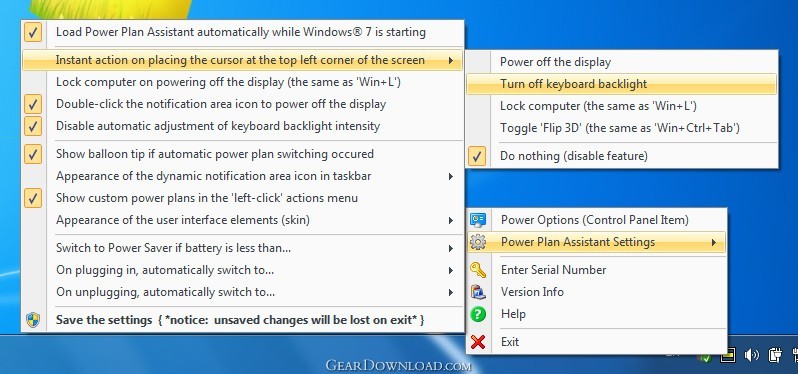 Click to enlarge screenshot
Software Description:
Power Plan Assistant for Windows 7 is the world's smartest power management tool
Power Plan Assistant for Windows 7 is a multiple award-winning software, created to redefine the Windows 7 laptop experience.
Power Plan Assistant has been designed to work with any Windows 7-compatible hardware (32-bit and 64-bit).
In addition, it can install the truly unique features, specific for Boot Camp-enabled Apple Macbook Pro / Air notebooks running Windows 7: Power Plan Assistant brings the keyboard backlight management to a new level on these Macs, allowing the user to disable keyboard backlight completely or just disable / enable automatic keyboard backlight level adjustment. These features were previously available on Mac OS X only. Power Plan Assistant brings them to both the 32-bit and 64-bit Windows 7, at the same time preserving all of Boot Camp's native hardware controls.
With Power Plan Assistant you can:
1. Quickly switch between the Windows built-in and custom power plans (all power plans, not just 2 of them, as it is when operating via system Power icon);
2. Easily observe which power plan is currently active (dynamic application icon in a taskbar notification area changes in accordance with an active power plan, does not matter where it has been changed);
3. Instantly power off the display on user's demand (why wait at least one minute for it to be powered off, wasting the energy?). The display can be waked up then by pressing any key or moving the cursor;
4. Switch the power plans automatically:
- to 'Power Saver', in order to start saving the energy BEFORE battery power is gone (threshold is user-configurable);
- to 'High Performance' or 'Balanced' (on plugging in);
- to 'Power Saver' or 'Balanced' (on unplugging).
5. Instantly power off the display, lock workstation or toggle Windows Flip 3D mode WITHOUT A NEED TO PERFORM EVEN A SINGLE CLICK: the user-configurable action can fire on placing the cursor precisely at the top left corner of the screen.
Licensing: donationware (no obligatory charge, no feature limits).
Power Plan Assistant for Windows 7 is a multiple award-winning software, created to redefine the Windows 7 laptop experience.
Power Plan Assistant has been designed to work with any Windows 7-compatible hardware (32-bit and 64-bit).
In addition, it can install the truly unique features, specific for Boot Camp-enabled Apple Macbook Pro / Air notebooks running Windows 7: Power Plan Assistant brings the keyboard backlight management to a new level on these Macs, allowing the user to disable keyboard backlight completely or just disable / enable automatic keyboard backlight level adjustment. These features were previously available on Mac OS X only. Power Plan Assistant brings them to both the 32-bit and 64-bit Windows 7, at the same time preserving all of Boot Camp's native hardware controls.
With Power Plan Assistant you can:
1. Quickly switch between the Windows built-in and custom power plans (all power plans, not just 2 of them, as it is when operating via system Power icon);
2. Easily observe which power plan is currently active (dynamic application icon in a taskbar notification area changes in accordance with an active power plan, does not matter where it has been changed);
3. Instantly power off the display on user's demand (why wait at least one minute for it to be powered off, wasting the energy?). The display can be waked up then by pressing any key or moving the cursor;
4. Switch the power plans automatically:
- to 'Power Saver', in order to start saving the energy BEFORE battery power is gone (threshold is user-configurable);
- to 'High Performance' or 'Balanced' (on plugging in);
- to 'Power Saver' or 'Balanced' (on unplugging).
5. Instantly power off the display, lock workstation or toggle Windows Flip 3D mode WITHOUT A NEED TO PERFORM EVEN A SINGLE CLICK: the user-configurable action can fire on placing the cursor precisely at the top left corner of the screen.
Licensing: donationware (no obligatory charge, no feature limits).
100% Clean:
 Power Plan Assistant for Windows 7 2.2a is 100% clean
This download (Setup_PowerPlanAssistant_v22a.exe) was tested thoroughly and was found 100% clean. Click "Report Spyware" link on the top if you found this software contains any form of malware, including but not limited to: spyware, viruses, trojans and backdoors.
Related Software:
- MouseStar 3.57 - Powerful application to transform your mouse into a highly functional tool.
- MaxMonkey 2.40 - Maximize, minimize, close and restore windows
- Shutdown Lock 1.5 - Create hibernate shortcut to hibernate computer automatically.
- Talisman Desktop 3.4 - Desktop Manager and Shell Replacement for Windows
- KO Approach 0.5.2 - Click on a folder icon in Explorer and navigate a menu to locate files quicker
- PromptPal 2.1 - Eliminate the frustrations of the Command Prompt with a modern command line tool
- Captain Tray Pro 6.4 - Captain Tray Pro is a simple tool for system tray management.
- Jitbit Virtual Keyboard 2.22 - Multilingual on-screen virtual keyboard. Type text with your mouse.
- DirDate 6.5 - Modify file and folder dates from command line, exif support
- IPod Audio Studio 6.4.2 - record, convert and transit audio to your iPod.
top 10 most downloaded


recommended software
-
- AppleXsoft Photo Recovery for Mac
- AppleXsoft Photo Recovery is the comprehensive digital media data rescue software designed for Mac users, it featuring innovative photo recovery algor...

-
- Cacheman
- Memory is one of the most important pieces of computer hardware as it is in constant use no matter what a PC is used for. There is a tremendous number...
