Index >> System Utilities >> Clipboard Tools >> PhraseExpress Autotext - USB Edition
Report SpywarePhraseExpress Autotext - USB Edition 8.0.154

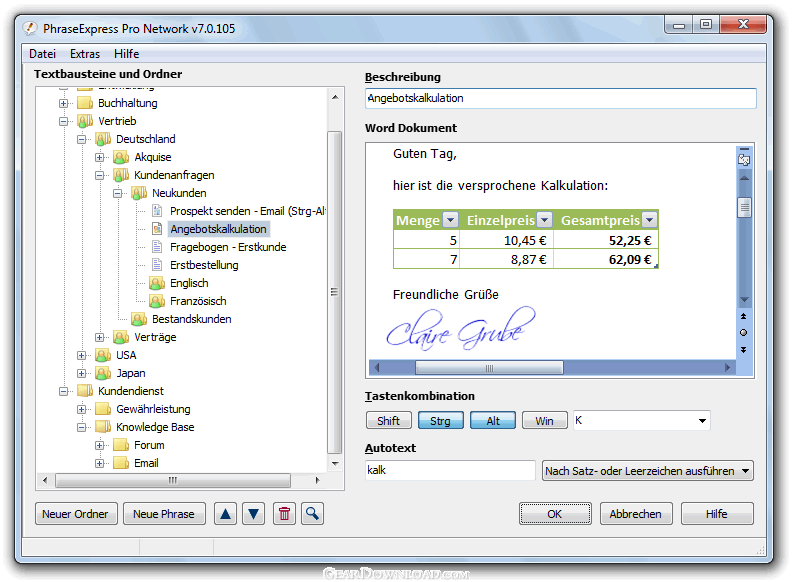 Click to enlarge screenshot
Software Description:
PhraseExpress Autotext - USB Edition - Autotext Text Expander and Boilerplate Template Manager for USB sticks
Autotext Text Expander and Boilerplate Template Manager for Windows. PhraseExpress for USB sticks manages frequently used text snippets for quick access and eliminates repetitive typing with the text replacement feature. Boilerplate templates can be stored together with bitmaps and Microsoft Word-, RTF- or HTML text formatting.
The text prediction feature watches out for repetitive text patterns and offers to auto-complete such phrases. Smart algorithms analyze and learn your writing patterns, and suggest the most relevant ways to complete phrases and sentences.
The Autotext feature allows assigning a frequently used text such as your address, your signature or a common phrase to a much shorter abbreviation. Whenever you type in the assigned abbreviation PhraseExpress will automatically replace it with the original text. For example, "ty" will be expanded to "thank you very much. Existing MS Office AutoCorrect entries can be imported for use in any Windows program, not just MS Office.
The Clipboard Cache enhances the native Windows clipboard functionality by remembering all items that are copied to the clipboard and storing them for later pasting.
PhraseExpress can optionally remove any text formatting from the clipboard contents.
Powerful macro functions can add dynamic contents to static phrases such as the current date, counters or additional manual input. Phrases can be linked or nested. Macros can also launch programs or open documents triggered by shortcuts. Entering 'calc' may open the Windows calculator program or pressing the hotkey CTRL-F8 may offer a Google search query of a highlighted text on-the-fly.
This keyboard macro utility is free-of-charge for personal users - The optional Network Edition provides the PhraseExpress functionality in a company network with a professional Client-/Server architecture. A separate USB installer allows to run PhraseExpress from USB memory devices.
What's New: Major Update
Autotext Text Expander and Boilerplate Template Manager for Windows. PhraseExpress for USB sticks manages frequently used text snippets for quick access and eliminates repetitive typing with the text replacement feature. Boilerplate templates can be stored together with bitmaps and Microsoft Word-, RTF- or HTML text formatting.
The text prediction feature watches out for repetitive text patterns and offers to auto-complete such phrases. Smart algorithms analyze and learn your writing patterns, and suggest the most relevant ways to complete phrases and sentences.
The Autotext feature allows assigning a frequently used text such as your address, your signature or a common phrase to a much shorter abbreviation. Whenever you type in the assigned abbreviation PhraseExpress will automatically replace it with the original text. For example, "ty" will be expanded to "thank you very much. Existing MS Office AutoCorrect entries can be imported for use in any Windows program, not just MS Office.
The Clipboard Cache enhances the native Windows clipboard functionality by remembering all items that are copied to the clipboard and storing them for later pasting.
PhraseExpress can optionally remove any text formatting from the clipboard contents.
Powerful macro functions can add dynamic contents to static phrases such as the current date, counters or additional manual input. Phrases can be linked or nested. Macros can also launch programs or open documents triggered by shortcuts. Entering 'calc' may open the Windows calculator program or pressing the hotkey CTRL-F8 may offer a Google search query of a highlighted text on-the-fly.
This keyboard macro utility is free-of-charge for personal users - The optional Network Edition provides the PhraseExpress functionality in a company network with a professional Client-/Server architecture. A separate USB installer allows to run PhraseExpress from USB memory devices.
What's New: Major Update
100% Clean:
 PhraseExpress Autotext - USB Edition 8.0.154 is 100% clean
This download (PhraseExpress_USB.zip) was tested thoroughly and was found 100% clean. Click "Report Spyware" link on the top if you found this software contains any form of malware, including but not limited to: spyware, viruses, trojans and backdoors.
Related Software:
- ! - M8 Multi Clipboard 5.Release - The M8 multi clipboard captures all clips and Screen Shots
- 101 Clips 19.00 - Free Multi-Clipboard and Clip Organizer
- Speed Dial for Phone Cards 2.00 - Speed Dial for Phone Cards
- Speed Dial 13.07.01 - This computer speed dial software program makes dialing the phone easy
- WinM8 4.01.03 - The original multi clipboard
- CopyPlus 2.02.33 - Now you can copy as often as you like and paste all your clips at the same time.
- I Love Clipboard 1.3 - ILoveClipboard is a useful software to manage Windows clipboard.
- M8 Multi Clipboard 9.73.11 - Multi clipboard, organizer, text and graphics editors all rolled into one.
- Alpha Clipboard Recorder 9.03 - Free Clipboard Recorder
- AceText 3.1.1 - Speed up and smarten up the way you write and communicate on your PC
top 10 most downloaded


recommended software
-
- AppleXsoft Photo Recovery for Mac
- AppleXsoft Photo Recovery is the comprehensive digital media data rescue software designed for Mac users, it featuring innovative photo recovery algor...

-
- Cacheman
- Memory is one of the most important pieces of computer hardware as it is in constant use no matter what a PC is used for. There is a tremendous number...
