Index >> System Utilities >> Backup & Restore >> PC Backup Utilities 2008 Home 05.10
Report SpywarePC Backup Utilities 2008 Home 05.10 2008E.10

 Click to enlarge screenshot
Software Description:
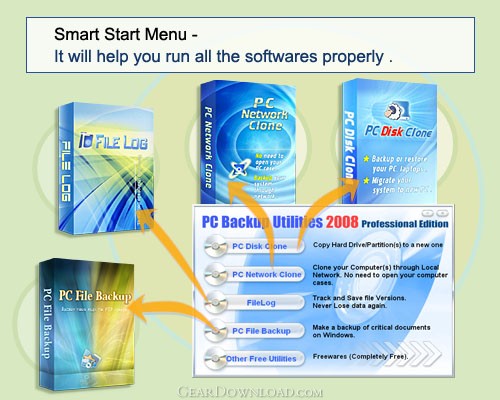
PC Backup Utilities 2008 Home 05.10 - Includes System Clone and File Backup which cater for Business and Home users
Why PCBackupUtilities?
PC Backup Utilities Free Edition is an exclusive backup/restore solution for home and business purposes. With this comprehensive solution, Even a novice can backs up his/her Windows/Linux Systems, documents, business information, photos, musics and emails; Upgrade hard drive and migrate/propagate system to other computers locally or over network will become an easy and efficient task with the Wizard interface and fast copying speed.
1. Clone your harddisk or partition at up to 2GB/min:
As for upgrading old disk to new one, people can use the PCDiskClone Free Edition Software inside the "PC Backup Utilities" to copy hard drive data through an IDE/SATA/SCSI/USB/Firewire cable line linking to an external disk.
2. Clone your harddisk or partition via network at up to 9GB/min network throughput:
PCNetworkClone Free Edition is a Linux LiveCD based boot CD that allows cloning of computer hard drives to backup data or migrating system to other computers over network. It’s a perfect solution for Home users to easily migrate his/her hard drive to a new computer over internet cable, also an economical and comprehensive solution for Enterprises that need system mass installation and reproduction.
3. Make a backup of critical documents on Windows :
PCFileBackup Software inside "PC Backup Utilities" will help those who want to back up important files when working on Windows Systems. PC File Backup can analyze which files are modified and back up those as incremental backup in zip format, which means only modified files are added. Space and time are saved.
4. Track and save file changes. View and restore previous revisions. Never lose changes to documents :
FileLog allows you to track and record any changes to files and restore an earlier version of a tracked file. You can go back to a previous version of a document and never lose changes of your Microsoft Office documents, images, drawings or other important files.
Why PCBackupUtilities?
PC Backup Utilities Free Edition is an exclusive backup/restore solution for home and business purposes. With this comprehensive solution, Even a novice can backs up his/her Windows/Linux Systems, documents, business information, photos, musics and emails; Upgrade hard drive and migrate/propagate system to other computers locally or over network will become an easy and efficient task with the Wizard interface and fast copying speed.
1. Clone your harddisk or partition at up to 2GB/min:
As for upgrading old disk to new one, people can use the PCDiskClone Free Edition Software inside the "PC Backup Utilities" to copy hard drive data through an IDE/SATA/SCSI/USB/Firewire cable line linking to an external disk.
2. Clone your harddisk or partition via network at up to 9GB/min network throughput:
PCNetworkClone Free Edition is a Linux LiveCD based boot CD that allows cloning of computer hard drives to backup data or migrating system to other computers over network. It’s a perfect solution for Home users to easily migrate his/her hard drive to a new computer over internet cable, also an economical and comprehensive solution for Enterprises that need system mass installation and reproduction.
3. Make a backup of critical documents on Windows :
PCFileBackup Software inside "PC Backup Utilities" will help those who want to back up important files when working on Windows Systems. PC File Backup can analyze which files are modified and back up those as incremental backup in zip format, which means only modified files are added. Space and time are saved.
4. Track and save file changes. View and restore previous revisions. Never lose changes to documents :
FileLog allows you to track and record any changes to files and restore an earlier version of a tracked file. You can go back to a previous version of a document and never lose changes of your Microsoft Office documents, images, drawings or other important files.
100% Clean:
 PC Backup Utilities 2008 Home 05.10 2008E.10 is 100% clean
This download (PCBackupUtilities_Free.exe) was tested thoroughly and was found 100% clean. Click "Report Spyware" link on the top if you found this software contains any form of malware, including but not limited to: spyware, viruses, trojans and backdoors.
Related Software:
- FileLog 2008 v1.4.0 1.4.0 - Track and save file changes. Go back to previous revisions at any time.
- ! - Oops 1.02 - ! Oops ! - the independant auto-save.
- ERS 2K/XP, Emergency Recovery System FAT/FAT32 6.01 - Win 2K/XP, Recover gracefully from a system crash with ERS 2K/XP.
- ERS 9x, Emergency Recovery System 9x 11.45 - Win 95/98/ME Recover gracefully from a system crash with ERS.
- Acronis True Image Enterprise Server 8.0 - Real-time disk backup, disk imaging, and bare metal restore for Windows servers
- NH Backup 3.0.74 - Get a fast, reliable and affordable backups solution.
- DataBK SQL Server Backup 11.0.6 - Backup and restore Microsoft SQL Server database to a local or network drive.
- Outlook Express Backup Restore 2.364 - Backup your Outlook Express and restore it when it is necessary.
- Backup4all Professional 6.1.180 - Customizable backup program. Full, incremental, differential and mirror backups
- MinuteMan Data Backup Suite 8.54 - MinuteMan Data Backup with MinZip and MinSelfEx.
top 10 most downloaded


recommended software
-
- AppleXsoft Photo Recovery for Mac
- AppleXsoft Photo Recovery is the comprehensive digital media data rescue software designed for Mac users, it featuring innovative photo recovery algor...

-
- Cacheman
- Memory is one of the most important pieces of computer hardware as it is in constant use no matter what a PC is used for. There is a tremendous number...
