Index >> System Utilities >> Other >> Outlook Cleanup Tool
Report SpywareOutlook Cleanup Tool 1.0

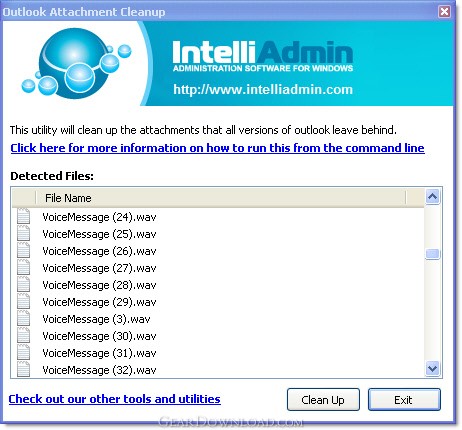 Click to enlarge screenshot
Software Description:
Outlook Cleanup Tool - View, and remove MS Outlook temp files.
The MS Outlook cleanup tool will automatically scan your registry, find all Microsoft Outlook attachments, and then display them to you in the main window.
If it all looks like stuff you want to remove, you just hit the Clean Up button and it will delete them for you.
Here comes the bonus. You can run it silently from the command line.
What would you need that for?
You might have user that opens lots of attachments, and runs into this bug all the time.
Here is how you can have it run without any prompts:
OutlookCleanup.exe /SILENT
It will quietly scan through your registry and find the temp folder and empty it. Throw this in a batch file and have it run at logon - you will never have to deal with this problem again.
Another thought came to mind while working on this: This is a security problem too.
While email is on your Exchange serve it is relatively secure. Not knowing this you might open a sensitive document, read it, and when you are finished - delete it. Unknown to you, Outlook has just made a copy of it and it is sitting right there on your hard drive. Waiting for someone to grab.
Until MS provides a fix, you can use this little utility to keep your Outlook attachments clean. I wouldn't hold your breath waiting for an update - this bug has been around since 2002.
What's New: Added support for Outlook 2010
The MS Outlook cleanup tool will automatically scan your registry, find all Microsoft Outlook attachments, and then display them to you in the main window.
If it all looks like stuff you want to remove, you just hit the Clean Up button and it will delete them for you.
Here comes the bonus. You can run it silently from the command line.
What would you need that for?
You might have user that opens lots of attachments, and runs into this bug all the time.
Here is how you can have it run without any prompts:
OutlookCleanup.exe /SILENT
It will quietly scan through your registry and find the temp folder and empty it. Throw this in a batch file and have it run at logon - you will never have to deal with this problem again.
Another thought came to mind while working on this: This is a security problem too.
While email is on your Exchange serve it is relatively secure. Not knowing this you might open a sensitive document, read it, and when you are finished - delete it. Unknown to you, Outlook has just made a copy of it and it is sitting right there on your hard drive. Waiting for someone to grab.
Until MS provides a fix, you can use this little utility to keep your Outlook attachments clean. I wouldn't hold your breath waiting for an update - this bug has been around since 2002.
What's New: Added support for Outlook 2010
100% Clean:
 Outlook Cleanup Tool 1.0 is 100% clean
This download (OutlookCleanup.exe) was tested thoroughly and was found 100% clean. Click "Report Spyware" link on the top if you found this software contains any form of malware, including but not limited to: spyware, viruses, trojans and backdoors.
Related Software:
- Advanced-Password-Manager 3.0 - Advance Password Manager is a safe & user friendly password management utility.
- FastSum Standard Edition 1.6 - Check the integrity and track changes within your important files
- Acronis True Image Corporate Workstation 8.0 - Data and system backup and restore solution for corporate workstations
- Ashampoo PowerUp 3 3.23 - More protection, more control, faster and easier than ever
- Odbc 4 All 2.3 - Easy connection to ODBC data sources for any application, DOS and scripts too !
- Antechinus eBook Wizard 3.2 - Use eBook Wizard to compile your highly-compressed eBooks easily and in no time.
- O&O DriveLED 2.0 - O&O DriveLED permanently monitors the status of the hard disks in the background
- Unusual Works Utility Pack 1.0 - CD Ejector and Note Manager programs.
- 1-abc.net Surf Trail Washer 7.00 - Tool to delete your internet trail (files, cookies, history, URLs) permanently!
- txt2pdf 10.2 - txt2pdf is a flexible and powerful converter from text files to PDFs
top 10 most downloaded


recommended software
-
- AppleXsoft Photo Recovery for Mac
- AppleXsoft Photo Recovery is the comprehensive digital media data rescue software designed for Mac users, it featuring innovative photo recovery algor...

-
- Cacheman
- Memory is one of the most important pieces of computer hardware as it is in constant use no matter what a PC is used for. There is a tremendous number...
