Index >> System Utilities >> Backup & Restore >> Outlook Backup Toolbox
Report SpywareOutlook Backup Toolbox 1.2.9

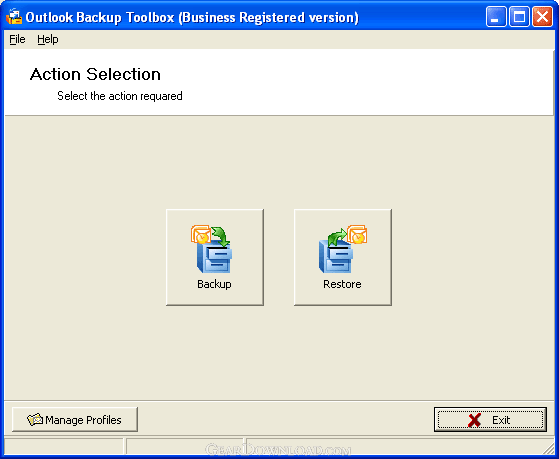 Click to enlarge screenshot
Software Description:
Outlook Backup Toolbox - Efficient and reliable Outlook backup software with an attractive price tag
Microsoft Outlook is by far the most powerful and popular email application in the world. Being a part of the standard Microsoft Office package, it is installed on millions of computers and is used by individuals, businesses and public organizations for sending and receiving email messages, storing contacts, managing tasks and much more. Some users have a single email account, while others may be working with dozens of inboxes, huge contacts lists and complex mail sorting rules. Regardless of the complexity of your Outlook setup, the information you receive daily may be crucial for your business, career or even personal life, and the bigger your Outlook grows, the more important your data become. If you don't want to lose everything once because of an unexpected software or hardware error, you can safeguard your data in advance using Outlook Backup Toolbox!
Outlook Backup Toolbox is an easy-to-use tool for backing up your Outlook data and restoring them at any point of time. Its intuitive interface makes the whole process a snap - just follow a series of simple steps until the software starts the backup/restoration process. All you need to do is select the mail application (Microsoft Outlook) you would like to back up and specify the path to the output file. Optionally, you can modify several backup parameters. If you want to reduce the hard drive space occupied by the backup file, change the file compression parameter. Bear in mind, however, that higher compression levels result in a slower backup process. You can also split the backup file into volumes or equal size (for instance, for burning them onto CDs), protect the file using an encrypted password and specify the backup mode to use. The process can either start immediately or be added to the list of scheduled tasks for regular automated execution.
Outlook Backup Toolbox is a simple and highly efficient backup solution that will help you reliably safeguard your Outlook data.
What's New: Added support Outlook 2010, Outlook 2010 x64.
Limitations: 30 Days Trial
Microsoft Outlook is by far the most powerful and popular email application in the world. Being a part of the standard Microsoft Office package, it is installed on millions of computers and is used by individuals, businesses and public organizations for sending and receiving email messages, storing contacts, managing tasks and much more. Some users have a single email account, while others may be working with dozens of inboxes, huge contacts lists and complex mail sorting rules. Regardless of the complexity of your Outlook setup, the information you receive daily may be crucial for your business, career or even personal life, and the bigger your Outlook grows, the more important your data become. If you don't want to lose everything once because of an unexpected software or hardware error, you can safeguard your data in advance using Outlook Backup Toolbox!
Outlook Backup Toolbox is an easy-to-use tool for backing up your Outlook data and restoring them at any point of time. Its intuitive interface makes the whole process a snap - just follow a series of simple steps until the software starts the backup/restoration process. All you need to do is select the mail application (Microsoft Outlook) you would like to back up and specify the path to the output file. Optionally, you can modify several backup parameters. If you want to reduce the hard drive space occupied by the backup file, change the file compression parameter. Bear in mind, however, that higher compression levels result in a slower backup process. You can also split the backup file into volumes or equal size (for instance, for burning them onto CDs), protect the file using an encrypted password and specify the backup mode to use. The process can either start immediately or be added to the list of scheduled tasks for regular automated execution.
Outlook Backup Toolbox is a simple and highly efficient backup solution that will help you reliably safeguard your Outlook data.
What's New: Added support Outlook 2010, Outlook 2010 x64.
Limitations: 30 Days Trial
100% Clean:
 Outlook Backup Toolbox 1.2.9 is 100% clean
This download (OutlookBackupToolboxInstall.exe) was tested thoroughly and was found 100% clean. Click "Report Spyware" link on the top if you found this software contains any form of malware, including but not limited to: spyware, viruses, trojans and backdoors.
Related Software:
- Recovery Toolbox for CD Free 2.0.0 - Parses not openable optical discs and retrieves the source data from this media
- Outlook Express Backup Toolbox 1.1.17 - Easy Outlook Express backup solution, recovers the source data from scratch
- eRepair Excel 1.1.0.7 - Restore broken Excel files. Rebuild Microsoft Excel data .xls,.xlt,.xlsx,.xltx
- eRepair SQL Server 1.0.1.0 - Fast, affordable and reliable data recovery tool for corrupted MSSQL databases
- eRepair Word 1.0.1.2 - Repair damaged Word files. Recover Microsoft Word files .doc, dot, .docx,.dotx
- Mail Undelete Recovery Toolbox Free 2.0.9 - Quick and free recovery tool for Windows Mail/Live emails and Windows contacts
- ! - Oops 1.02 - ! Oops ! - the independant auto-save.
- ERS 2K/XP, Emergency Recovery System FAT/FAT32 6.01 - Win 2K/XP, Recover gracefully from a system crash with ERS 2K/XP.
- ERS 9x, Emergency Recovery System 9x 11.45 - Win 95/98/ME Recover gracefully from a system crash with ERS.
- Acronis True Image Enterprise Server 8.0 - Real-time disk backup, disk imaging, and bare metal restore for Windows servers
top 10 most downloaded


recommended software
-
- AppleXsoft Photo Recovery for Mac
- AppleXsoft Photo Recovery is the comprehensive digital media data rescue software designed for Mac users, it featuring innovative photo recovery algor...

-
- Cacheman
- Memory is one of the most important pieces of computer hardware as it is in constant use no matter what a PC is used for. There is a tremendous number...
