Index >> System Utilities >> Backup & Restore >> O&O UnErase Personal Edition
Report SpywareO&O UnErase Personal Edition 6.0.1899

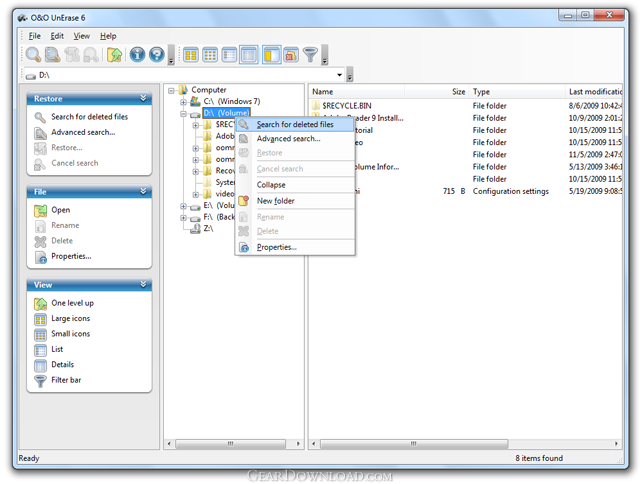 Click to enlarge screenshot
Software Description:
O&O UnErase Personal Edition - O&O UnErase allows users to rescue important files that have been deleted.
Losing data is still not something that can be ruled out completely; not even in today’s sophisticated, high-tech world. Carelessness, a faulty operation, or technical problems may result in your losing important data, and a backup does not always exist. O&O UnErase will be able to find and restore your deleted files within just a matter of seconds. In almost the blink of an eye, those important documents, digital photos, and videos will be back in your hands and at your disposal.
Increase the chances for recovery
Erased data is marked as “available” on a hard disk or memory card. Even the simple installation or downloading of a data recovery program from the internet can make recovering lost data impossible. That’s why O&O UnErase 4 should already be installed on your computer before the loss of data occurs. This way it will be ready for use when trouble strikes, and you’ll have the best chance for recovering data that’s been lost as a result of unintentional deletion or a system crash.
What to do when data is lost
If you have erased data by mistake, immediately close all programs and when possible, avoid saving any new data. Make sure the data isn’t in the Windows Recycle Bin. You can then begin searching for the lost data with O&O UnErase. If you’re not sure of the drive where the data was deleted, just scan through one drive after the other. When the scanning’s done, all the files and folders that have been found will be displayed. Now you’ll just have to indicate the ones you want to be restored.
What's New: Restoration on network drives (Shares and UNC) , Enhanced search algorithm for texts within files, non-Ansi texts can also be recognized.,Compatible with Windows ® 7 and Windows® Server 2008 R2
Limitations: 30 Days Trial
Losing data is still not something that can be ruled out completely; not even in today’s sophisticated, high-tech world. Carelessness, a faulty operation, or technical problems may result in your losing important data, and a backup does not always exist. O&O UnErase will be able to find and restore your deleted files within just a matter of seconds. In almost the blink of an eye, those important documents, digital photos, and videos will be back in your hands and at your disposal.
Increase the chances for recovery
Erased data is marked as “available” on a hard disk or memory card. Even the simple installation or downloading of a data recovery program from the internet can make recovering lost data impossible. That’s why O&O UnErase 4 should already be installed on your computer before the loss of data occurs. This way it will be ready for use when trouble strikes, and you’ll have the best chance for recovering data that’s been lost as a result of unintentional deletion or a system crash.
What to do when data is lost
If you have erased data by mistake, immediately close all programs and when possible, avoid saving any new data. Make sure the data isn’t in the Windows Recycle Bin. You can then begin searching for the lost data with O&O UnErase. If you’re not sure of the drive where the data was deleted, just scan through one drive after the other. When the scanning’s done, all the files and folders that have been found will be displayed. Now you’ll just have to indicate the ones you want to be restored.
What's New: Restoration on network drives (Shares and UNC) , Enhanced search algorithm for texts within files, non-Ansi texts can also be recognized.,Compatible with Windows ® 7 and Windows® Server 2008 R2
Limitations: 30 Days Trial
100% Clean:
 O&O UnErase Personal Edition 6.0.1899 is 100% clean
This download (OOUnErase6Enu.exe) was tested thoroughly and was found 100% clean. Click "Report Spyware" link on the top if you found this software contains any form of malware, including but not limited to: spyware, viruses, trojans and backdoors.
Related Software:
- ! - Oops 1.02 - ! Oops ! - the independant auto-save.
- ERS 2K/XP, Emergency Recovery System FAT/FAT32 6.01 - Win 2K/XP, Recover gracefully from a system crash with ERS 2K/XP.
- ERS 9x, Emergency Recovery System 9x 11.45 - Win 95/98/ME Recover gracefully from a system crash with ERS.
- Acronis True Image Enterprise Server 8.0 - Real-time disk backup, disk imaging, and bare metal restore for Windows servers
- NH Backup 3.0.74 - Get a fast, reliable and affordable backups solution.
- DataBK SQL Server Backup 11.0.6 - Backup and restore Microsoft SQL Server database to a local or network drive.
- Outlook Express Backup Restore 2.364 - Backup your Outlook Express and restore it when it is necessary.
- Backup4all Professional 6.1.180 - Customizable backup program. Full, incremental, differential and mirror backups
- MinuteMan Data Backup Suite 8.54 - MinuteMan Data Backup with MinZip and MinSelfEx.
- Adolix Outlook Express Backup 3.0 - The easiest way to backup email data from Top Email Clients
top 10 most downloaded


recommended software
-
- AppleXsoft Photo Recovery for Mac
- AppleXsoft Photo Recovery is the comprehensive digital media data rescue software designed for Mac users, it featuring innovative photo recovery algor...

-
- Cacheman
- Memory is one of the most important pieces of computer hardware as it is in constant use no matter what a PC is used for. There is a tremendous number...
