Index >> System Utilities >> Backup & Restore >> nnBackup
Report SpywarennBackup 3.01 RC1

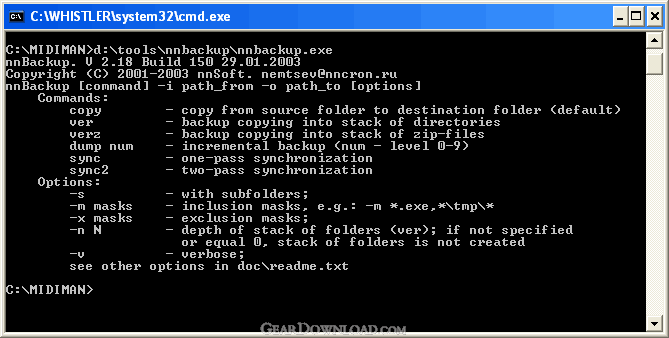 Click to enlarge screenshot
Software Description:
nnBackup - Command line utility for backing up and synchronizing your files and folders
nnBackup is a small and convenient tool for backing up and synchronizing your files and folders, creating and processing file-lists. When backing up you can optionally compress the data using gz or zip algorythms and start specified applications before and after main backup process. nnBackup includes special tools for removing obsolete data from the backup.
Using nnBackup you can choose one of the following backup methods:
- conventional copying of files and folders,
- copying your data into a special numbered stack of folders or zip-files with predefined depth,
- incremental backup (like the one, used in Unix 'dump' utility),
- folder synchronization (one- or bidirectional).
Main nnBackup advantages are:
- customizeability,
- small memory fingerprint,
- fastest possible working speed,
- setting of inclusive and exclusive file-name masks,
- working with file creation/modification/last-access times,
- working with file size,
- customizeable processing of empty folders and deleted files,
- customizeable processing of errors when copying files,
- reading startup parameters from a text file,
- optional logging of all of your backups.
nnBackup can be started from command line or from external scheduler like nnCron or nnCron LITE (http://www.nncron.ru/)
What's New: - full Unicode support; - external archivers support; - can sync with Pocket PC; - shows a simple statistics after file operations; - many other bugfixes and enhancements;
Limitations: 30 Days Trial; 30 day free trial
nnBackup is a small and convenient tool for backing up and synchronizing your files and folders, creating and processing file-lists. When backing up you can optionally compress the data using gz or zip algorythms and start specified applications before and after main backup process. nnBackup includes special tools for removing obsolete data from the backup.
Using nnBackup you can choose one of the following backup methods:
- conventional copying of files and folders,
- copying your data into a special numbered stack of folders or zip-files with predefined depth,
- incremental backup (like the one, used in Unix 'dump' utility),
- folder synchronization (one- or bidirectional).
Main nnBackup advantages are:
- customizeability,
- small memory fingerprint,
- fastest possible working speed,
- setting of inclusive and exclusive file-name masks,
- working with file creation/modification/last-access times,
- working with file size,
- customizeable processing of empty folders and deleted files,
- customizeable processing of errors when copying files,
- reading startup parameters from a text file,
- optional logging of all of your backups.
nnBackup can be started from command line or from external scheduler like nnCron or nnCron LITE (http://www.nncron.ru/)
What's New: - full Unicode support; - external archivers support; - can sync with Pocket PC; - shows a simple statistics after file operations; - many other bugfixes and enhancements;
Limitations: 30 Days Trial; 30 day free trial
Feature List:
- conventional copying of files and folders
- copying your data into a special numbered stack of folders or zip-files with predefined depth
- incremental backup (like the one, used in Unix 'dump' utility)
- folder synchronization (one- or bidirectional)
- Main nnBackup advantages are
- customizeability
- small memory fingerprint
- fastest possible working speed
- setting of inclusive and exclusive file-name masks
- working with file creation/modification/last-access times
- working with file size
- customizeable processing of empty folders and deleted files
- customizeable processing of errors when copying files
- reading startup parameters from a text file
- optional logging of all of your backups
100% Clean:
 nnBackup 3.01 RC1 is 100% clean
This download (nnbackup301r1.exe) was tested thoroughly and was found 100% clean. Click "Report Spyware" link on the top if you found this software contains any form of malware, including but not limited to: spyware, viruses, trojans and backdoors.
Related Software:
- ! - Oops 1.02 - ! Oops ! - the independant auto-save.
- ERS 2K/XP, Emergency Recovery System FAT/FAT32 6.01 - Win 2K/XP, Recover gracefully from a system crash with ERS 2K/XP.
- ERS 9x, Emergency Recovery System 9x 11.45 - Win 95/98/ME Recover gracefully from a system crash with ERS.
- Acronis True Image Enterprise Server 8.0 - Real-time disk backup, disk imaging, and bare metal restore for Windows servers
- NH Backup 3.0.74 - Get a fast, reliable and affordable backups solution.
- DataBK SQL Server Backup 11.0.6 - Backup and restore Microsoft SQL Server database to a local or network drive.
- Outlook Express Backup Restore 2.364 - Backup your Outlook Express and restore it when it is necessary.
- Backup4all Professional 6.1.180 - Customizable backup program. Full, incremental, differential and mirror backups
- MinuteMan Data Backup Suite 8.54 - MinuteMan Data Backup with MinZip and MinSelfEx.
- Adolix Outlook Express Backup 3.0 - The easiest way to backup email data from Top Email Clients
top 10 most downloaded


recommended software
-
- AppleXsoft Photo Recovery for Mac
- AppleXsoft Photo Recovery is the comprehensive digital media data rescue software designed for Mac users, it featuring innovative photo recovery algor...

-
- Cacheman
- Memory is one of the most important pieces of computer hardware as it is in constant use no matter what a PC is used for. There is a tremendous number...
