Index >> System Utilities >> Launchers & Task Managers >> NextSTART
Report SpywareNextSTART 11.10

 Click to enlarge screenshot
Software Description:
NextSTART is part of Winstep Xtreme, a Windows User Interface Replacement
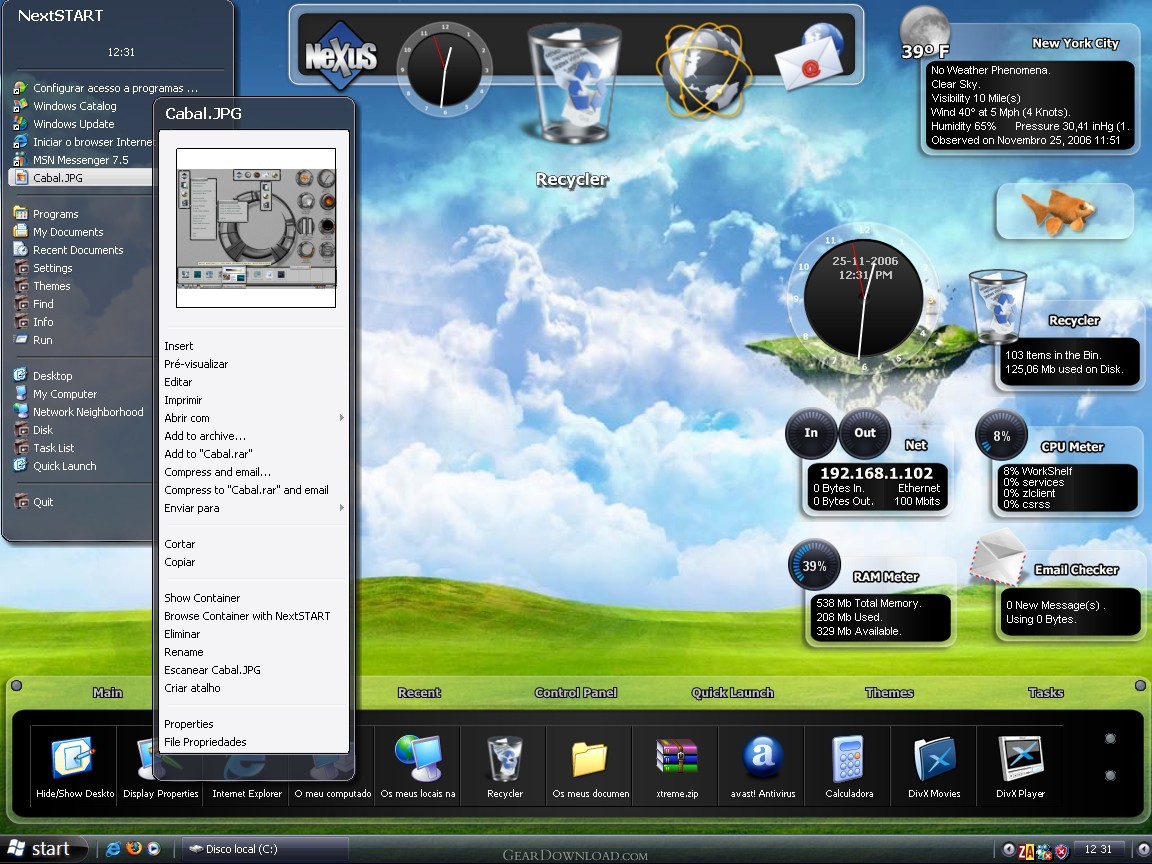
NextSTART is part of Winstep Xtreme, a powerful suite of User Interface replacement applications that merge incredible usability with breathtaking eye candy!
NeXuS is the dock system, and is just perfect for super fast access to your most used applications. You can have as many docks as you want, each with multiple sub-docks! When not in use, docks can hide behind your screen edges, taking virtually no screen space.
WorkShelf is a tabbed dock, better suited to complex organizational duties like organizing documents, URLs, movies, work projects, etc... If a dock is the top of your desk, then Workshelf is all the drawers below it.
NextSTART is the menu system - and takes care of all your task management needs as well. Menus are great for accessing infrequently used files and system related commands that aren't easily reachable in the file system or that have no readily user-recognizable graphic representation. You can create as many menus as you want, and, with NextSTART hotspots, you can invoke each of these menus by a super fast screen edge/corner bump with the mouse pointer.
The task management part of NextSTART allows you to efficiently organize and manipulate running tasks and windows. Using nothing but drag & drop, you can re-organize the items in your taskbar so that all your related documents are together (thus easier to find) and where you expect them to be, instead of where Windows decided to put them.
Modules, widgets, gadgets, docklets, desklets, are all different words to describe the same thing: mini-applications that usually live on your desktop and provide a staggering amount of information regarding your system, the weather, etc... Winstep Xtreme currently includes the following modules: a speaking Atomic Clock, Recycle Bin, Email Checker, Weather Monitor, CPU, Net and RAM Meters and the amazing 'fortune cookie' Wanda. New modules are constantly being added.
The Winstep Start Menu Organizer cleans and organizes your Start Menu.
Limitations: 30 Days Trial
NextSTART is part of Winstep Xtreme, a powerful suite of User Interface replacement applications that merge incredible usability with breathtaking eye candy!
NeXuS is the dock system, and is just perfect for super fast access to your most used applications. You can have as many docks as you want, each with multiple sub-docks! When not in use, docks can hide behind your screen edges, taking virtually no screen space.
WorkShelf is a tabbed dock, better suited to complex organizational duties like organizing documents, URLs, movies, work projects, etc... If a dock is the top of your desk, then Workshelf is all the drawers below it.
NextSTART is the menu system - and takes care of all your task management needs as well. Menus are great for accessing infrequently used files and system related commands that aren't easily reachable in the file system or that have no readily user-recognizable graphic representation. You can create as many menus as you want, and, with NextSTART hotspots, you can invoke each of these menus by a super fast screen edge/corner bump with the mouse pointer.
The task management part of NextSTART allows you to efficiently organize and manipulate running tasks and windows. Using nothing but drag & drop, you can re-organize the items in your taskbar so that all your related documents are together (thus easier to find) and where you expect them to be, instead of where Windows decided to put them.
Modules, widgets, gadgets, docklets, desklets, are all different words to describe the same thing: mini-applications that usually live on your desktop and provide a staggering amount of information regarding your system, the weather, etc... Winstep Xtreme currently includes the following modules: a speaking Atomic Clock, Recycle Bin, Email Checker, Weather Monitor, CPU, Net and RAM Meters and the amazing 'fortune cookie' Wanda. New modules are constantly being added.
The Winstep Start Menu Organizer cleans and organizes your Start Menu.
Limitations: 30 Days Trial
Feature List:
- Powerful Menu System
- Complete Start Menu/Taskbar Replacement
- Revolutionary "HotSpot" Feature
- Advanced NeXT-Style Look And Feel
- Flexible Configuration w/Theme Support
- Drag and Drop Support
- Full Multi-Monitor Support
- Context Sensitive Menus
- Low Registration Price
100% Clean:
 NextSTART 11.10 is 100% clean
This download (xtreme.zip) was tested thoroughly and was found 100% clean. Click "Report Spyware" link on the top if you found this software contains any form of malware, including but not limited to: spyware, viruses, trojans and backdoors.
Related Software:
- Winstep Nexus Dock 12.2 - Free Nexus dock with Leopard-style eye-candy effects.
- Astatix Launcher 1.63 - Quick start any application in a single click and control Winamp with hotkeys.
- ActiveActions 1.25 - ActiveActions is an launch tool that also acts like hotkey manager.
- eXtended Task Manager 2.15 - Extended windows task manager and performance monitoring tool
- Window Magician 1.1.3 - Small utility that can hide windows, system tray icons or run screensaver
- Program Sleuth 2.0.6 - Find out what is really running on your computer.
- RLauncher 2.3 - RLauncher is an easy to use application launcher.
- Pokki Start Menu 260.11.291 - Pokki Windows 8 Start menu lets you access & search all the stuff on your PC.
- FireDaemon Pro 3.14.2755 - A utility to install and run any application or script as a Windows service
- JetStart Free 4.4 - Launch Start Menu shortcuts faster and easier than ever
top 10 most downloaded


recommended software
-
- AppleXsoft Photo Recovery for Mac
- AppleXsoft Photo Recovery is the comprehensive digital media data rescue software designed for Mac users, it featuring innovative photo recovery algor...

-
- Cacheman
- Memory is one of the most important pieces of computer hardware as it is in constant use no matter what a PC is used for. There is a tremendous number...
