Index >> System Utilities >> File & Disk Management >> NameWiz
Report SpywareNameWiz 4.111

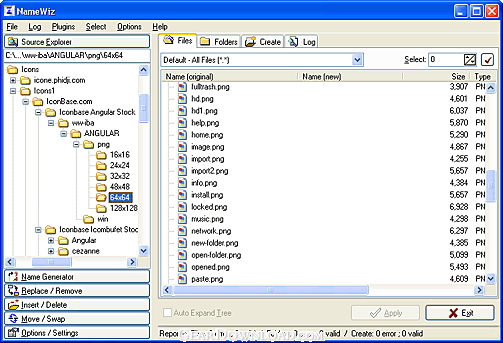 Click to enlarge screenshot
Software Description:
NameWiz rename files and a batch file renaming tool.
NameWiz will let you rename files, folders and sub-folders en masse in any which way you want, it is also an advanced file renaming utility. Some of the files are almost impossible to be rename, but NameWiz can be further expanded using plugins so you can rename anything you like, no restrictions. NameWiz already include many renaming functions, such as sequential using numbers, letters or both. Add prefixes and suffixes, Leading, Replace, Remove, Move, Swap, Insert, Delete, Trim, all or parts of file names etc. Change or add file extensions, file selection by position, specify capitalization rules, Sorting by name, size, extension, date/time, ascending/descending order. Multiple extension, Rename your files in Numerical, Alphabetical or Alphanumeric. Create files and folders. Batch rename. View your images with the Thumbnails viewer. NameWiz works with long and short filenames, wildcard renamer. MP3 plugin which let you rename your MP3 files using the music headers, such as Author name, Album name, Song name etc. The automatic preview let you quickly view the result along with potential errors. The editable log feature allow you to undo some or all renaming you have done since the log was last cleared. No need to worry about mistakes. NameWiz is particularly useful for managing graphic files or text files downloaded from the Internet or saved from your browser's cache. Photographers will find NameWiz a must. It can also be useful for programmers or for those who create sequential versions of files, etc. You can also run NameWiz in multi-language interface. The Windows system menu is available by right-clicking a file.
What's New: Maintenance update
Limitations: 30 Days Trial; 30 days full working copy
NameWiz will let you rename files, folders and sub-folders en masse in any which way you want, it is also an advanced file renaming utility. Some of the files are almost impossible to be rename, but NameWiz can be further expanded using plugins so you can rename anything you like, no restrictions. NameWiz already include many renaming functions, such as sequential using numbers, letters or both. Add prefixes and suffixes, Leading, Replace, Remove, Move, Swap, Insert, Delete, Trim, all or parts of file names etc. Change or add file extensions, file selection by position, specify capitalization rules, Sorting by name, size, extension, date/time, ascending/descending order. Multiple extension, Rename your files in Numerical, Alphabetical or Alphanumeric. Create files and folders. Batch rename. View your images with the Thumbnails viewer. NameWiz works with long and short filenames, wildcard renamer. MP3 plugin which let you rename your MP3 files using the music headers, such as Author name, Album name, Song name etc. The automatic preview let you quickly view the result along with potential errors. The editable log feature allow you to undo some or all renaming you have done since the log was last cleared. No need to worry about mistakes. NameWiz is particularly useful for managing graphic files or text files downloaded from the Internet or saved from your browser's cache. Photographers will find NameWiz a must. It can also be useful for programmers or for those who create sequential versions of files, etc. You can also run NameWiz in multi-language interface. The Windows system menu is available by right-clicking a file.
What's New: Maintenance update
Limitations: 30 Days Trial; 30 days full working copy
100% Clean:
 NameWiz 4.111 is 100% clean
This download (NameWiz_Setup.exe) was tested thoroughly and was found 100% clean. Click "Report Spyware" link on the top if you found this software contains any form of malware, including but not limited to: spyware, viruses, trojans and backdoors.
Related Software:
- Folder Cache 2.6 - Access to the recently used & favorite folders from the Save and Open dialogs.
- O&O Defrag Professional Edition 16.0 - Faster system starts, accelerated programs, and professional settings
- Visual Comparer 1.40 - Visual file compare and merge of the text files with syntax hightlight
- Advanced CATaloguer Pro 2.6 - Professional software for cataloguing on all kinds of media
- EF Duplicate Files Manager 7.10 - Find out duplicate files with same name, same size, same content
- EF Find 8.00 - EF Find is a powerful search program also inside archive files.
- Visual Multitool 4.4 - It is a file viewer, finder and editor with text tools.
- Advanced File Organizer 3.01 - Powerful cataloguer for all kinds of removable media, network drives, hard disk.
- Owl Commander 4.0 - Owl Commander is a complete solution for managing files for Windows Computer.
- MyBFL:The Body for LIFE Companion 6.4c - Complete body for life S/W for palm includes Meal Planner,Graphs,Photo Album.
top 10 most downloaded


recommended software
-
- AppleXsoft Photo Recovery for Mac
- AppleXsoft Photo Recovery is the comprehensive digital media data rescue software designed for Mac users, it featuring innovative photo recovery algor...

-
- Cacheman
- Memory is one of the most important pieces of computer hardware as it is in constant use no matter what a PC is used for. There is a tremendous number...
