Index >> System Utilities >> Other >> MLEditor Standard Edition
Report SpywareMLEditor Standard Edition 2.2

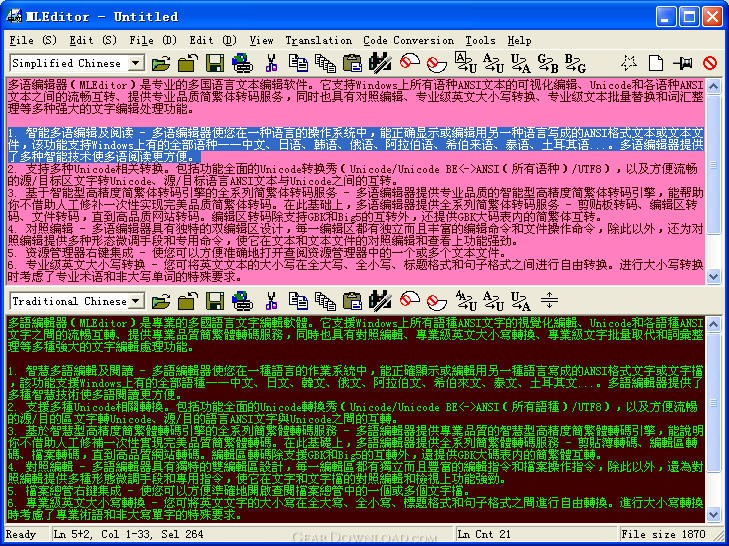 Click to enlarge screenshot
Software Description:
MLEditor Standard Edition - Professional multi-language text editor; Unicode/ANSI/UTF-8/GBK/Big5 conversions
MLEditor (Multi-Language Editor) is a handy but still professional multi-language text editor. It provides professional features that could be of great help for language/localization experts and general computer users:
1. Read and edit ANSI text/text files in all languages supported by Microsoft Windows, such as Chinese (GBK and Big5), Japanese, Korean, Russian, Arabic, Hebrew, Thai, Turkish.... Intelligent techniques are involved in helping read/edit text/text files in multiple languages.
2. Clipboard-based conversions between ANSI (in any languages)/Unicode/Unicode BE/UTF-8), fluent conversions between Unicode and ANSI in current source/destination text/languages.
3. Professional-quality conversions between Simplified Chinese and Traditional Chinese in the forms of clipboard conversion, edit area conversion and file/web page and site conversions between GBK and Big5.
4. Professional-quality English case conversions between all upper, all lower, caption and sentence styles. Proper nouns and words that should not be capitalized are considered during case conversions
5. Professional character count, word count, line count and paragraph count for text file(s), independent or in a folder, in English, Simplified Chinese and Traditional Chinese.
6. Dual-editing-area control editing.
7. Handy text file preview - open and preview any text files from Windows Explorer simply with a context menu command.
8. Mature find/replace and the featured Batch Replace which supports unlimited rounds of replaces in one click. Regular expressions are supported.
9. Glossary management - line sorting, redundant line handling, and glossary entry mergence, split and swap. The word adjustment systems itself is an advanced phrase management system.
10. Desktop sticky note and much more - you can easily manage the appearance of MLEditor, and set it as a sticky note, text verifier, or notepad, or a fully-equipped editor...by the feature of profile management.
What's New: Fixed the bug that some registration codes could not get through in Windows 7 (64-bit); fixed the bug that when doing Replace All, the Find and Replace strings were not added to the Find and Replace history lists respectively; some other modifications and improvements on program and documentation.
Limitations: 30 Days Trial
MLEditor (Multi-Language Editor) is a handy but still professional multi-language text editor. It provides professional features that could be of great help for language/localization experts and general computer users:
1. Read and edit ANSI text/text files in all languages supported by Microsoft Windows, such as Chinese (GBK and Big5), Japanese, Korean, Russian, Arabic, Hebrew, Thai, Turkish.... Intelligent techniques are involved in helping read/edit text/text files in multiple languages.
2. Clipboard-based conversions between ANSI (in any languages)/Unicode/Unicode BE/UTF-8), fluent conversions between Unicode and ANSI in current source/destination text/languages.
3. Professional-quality conversions between Simplified Chinese and Traditional Chinese in the forms of clipboard conversion, edit area conversion and file/web page and site conversions between GBK and Big5.
4. Professional-quality English case conversions between all upper, all lower, caption and sentence styles. Proper nouns and words that should not be capitalized are considered during case conversions
5. Professional character count, word count, line count and paragraph count for text file(s), independent or in a folder, in English, Simplified Chinese and Traditional Chinese.
6. Dual-editing-area control editing.
7. Handy text file preview - open and preview any text files from Windows Explorer simply with a context menu command.
8. Mature find/replace and the featured Batch Replace which supports unlimited rounds of replaces in one click. Regular expressions are supported.
9. Glossary management - line sorting, redundant line handling, and glossary entry mergence, split and swap. The word adjustment systems itself is an advanced phrase management system.
10. Desktop sticky note and much more - you can easily manage the appearance of MLEditor, and set it as a sticky note, text verifier, or notepad, or a fully-equipped editor...by the feature of profile management.
What's New: Fixed the bug that some registration codes could not get through in Windows 7 (64-bit); fixed the bug that when doing Replace All, the Find and Replace strings were not added to the Find and Replace history lists respectively; some other modifications and improvements on program and documentation.
Limitations: 30 Days Trial
Feature List:
- Intelligent multi-language text reader and editor - MLEditor was designed to help people read and edit text or text files in a language other than the language for the operating system he/she is working on. Chinese, Japanese, Korean, Russian, Arabic, Hebrew, Thai, Turkish...all languages supported by Microsoft Windows are supported by MLEditor. Intelligent techniques are involved in helping read and edit text/text files in multiple languages
- Various Unicode-related transfers - Including the all-purpose Clipboard Unicode Transfer Show (Unicode/Unicode BE ANSI (in any languages)/UTF-8) and fluent transfers between Unicode and ANSI in current source/destination text/languages
- Professional quality transfers between Simplified Chinese and Traditional Chinese - based on its leading intelligent transfer engine - MLEditor provides clipboard transfer, edit area transfer, file/web page and site transfer between GBK and Big5 at professional quality. It also supports transfers between "Simplified Chinese" and "Traditional Chinese" within the big GBK table
- Control editing - Its unique dual-editing-area design with independent and complete text editing and file support for each area makes it a great tool in editing or reading text or text files one against another
- Handy text file preview - You can open any text files from Windows Explorer easily just in the way you open zip file with WinZip, only in a multi-language way
- Batch replace - unlimited rounds of replaces in one click, supports multi-line text, special character and all other replace options. A batch can be saved to / extracted from a file for long term use
- Glossary management - Line sorting, redundant line management, and glossary item mergence, split and swap. The word adjustment systems itself is also an advanced phrase management system
- Desktop sticky note and much more - You can easily manage the appearance of MLEditor, and set it as a sticky note, text verifier, or notepad, or a fully-equipped editor...by the feature of profile management
100% Clean:
 MLEditor Standard Edition 2.2 is 100% clean
This download (mlestp_s.exe) was tested thoroughly and was found 100% clean. Click "Report Spyware" link on the top if you found this software contains any form of malware, including but not limited to: spyware, viruses, trojans and backdoors.
Related Software:
- Advanced-Password-Manager 3.0 - Advance Password Manager is a safe & user friendly password management utility.
- FastSum Standard Edition 1.6 - Check the integrity and track changes within your important files
- Acronis True Image Corporate Workstation 8.0 - Data and system backup and restore solution for corporate workstations
- Ashampoo PowerUp 3 3.23 - More protection, more control, faster and easier than ever
- Odbc 4 All 2.3 - Easy connection to ODBC data sources for any application, DOS and scripts too !
- Antechinus eBook Wizard 3.2 - Use eBook Wizard to compile your highly-compressed eBooks easily and in no time.
- O&O DriveLED 2.0 - O&O DriveLED permanently monitors the status of the hard disks in the background
- Unusual Works Utility Pack 1.0 - CD Ejector and Note Manager programs.
- 1-abc.net Surf Trail Washer 7.00 - Tool to delete your internet trail (files, cookies, history, URLs) permanently!
- txt2pdf 10.2 - txt2pdf is a flexible and powerful converter from text files to PDFs
top 10 most downloaded


recommended software
-
- AppleXsoft Photo Recovery for Mac
- AppleXsoft Photo Recovery is the comprehensive digital media data rescue software designed for Mac users, it featuring innovative photo recovery algor...

-
- Cacheman
- Memory is one of the most important pieces of computer hardware as it is in constant use no matter what a PC is used for. There is a tremendous number...
