Index >> System Utilities >> Clipboard Tools >> M8 Free Clipboard Manager
Report SpywareM8 Free Clipboard Manager 30.00

 Click to enlarge screenshot
Software Description:
M8 Free Clipboard Manager - Free Clipboard Manager
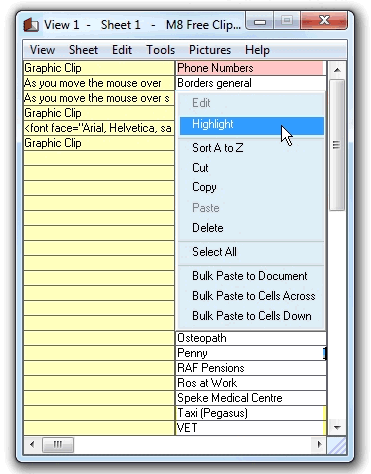
CLIPS - M8 is the simplest of all clipboard manager programs. Just have it running minimized and it captures everything you cut or copy from other programs. When you want to paste one back, all you have to do is restore M8 and click on the clip you want. When you move the mouse over the clips, you can see them in the viewer. If the clip is text, you see several lines and if it is a graphic, you see a thumbnail. - SCREEN SHOTS - To capture the entire screen press Prt Scr. - To capture the active window press Alt+PrtScr - To capture an individual graphic from Internet Explorer or AOL, point to the graphic, right click and select "Copy" from the drop down list. M8 also allows you to paste your digital photos directly into the body of Outlook, Windows Mail, Mozilla and other email programs.
What's New: Alphabetic sort in text editor and new color picker tool.
TAGS: clipboard, multiclipboard, multi-clipboard, screen shot, screen capture, screenshot
CLIPS - M8 is the simplest of all clipboard manager programs. Just have it running minimized and it captures everything you cut or copy from other programs. When you want to paste one back, all you have to do is restore M8 and click on the clip you want. When you move the mouse over the clips, you can see them in the viewer. If the clip is text, you see several lines and if it is a graphic, you see a thumbnail. - SCREEN SHOTS - To capture the entire screen press Prt Scr. - To capture the active window press Alt+PrtScr - To capture an individual graphic from Internet Explorer or AOL, point to the graphic, right click and select "Copy" from the drop down list. M8 also allows you to paste your digital photos directly into the body of Outlook, Windows Mail, Mozilla and other email programs.
What's New: Alphabetic sort in text editor and new color picker tool.
TAGS: clipboard, multiclipboard, multi-clipboard, screen shot, screen capture, screenshot
100% Clean:
 M8 Free Clipboard Manager 30.00 is 100% clean
This download (freeclip.exe) was tested thoroughly and was found 100% clean. Click "Report Spyware" link on the top if you found this software contains any form of malware, including but not limited to: spyware, viruses, trojans and backdoors.
Related Software:
- ! - M8 Multi Clipboard 5.Release - The M8 multi clipboard captures all clips and Screen Shots
- Speed Dial for Phone Cards 2.00 - Speed Dial for Phone Cards
- WinM8 4.01.08 - The original multi clipboard
- CopyPlus 2.02.38 - Now you can copy as often as you like and paste all your clips at the same time.
- M8 Multi Clipboard 9.73.18 - Multi clipboard, organizer, text and graphics editors all rolled into one.
- Spartan Clipboard for Windows 20.01 - Programmable Clipboard manager
- Spartan Portable Multi Clipboard Manager 20.01 - Programmable Mobile Clipboard Manager
- Spartan U3 Multi Clipboard Manager 20.04 - Programmable clipboard manager for U3 drives
- 101 Clips 24.00 - Free Multi-Clipboard and Clip Organizer
- Speed Dial 13.07.01 - This computer speed dial software program makes dialing the phone easy
top 10 most downloaded


recommended software
-
- MiniTool Power Data Recovery Free
- MiniTool Power Data Recovery is an easy-to-use and all in one free file recovery software for home users. With this most effective free file recovery ...
-
- Cacheman
- Memory is one of the most important pieces of computer hardware as it is in constant use no matter what a PC is used for. There is a tremendous number...
