Index >> System Utilities >> File & Disk Management >> LuJoSoft HideMyDrive
Report SpywareLuJoSoft HideMyDrive 1.0.0.0

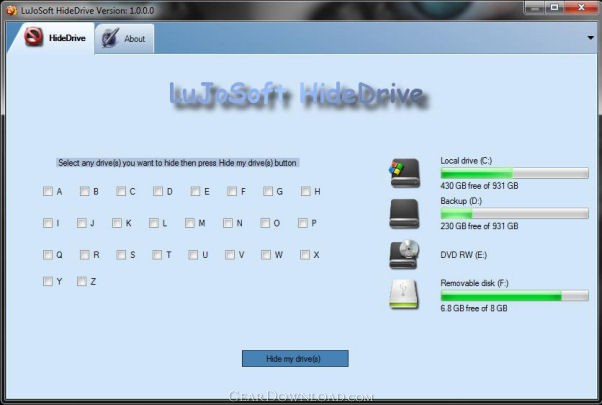 Click to enlarge screenshot
Software Description:
LuJoSoft HideMyDrive - If you have drives in Windows Explorer that you never access
Introduction:
If you have drives in Windows Explorer that you never access, such as a USB Flash drive that you are using only for ReadyBoost, a floppy drive or a backup drive only used for a particular piece of software, then you might want to simply hide the drive from your computer.
This application will only hide the drive from being displayed, applications and the command prompt will still have access to it, and you can still manually browse to the folder if you type in the path.
Feature:
1. Support all Windows OS.
2. Easy to install.
3. Hide as many drives you want.
4. It's absolutely free!!! No catch no nag screen or cripple function.
How to use it:
1. Run the application, note that you need administrator right to use this application.
2. Check all the drive(s) you want to hide.
3. Click the Hide my drive(s) button.
4. Voila! Your done.
System Requirements:
Should work on any windows version tested only on 32bit OS.
.Net framework 3.5 SP1.
Administrator elevation.
Install Info:
1. Extract LuJoSoft_HideMyDrive.rar.
2. Double click setup.exe.
3. Enjoy!!!
What's New: New release
Introduction:
If you have drives in Windows Explorer that you never access, such as a USB Flash drive that you are using only for ReadyBoost, a floppy drive or a backup drive only used for a particular piece of software, then you might want to simply hide the drive from your computer.
This application will only hide the drive from being displayed, applications and the command prompt will still have access to it, and you can still manually browse to the folder if you type in the path.
Feature:
1. Support all Windows OS.
2. Easy to install.
3. Hide as many drives you want.
4. It's absolutely free!!! No catch no nag screen or cripple function.
How to use it:
1. Run the application, note that you need administrator right to use this application.
2. Check all the drive(s) you want to hide.
3. Click the Hide my drive(s) button.
4. Voila! Your done.
System Requirements:
Should work on any windows version tested only on 32bit OS.
.Net framework 3.5 SP1.
Administrator elevation.
Install Info:
1. Extract LuJoSoft_HideMyDrive.rar.
2. Double click setup.exe.
3. Enjoy!!!
What's New: New release
100% Clean:
 LuJoSoft HideMyDrive 1.0.0.0 is 100% clean
This download was tested thoroughly and was found 100% clean. Click "Report Spyware" link on the top if you found this software contains any form of malware, including but not limited to: spyware, viruses, trojans and backdoors.
Related Software:
- LuJoSoft Rename All 1.0.0 - LuJoSoft Rename-All is program that can help you with the tedious task of renam
- Folder Cache 2.6 - Access to the recently used & favorite folders from the Save and Open dialogs.
- O&O Defrag Professional Edition 16.0 - Faster system starts, accelerated programs, and professional settings
- Visual Comparer 1.40 - Visual file compare and merge of the text files with syntax hightlight
- Advanced CATaloguer Pro 2.6 - Professional software for cataloguing on all kinds of media
- EF Duplicate Files Manager 7.10 - Find out duplicate files with same name, same size, same content
- EF Find 8.00 - EF Find is a powerful search program also inside archive files.
- Visual Multitool 4.4 - It is a file viewer, finder and editor with text tools.
- Advanced File Organizer 3.01 - Powerful cataloguer for all kinds of removable media, network drives, hard disk.
- Owl Commander 4.0 - Owl Commander is a complete solution for managing files for Windows Computer.
top 10 most downloaded


recommended software
-
- AppleXsoft Photo Recovery for Mac
- AppleXsoft Photo Recovery is the comprehensive digital media data rescue software designed for Mac users, it featuring innovative photo recovery algor...

-
- Cacheman
- Memory is one of the most important pieces of computer hardware as it is in constant use no matter what a PC is used for. There is a tremendous number...
