Index >> System Utilities >> Other >> Just Stuff
Report SpywareJust Stuff 2.1

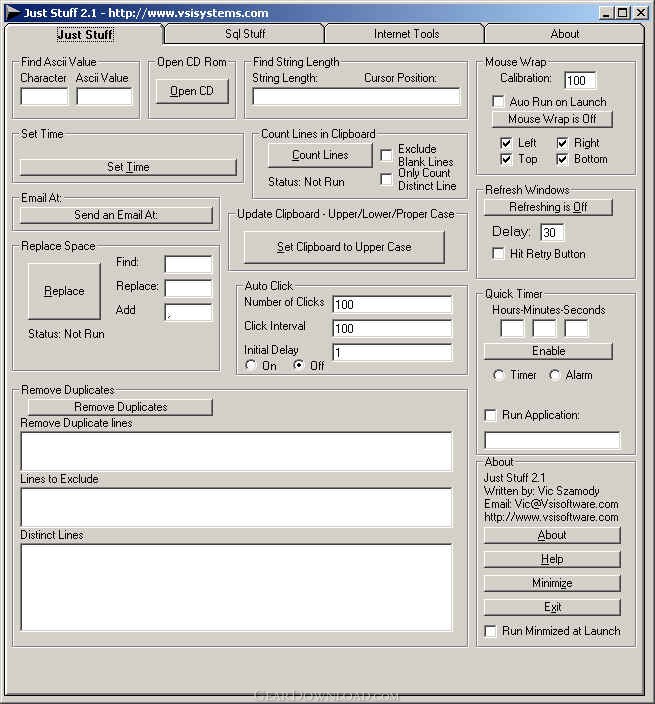 Click to enlarge screenshot
Software Description:
Just Stuff - An assortment of simply and useful utilities combined into a One application
Just Stuff 2.1 is an assortment of simply and useful utilities combined into a one application.
Clipboard to Upper/Lower/Proper Case
Click on the Clipboard to Upper Case and the text in the Clipboard is set to upper case. Click it again and it is set to Lower Case. Click it again and it is set to Proper Case.
Count Lines in Clipboard
Click the Count Lines button. It counts the number of lines in you clipboard. If you click the exclude blank lines check box, it will not count the blank lines.
Email Setup
Enter Exchange Server name in text box labeled Exchange Server. Enter Exchange Account name in text box labeled Exchange Account. Then Enter in Email Subject, Message
Find ASCII Value
-Enter Character in Text Box on the left and ASCII value is displayed in the Text Box on the right
-Enter Numeric value between 0 - 255 in Text Box on the right and the Character value is Displayed in the Text Box on the left
Find String Length
Enter or Paste string into Text box. The length of the string is displayed in next to String Length: label. Move cursor thought string using arrow keys or the mouse, and the current Cursor Position length from the begging of the string is displayed next to the Cursor Position: Label
Find Value in Database
Find Value in Database will find one or all instances of a value in a database. It searches the entire database for the value specified in the search string text box. To use Find Value in Database enter in the server name into the text box labeled Server. Enter a Database name in the text box labeled Database. Enter a user name into the text box labeled in User Name and a password in the text box labeled Password. You can leave the User Name and Password text boxes blank if authentication is not required. Then Enter in a value you would like to search for in the â Search String text box. <a href="http://www.vsisystems.com/JustStuff.htm">VsiSystems.com</a>
Limitations: 30 Days Trial
TAGS: compare, case, ASCII
Just Stuff 2.1 is an assortment of simply and useful utilities combined into a one application.
Clipboard to Upper/Lower/Proper Case
Click on the Clipboard to Upper Case and the text in the Clipboard is set to upper case. Click it again and it is set to Lower Case. Click it again and it is set to Proper Case.
Count Lines in Clipboard
Click the Count Lines button. It counts the number of lines in you clipboard. If you click the exclude blank lines check box, it will not count the blank lines.
Email Setup
Enter Exchange Server name in text box labeled Exchange Server. Enter Exchange Account name in text box labeled Exchange Account. Then Enter in Email Subject, Message
Find ASCII Value
-Enter Character in Text Box on the left and ASCII value is displayed in the Text Box on the right
-Enter Numeric value between 0 - 255 in Text Box on the right and the Character value is Displayed in the Text Box on the left
Find String Length
Enter or Paste string into Text box. The length of the string is displayed in next to String Length: label. Move cursor thought string using arrow keys or the mouse, and the current Cursor Position length from the begging of the string is displayed next to the Cursor Position: Label
Find Value in Database
Find Value in Database will find one or all instances of a value in a database. It searches the entire database for the value specified in the search string text box. To use Find Value in Database enter in the server name into the text box labeled Server. Enter a Database name in the text box labeled Database. Enter a user name into the text box labeled in User Name and a password in the text box labeled Password. You can leave the User Name and Password text boxes blank if authentication is not required. Then Enter in a value you would like to search for in the â Search String text box. <a href="http://www.vsisystems.com/JustStuff.htm">VsiSystems.com</a>
Limitations: 30 Days Trial
TAGS: compare, case, ASCII
100% Clean:
 Just Stuff 2.1 is 100% clean
This download (juststuf.exe) was tested thoroughly and was found 100% clean. Click "Report Spyware" link on the top if you found this software contains any form of malware, including but not limited to: spyware, viruses, trojans and backdoors.
Related Software:
- Advanced-Password-Manager 3.0 - Advance Password Manager is a safe & user friendly password management utility.
- FastSum Standard Edition 1.6 - Check the integrity and track changes within your important files
- Acronis True Image Corporate Workstation 8.0 - Data and system backup and restore solution for corporate workstations
- Ashampoo PowerUp 3 3.23 - More protection, more control, faster and easier than ever
- Odbc 4 All 2.3 - Easy connection to ODBC data sources for any application, DOS and scripts too !
- Antechinus eBook Wizard 3.2 - Use eBook Wizard to compile your highly-compressed eBooks easily and in no time.
- O&O DriveLED 2.0 - O&O DriveLED permanently monitors the status of the hard disks in the background
- Unusual Works Utility Pack 1.0 - CD Ejector and Note Manager programs.
- 1-abc.net Surf Trail Washer 7.00 - Tool to delete your internet trail (files, cookies, history, URLs) permanently!
- txt2pdf 10.2 - txt2pdf is a flexible and powerful converter from text files to PDFs
top 10 most downloaded


recommended software
-
- AppleXsoft Photo Recovery for Mac
- AppleXsoft Photo Recovery is the comprehensive digital media data rescue software designed for Mac users, it featuring innovative photo recovery algor...

-
- Cacheman
- Memory is one of the most important pieces of computer hardware as it is in constant use no matter what a PC is used for. There is a tremendous number...
