Index >> System Utilities >> File Recovery >> IsoBuster
Report SpywareIsoBuster 3.0

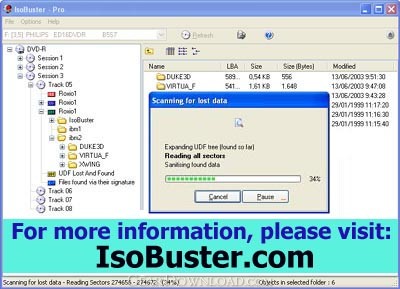 Click to enlarge screenshot
Software Description:
IsoBuster - A low cost utility to do data recovery from CD,DVD,BD, HD and Flash media
IsoBuster is high-end software to do data recovery from all types of media ranging from optical (CD, DVD, BD) to flash drives (USB Sticks, MMC / Compact / SD cards) and Hard Drives. All File-Systems are supported. Scanning for lost files and folders, Surface scanning. By better Error handling and several retry-mechanisms IsoBuster has a fair chance of recovering your data. The use of alternative ways to get to the data means that you get the best out of your drive. Furthermore IsoBuster circumvents Windows and does everything by itself, it communicates directly with the devices and takes care of all the data interpretation. As a result discs stay 'readable' after problems, such as a Buffer Under-run or a failed disc finalisation, and all common file-systems, even the ones not supported by Windows are recognised and interpreted by the program. The program is however not limited by the file-system standards, it copes with a vast range of possible issues, hard coded or via virtual intelligence and on top of this it is able to build file lists based on file-signatures, independent from any file-system data. Supported file-systems are ISO9660, Romeo, Joliet, Rock Ridge, UDF 1.02 up to 2.6, HFS, HFS+, IFO/VOB, NTFS, FAT. Additionally IsoBuster takes care of all sorts of drive-disc incompatibilities, such as support for Mount Rainier discs in non-Mount Rainier drives. All this means that any currently available optical disc (from CD to HD DVD to ...) is supported, even discs not created on Windows, such as Mac HFS discs or Mavica digital camera disc etc. Additional features are : The support of an enormous range of image files, which are identical copies of CD, BD or (HD)DVD saved into a file, they are dealt with as if they are actual discs.
What's New: New features and improvements (see: http://www.isobuster.com/news/)
Limitations: http://www.isobuster.com/license-models.php
IsoBuster is high-end software to do data recovery from all types of media ranging from optical (CD, DVD, BD) to flash drives (USB Sticks, MMC / Compact / SD cards) and Hard Drives. All File-Systems are supported. Scanning for lost files and folders, Surface scanning. By better Error handling and several retry-mechanisms IsoBuster has a fair chance of recovering your data. The use of alternative ways to get to the data means that you get the best out of your drive. Furthermore IsoBuster circumvents Windows and does everything by itself, it communicates directly with the devices and takes care of all the data interpretation. As a result discs stay 'readable' after problems, such as a Buffer Under-run or a failed disc finalisation, and all common file-systems, even the ones not supported by Windows are recognised and interpreted by the program. The program is however not limited by the file-system standards, it copes with a vast range of possible issues, hard coded or via virtual intelligence and on top of this it is able to build file lists based on file-signatures, independent from any file-system data. Supported file-systems are ISO9660, Romeo, Joliet, Rock Ridge, UDF 1.02 up to 2.6, HFS, HFS+, IFO/VOB, NTFS, FAT. Additionally IsoBuster takes care of all sorts of drive-disc incompatibilities, such as support for Mount Rainier discs in non-Mount Rainier drives. All this means that any currently available optical disc (from CD to HD DVD to ...) is supported, even discs not created on Windows, such as Mac HFS discs or Mavica digital camera disc etc. Additional features are : The support of an enormous range of image files, which are identical copies of CD, BD or (HD)DVD saved into a file, they are dealt with as if they are actual discs.
What's New: New features and improvements (see: http://www.isobuster.com/news/)
Limitations: http://www.isobuster.com/license-models.php
Feature List:
- Data recovery from CD, DVD, BD and HD DVD
- Better Error handling and several retry-mechanisms to aid you in getting the data anyway
- The use of alternative ways to get to the data, get the best out of your CD/DVD-ROM drive
- The use of alternative File-Systems to get to the data, make use of all content
- CDs stay 'readable' after problems (such as Buffer Under-run)
- Read and Extraction of files, CD/DVD images, tracks and sessions from all optical media
- Supports : CD-i, VCD, SACD, SVCD, CD-ROM, CD-ROM XA, CD-R, CD-RW, ..
- Supports : DVD-ROM, DVCD, DVD-RAM, DVD-R, DVD-RW, DVD+R, DVD+RW, DVD+R DL, DVD-R DL, DVD+RW DL, ..
- Supports : DVD+VR, DVD+VRW, DVD-VM, DVD-VR, DVD-VRW, ..
- Supports : BD-ROM, BD-R, BD-R DL, BD-RE, BD-RE DL, BD-R SRM, BD-R RRM, BD-R SRM+POW, BD-R SRM-POW, BDAV, BDMV
- Supports : HD DVD-ROM, HD DVD-R, HD DVD-R DL, HD DVD-RW, HD DVD-RW DL, HD DVD-RAM, HD DVD-Video
- Mpg (*.dat) Extraction and dat2mpg 'in one'
- Enormous File System coverage and ways to use them all (find the best one for your needs)
- ISO9660, Joliet, Romeo (Short File-names Long File-names on mastered CDs)
- Big Endian (Motorola), Little Endian (Intel) (Windows vs. Unix, Mac and other systems' defaults)
- UDF 1.02 (e.g DVDs), UDF 1.5 (e.g. Packet writing on CD-R and CD-RW), UDF 2.01 - UDF 2.60 - FAT 12, FAT 16 and FAT 32 support
- HFS and HFS+, the Apple Mac file system
- Full Mac properties, Resource Fork and MacBinary extraction support for ISO9660 and Joliet
- Full Mac properties, Resource Fork and MacBinary extraction support for UDF
- Rock Ridge (e.g. for Commodore users, Server use, etc.)
- VIDEO DVD interpretation based on IFO/BUP and VOB files
- Support for the VIDEO +VR standard
- Show and allow to extract the different recordings
- AUDIO DVD interpretation based on IFO/BUP and VOB files
- Show and allow to extract the Audio recordings/tracks
- Information on and File system properties (must for FS developers)
- Scanning for lost files and folders (UDF, ISO, ...)
- Find lost data on CD, DVD, BD and HD DVD created discs with drag and drop applications (Direct CD, InCD, DLA, Instant-Write, Drag to disc, ...)
- Find lost pictures created and saved to CD with Mavica or other digital cameras
- Find lost ISO9660/Joliet sessions
- Find files based on their signature. Ability to change the list of files found based on their signature, add, edit, delete file properties to extract a file where on disc you want
- Find lost IFO/VOB VIDEO/AUDIO File-Systems
- Find multiple sessions inside a single DVD+RW, DVD-RW, BD-RE or HD DVD-RAM track (e.g. by Nero and Ashampoo on DVD+RW and DVD-RW)
- Auto find extensions based on file content to try and give an appropriate name to an orphaned file
- Support for Direct CD compressed files
- Support for blanked DVD+RW media
- Support for Mount Rainier discs (CD and DVD) in Mount Rainier drives and in none MRW capable drives
- Automatic detection of Mount Rainier discs and automatic Method 2 and/or 3 remapping if required
- CD/DVD/BD/HD DVD Surface scan to see if there are physical read errors
- Check if all files and folders are readable without having to extract to HD
- Ability to make special image files (*.IBP / *.IBQ) which can be continued if not complete. This allows you to make an image file of a CD/DVD/BD/HD DVD with many different drives, each drive then completes the image file with parts it can read. So if many drives are able to read different sections of a CD or DVD, then you can use them all to complete one image files which then contains *all* (or most) data
- Compare Image Files with their checksum, provided via *.MD5 files
- Single sector extraction. Extraction of CD/DVD/BD and HD DVD parts, fit to your needs
- Sector Viewer. Check a sector's content in IsoBuster's editor and print or save to HD
- Compile (and edit, save, print) lists of all files that contain physical read errors
- Compile lists of all files, including their Logical block address (ideal to find the logical play order for mp3 CDs)
- CD-Text support from CD, *.PXI, *.CCD and *.CUE image files
- Creation of image files (*.iso, *.bin, *.tao)
- Creation of cuesheet files (*.cue)
- Creation of checksum files (*.MD5) for image files
- Conversion of image files
- Handles opening of multi-file image files
- Creation of multi-file image files or disc spanning to specified size
- Many other neat features the OS doesn't offer
- Comprehensive help file
- Supports an enormous range of image files (see further)
- Automatic Online check to see if there is a newer version available
100% Clean:
 IsoBuster 3.0 is 100% clean
This download (dlib1.exe) was tested thoroughly and was found 100% clean. Click "Report Spyware" link on the top if you found this software contains any form of malware, including but not limited to: spyware, viruses, trojans and backdoors.
Related Software:
- Flash File Recovery 7.0 - Risk-free image recovery software for digital cameras (including flash cards)
- HDD Regenerator 2011 - HDD Regenerator repairs bad sectors on hard drive surface.
- DiskInternals Uneraser 5.0 - Restore deleted files from any storage device, including cameras, with this tool
- DiskInternals Partition Recovery 1.5 - DiskInternals Partition Recovery restores files, folders, and partitions
- RecoverPlus Photo Recovery 2.7.82 - Digital Photo Recovery of all lost, deleted and formatted photo's on all media.
- DiskInternals NTFS Recovery 1.4 - A user-friendly automatic tool to recover files from damaged disk volumes
- EaseUS Data Recovery Wizard 6.1 - One-stop data recovery software to recover lost data after format, deletion, etc
- FILERECOVERY 2016 Standard PC 5.5.8.4 - FILERECOVERY 2016 is for recovering lost and deleted files.
- PHOTORECOVERY 2014 for Mac 5.1.0.2 - PHOTORECOVERY 2014 recovers images, movies and sound files.
- DiskInternals Outlook Express Repair 2.0 - A potent solution from the data recovery expert that repairs Outlook Express
top 10 most downloaded


recommended software
-
- AppleXsoft Photo Recovery for Mac
- AppleXsoft Photo Recovery is the comprehensive digital media data rescue software designed for Mac users, it featuring innovative photo recovery algor...

-
- Cacheman
- Memory is one of the most important pieces of computer hardware as it is in constant use no matter what a PC is used for. There is a tremendous number...
