Index >> System Utilities >> System Maintenance >> ID Startup Cleaner
Report SpywareID Startup Cleaner 1.2

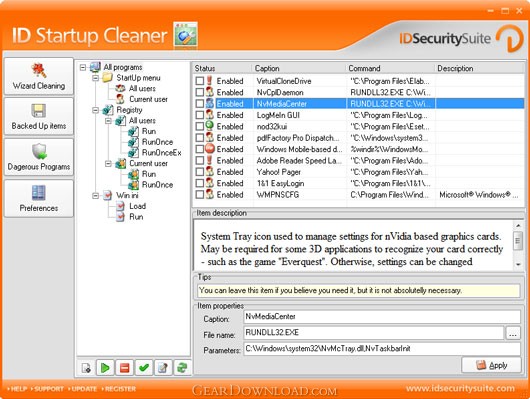 Click to enlarge screenshot
Software Description:
ID Startup Cleaner is a startup cleansing program.
ID Startup Cleaner is an essential utility that provides the opportunity to control, manage and optimize items in Windows Startup. It also protects your computer at Startup against harmful applications by automatically removing or stopping dangerous applications.
Main Features:
- Monitors startup applications
- Stops or starts Startup programs
- Protects your PC against harmful applications
- Tracks changes to the Startup configuration
- Preserves and restores deleted files
Detailed features:
- Manages Startup items according to your personal preferences. It displays all startup items from Registry, Startup folders and Win.ini and provides the opportunity to check each program and application.
- Allows you to add, edit, disable or delete programs. You can decide which programs should automatically start when Windows begins by viewing and selecting them in a list provided by the ID Startup Cleaner.
- Erases automatically Startup items that are not required or harmful. It detects applications that may harm your computer and stops them from running.
- Create and detains an integrated database of potentially dangerous programs and use this database to protect your computer against harmful applications, viruses and adware items at Startup, by automatically removing them when they appear.
- Adds all deleted items to a Restore list. Creates a backup list of all items that have been erased and provides the opportunity to recover those files and restore them completely with no content damage.
- Tracks all changes made in the Startup configuration alerts you about them. It asks for permission to run those modified applications and keeps you informed and in control of all changes that have been completed.
- ID Startup Cleaner runs at a high speed and has a convenient graphic interface which is very simple to use and requires minimum space on your system
Limitations: 14 Days Trial
ID Startup Cleaner is an essential utility that provides the opportunity to control, manage and optimize items in Windows Startup. It also protects your computer at Startup against harmful applications by automatically removing or stopping dangerous applications.
Main Features:
- Monitors startup applications
- Stops or starts Startup programs
- Protects your PC against harmful applications
- Tracks changes to the Startup configuration
- Preserves and restores deleted files
Detailed features:
- Manages Startup items according to your personal preferences. It displays all startup items from Registry, Startup folders and Win.ini and provides the opportunity to check each program and application.
- Allows you to add, edit, disable or delete programs. You can decide which programs should automatically start when Windows begins by viewing and selecting them in a list provided by the ID Startup Cleaner.
- Erases automatically Startup items that are not required or harmful. It detects applications that may harm your computer and stops them from running.
- Create and detains an integrated database of potentially dangerous programs and use this database to protect your computer against harmful applications, viruses and adware items at Startup, by automatically removing them when they appear.
- Adds all deleted items to a Restore list. Creates a backup list of all items that have been erased and provides the opportunity to recover those files and restore them completely with no content damage.
- Tracks all changes made in the Startup configuration alerts you about them. It asks for permission to run those modified applications and keeps you informed and in control of all changes that have been completed.
- ID Startup Cleaner runs at a high speed and has a convenient graphic interface which is very simple to use and requires minimum space on your system
Limitations: 14 Days Trial
Feature List:
- Manages Startup items according to your personal preferences. It displays all startup items from Registry, Startup folders and Win.ini and provides the opportunity to check each program and application
- Allows you to add, edit, disable or delete programs. You can decide which programs should automatically start when Windows begins by viewing and selecting them in a list provided by the ID Startup Cleaner
- Erases automatically Startup items that are not required or harmful. It detects applications that may harm your computer and stops them from running
- Create and detains an integrated database of potentially dangerous programs and use this database to protect your computer against harmful applications, viruses and adware items at Startup, by automatically removing them when they appear
- Adds all deleted items to a Restore list. Creates a backup list of all items that have been erased and provides the opportunity to recover those files and restore them completely with no content damage
- Tracks all changes made in the Startup configuration alerts you about them. It asks for permission to run those modified applications and keeps you informed and in control of all changes that have been completed
- ID Startup Cleaner runs at a high speed and has a convenient graphic interface which is very simple to use and requires minimum space on your system
100% Clean:
 ID Startup Cleaner 1.2 is 100% clean
This download (idstartupcleanersetup.exe) was tested thoroughly and was found 100% clean. Click "Report Spyware" link on the top if you found this software contains any form of malware, including but not limited to: spyware, viruses, trojans and backdoors.
Related Software:
- Casper RAM Cleaner 2.3 - Casper RAM Cleaner increases your system performance.
- StartPro 2.0 - Gain control of your Windows startup
- Serial Splitter 3.0 - Enable all applications to receive same data from a serial port simultaneously.
- PC Tweaker 2.20 - Using PC Tweaker you can improve software and internet connection productivity.
- Actions Monitor 1.02 - Monitor and display system activity.
- ActiveStartup 1.45 - Windows startup manager. Supports backup/restore configurations.
- Key Transformation 8.1701 - Customize keyboard layout; Change key on keyboard; On screen keyboard.
- SystemAI 1.5 - SystemAI™ creates an ideal virtual computer for each of your applications.
- Fast PC 1.0 - Fast PC makes your PC faster, error-free and more efficient!
- Cleanse Uninstaller Pro 10.2 - Cleanse the fast,easy, complete uninstaller
top 10 most downloaded


recommended software
-
- AppleXsoft Photo Recovery for Mac
- AppleXsoft Photo Recovery is the comprehensive digital media data rescue software designed for Mac users, it featuring innovative photo recovery algor...

-
- Cacheman
- Memory is one of the most important pieces of computer hardware as it is in constant use no matter what a PC is used for. There is a tremendous number...
