Index >> System Utilities >> File Recovery >> HDD Temperature Pro
Report SpywareHDD Temperature Pro 4.0.25

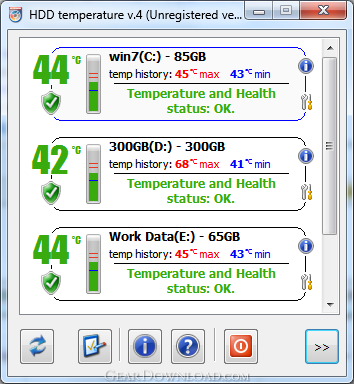 Click to enlarge screenshot
Software Description:
HDD Temperature Pro - Monitor hard drive temperatures and control overheating with HDD Temperature
Control hard disk temperature in real-time. HDD Temperature helps you prevent hard drive failures and associated data loss by giving an early warning about the disks overheating or being too cold. In case of a critical overheat, HDD Temperature can shut down the PC, while moderate overheating is dealt with email alerts. Get extended information about the disk, and see basic disk health statistics for all types of hard drives - IDE, SATA, SCSI, and USB disks.
HDD Temperature incorporates the results of researches in hard drive reliability, adding lower temperature thresholds to warn about disks being too cool as well as too hot. Statistically, newer hard drives are more sensitive to working temperatures being too low while older disks are more susceptible to higher working temperatures. HDD Temperature now protects against both temperature extremes.
Keep information safe and prevent data loss by controlling your disks' temperature and health status. HDD Temperature gathers and reports general health information of your hard disk, reporting possible issues well ahead of time. In case of a severely used disk with higher chances of failure, HDD Temperature advises about a replacement.
HDD Temperature is designed to keep overheating under control no matter whether or not a user is logged in to the system. Running as a system service, HDD Temperature can alert you or a network administrator by email or even go as far as shutting down the PC if more than a moderate overheating occurs.
System administrators can set up HDD Temperature with no user-accessible interface in service-only mode. Service operation ensures that HDD Temperature works without triggering any Vista's UAC prompts, does not require administrative privileges or a logged-in user.
HDD Temperature also reports all kinds of information about the disks, including the disk OEM and manufacture date, its exact model number and the number of hours the disk has has been used.
What's New: User interface language change don't work. Fixed.
Limitations: 14 Days Trial; max worktime - 2 hours per day
Control hard disk temperature in real-time. HDD Temperature helps you prevent hard drive failures and associated data loss by giving an early warning about the disks overheating or being too cold. In case of a critical overheat, HDD Temperature can shut down the PC, while moderate overheating is dealt with email alerts. Get extended information about the disk, and see basic disk health statistics for all types of hard drives - IDE, SATA, SCSI, and USB disks.
HDD Temperature incorporates the results of researches in hard drive reliability, adding lower temperature thresholds to warn about disks being too cool as well as too hot. Statistically, newer hard drives are more sensitive to working temperatures being too low while older disks are more susceptible to higher working temperatures. HDD Temperature now protects against both temperature extremes.
Keep information safe and prevent data loss by controlling your disks' temperature and health status. HDD Temperature gathers and reports general health information of your hard disk, reporting possible issues well ahead of time. In case of a severely used disk with higher chances of failure, HDD Temperature advises about a replacement.
HDD Temperature is designed to keep overheating under control no matter whether or not a user is logged in to the system. Running as a system service, HDD Temperature can alert you or a network administrator by email or even go as far as shutting down the PC if more than a moderate overheating occurs.
System administrators can set up HDD Temperature with no user-accessible interface in service-only mode. Service operation ensures that HDD Temperature works without triggering any Vista's UAC prompts, does not require administrative privileges or a logged-in user.
HDD Temperature also reports all kinds of information about the disks, including the disk OEM and manufacture date, its exact model number and the number of hours the disk has has been used.
What's New: User interface language change don't work. Fixed.
Limitations: 14 Days Trial; max worktime - 2 hours per day
100% Clean:
 HDD Temperature Pro 4.0.25 is 100% clean
This download (HDDTemp4.msi) was tested thoroughly and was found 100% clean. Click "Report Spyware" link on the top if you found this software contains any form of malware, including but not limited to: spyware, viruses, trojans and backdoors.
Related Software:
- Flash File Recovery 7.0 - Risk-free image recovery software for digital cameras (including flash cards)
- HDD Regenerator 2011 - HDD Regenerator repairs bad sectors on hard drive surface.
- DiskInternals Uneraser 5.0 - Restore deleted files from any storage device, including cameras, with this tool
- DiskInternals Partition Recovery 1.5 - DiskInternals Partition Recovery restores files, folders, and partitions
- RecoverPlus Photo Recovery 2.7.82 - Digital Photo Recovery of all lost, deleted and formatted photo's on all media.
- DiskInternals NTFS Recovery 1.4 - A user-friendly automatic tool to recover files from damaged disk volumes
- EaseUS Data Recovery Wizard 6.1 - One-stop data recovery software to recover lost data after format, deletion, etc
- FILERECOVERY 2016 Standard PC 5.5.8.4 - FILERECOVERY 2016 is for recovering lost and deleted files.
- PHOTORECOVERY 2014 for Mac 5.1.0.2 - PHOTORECOVERY 2014 recovers images, movies and sound files.
- DiskInternals Outlook Express Repair 2.0 - A potent solution from the data recovery expert that repairs Outlook Express
top 10 most downloaded


recommended software
-
- AppleXsoft Photo Recovery for Mac
- AppleXsoft Photo Recovery is the comprehensive digital media data rescue software designed for Mac users, it featuring innovative photo recovery algor...

-
- Cacheman
- Memory is one of the most important pieces of computer hardware as it is in constant use no matter what a PC is used for. There is a tremendous number...
