Index >> System Utilities >> Launchers & Task Managers >> HappyGameBossKey
Report SpywareHappyGameBossKey 1.1.0.1

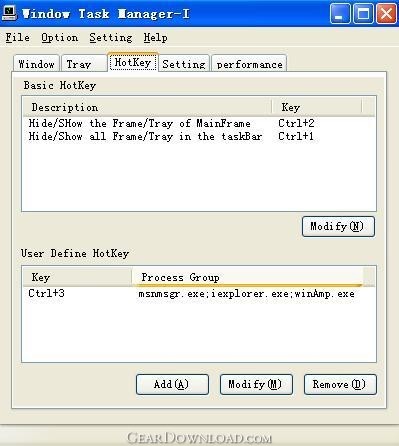 Click to enlarge screenshot
Software Description:
HappyGameBossKey - Hide windows and tray icons in the taskbar/desktop immediately
Sometimes we may do some private stuff at work( browse some sexual web site, download something from the Internet,talk with friends with MSN/ICQ,or enen play NET-games when nothing to do), but do not want our senior/Boss/Parent knows, which may bring bad impression of us,if they come close we will become hurry-scurry,do not know how to do then....
Now,Let me introduce you a powerful software. HappyGame BossKey,it's very helpful at that hurry-scurry moment.Only a hotkey pressed, all the windows and tray icons in the taskbar/desktop will be hided immediately, and after that, we could just press the same hotkey also to show them out again.
What's more, there are some useful functions relative. Such as we could define the specific programme/process/windows/trayicon that are sensitive to be hide .(and the other will remain the same as before when we press the hide-hotkey); change Title or iocn of a windowframe
1. Hide/Show all the windows and tray Icons in the taskbar now when pressing the hotkey.
2. Hide/Show one or a group of windows(that defined by you) when pressing the hotkeys.
3. Hide/show it's main-window/tray icon, to make itself disguise.
4. Change the icon and title of any window. For example,BossComing can change the Internet
Explorer window's icon to the Word's icon,so it will show the Word's icon instead of IE's in the taskbar.
5. Set the transparency of any window, this function will help you to hide window when
the Boss is not very close behind us.
6. Hide the tray icons of other applications which are shown in the notification area of the taskbar,and you can still use the pop menu of that hidden tray icon in BossComing's interface. For example,you can hide the tray icon of MSN or ICQ/OICQ.
7. Provides the password-protection function which can lock BossComing to ensure security of those hidden windows
8. BossComing's interface is the same as the windows Task Manager(taskmgr.exe),make itself enven move disguise.
Limitations: 30 Uses Trial
Sometimes we may do some private stuff at work( browse some sexual web site, download something from the Internet,talk with friends with MSN/ICQ,or enen play NET-games when nothing to do), but do not want our senior/Boss/Parent knows, which may bring bad impression of us,if they come close we will become hurry-scurry,do not know how to do then....
Now,Let me introduce you a powerful software. HappyGame BossKey,it's very helpful at that hurry-scurry moment.Only a hotkey pressed, all the windows and tray icons in the taskbar/desktop will be hided immediately, and after that, we could just press the same hotkey also to show them out again.
What's more, there are some useful functions relative. Such as we could define the specific programme/process/windows/trayicon that are sensitive to be hide .(and the other will remain the same as before when we press the hide-hotkey); change Title or iocn of a windowframe
1. Hide/Show all the windows and tray Icons in the taskbar now when pressing the hotkey.
2. Hide/Show one or a group of windows(that defined by you) when pressing the hotkeys.
3. Hide/show it's main-window/tray icon, to make itself disguise.
4. Change the icon and title of any window. For example,BossComing can change the Internet
Explorer window's icon to the Word's icon,so it will show the Word's icon instead of IE's in the taskbar.
5. Set the transparency of any window, this function will help you to hide window when
the Boss is not very close behind us.
6. Hide the tray icons of other applications which are shown in the notification area of the taskbar,and you can still use the pop menu of that hidden tray icon in BossComing's interface. For example,you can hide the tray icon of MSN or ICQ/OICQ.
7. Provides the password-protection function which can lock BossComing to ensure security of those hidden windows
8. BossComing's interface is the same as the windows Task Manager(taskmgr.exe),make itself enven move disguise.
Limitations: 30 Uses Trial
100% Clean:
 HappyGameBossKey 1.1.0.1 is 100% clean
This download (happygamebosskey.exe) was tested thoroughly and was found 100% clean. Click "Report Spyware" link on the top if you found this software contains any form of malware, including but not limited to: spyware, viruses, trojans and backdoors.
Related Software:
- Astatix Launcher 1.63 - Quick start any application in a single click and control Winamp with hotkeys.
- ActiveActions 1.25 - ActiveActions is an launch tool that also acts like hotkey manager.
- eXtended Task Manager 2.15 - Extended windows task manager and performance monitoring tool
- Window Magician 1.1.3 - Small utility that can hide windows, system tray icons or run screensaver
- Program Sleuth 2.0.6 - Find out what is really running on your computer.
- RLauncher 2.3 - RLauncher is an easy to use application launcher.
- Pokki Start Menu 260.11.291 - Pokki Windows 8 Start menu lets you access & search all the stuff on your PC.
- FireDaemon Pro 3.14.2755 - A utility to install and run any application or script as a Windows service
- JetStart Free 4.4 - Launch Start Menu shortcuts faster and easier than ever
- DE Launcher 2.2 - Desktop utility that provides an alternative method of launching applications
top 10 most downloaded


recommended software
-
- AppleXsoft Photo Recovery for Mac
- AppleXsoft Photo Recovery is the comprehensive digital media data rescue software designed for Mac users, it featuring innovative photo recovery algor...

-
- Cacheman
- Memory is one of the most important pieces of computer hardware as it is in constant use no matter what a PC is used for. There is a tremendous number...
