Index >> System Utilities >> Backup & Restore >> Handy Backup Disaster Recovery
Report SpywareHandy Backup Disaster Recovery 1.3

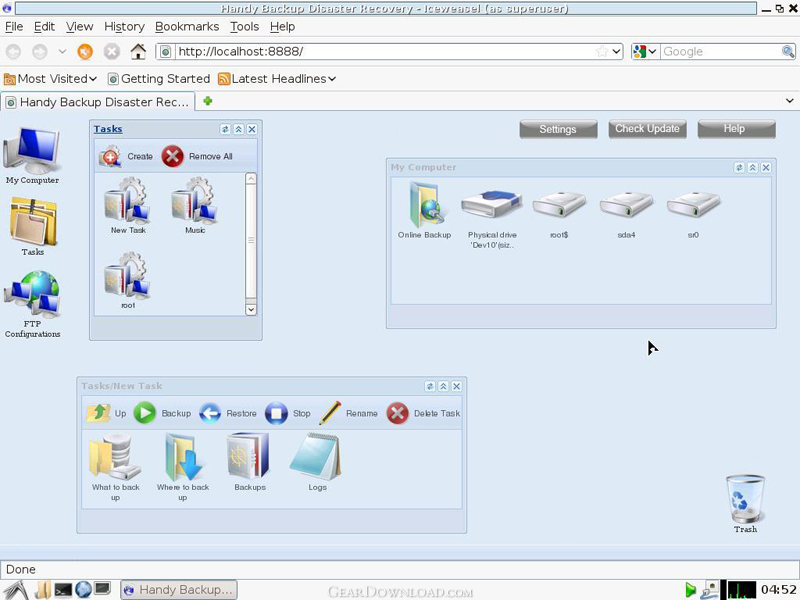 Click to enlarge screenshot
Software Description:
Handy Backup Disaster Recovery - Backup and restore PC independently of its OS using task-based interface
Backup Disaster Recovery is a product of Handy Backup family.
Main Handy Backup Disaster Recovery features are:
- Selective Hard Disk Backup. You can back up any partition you want or create a full disk image.
- Operating System Backup. You can back up and restore your main system HDD, this is possible because the computer is started from a recovery drive. It lets you back up data, which is locked while normal running of your PC, like system data, boot records, e.t.c.
- Windows-style Interface. The difference between most other disaster recovery software and Handy Backup Disaster Recovery is that the latter has a very friendly and understandable user interface that doesn't require any additional skills or specific knowledge.
Most PC backup software require you to have a working computer for restoration of backups. It means that even if you have a complete backup of a system drive, there is no way to restore it after failure, because you need a working OS to run the restore utility. Handy Backup Disaster Recovery lets you back up and restore data independently of your main operating system. In case of computer failure, you can instantly load from a recovery flash drive and restore your data either to the original hard drive, or to a different place. The main idea behind Handy Backup Disaster Recovery is to enable users to perform system recovery by loading from a recovery drive and treating their primary HDD as a 'cold' external media.
Handy Backup Disaster Recovery is a branch of Novosoft's Handy Backup Java project, which aims at creating a cross-platform backup solution that can run on Microsoft Windows, Linux, Mac OS, Solaris and other operating systems supporting the Java software.
What's New: Handy Backup Disaster Recovery 1.3 comes with an improved Image Backup plug-in which is faster, more stable and correct.
Limitations: 30 Days Trial
TAGS: backup, back up, automatic
Backup Disaster Recovery is a product of Handy Backup family.
Main Handy Backup Disaster Recovery features are:
- Selective Hard Disk Backup. You can back up any partition you want or create a full disk image.
- Operating System Backup. You can back up and restore your main system HDD, this is possible because the computer is started from a recovery drive. It lets you back up data, which is locked while normal running of your PC, like system data, boot records, e.t.c.
- Windows-style Interface. The difference between most other disaster recovery software and Handy Backup Disaster Recovery is that the latter has a very friendly and understandable user interface that doesn't require any additional skills or specific knowledge.
Most PC backup software require you to have a working computer for restoration of backups. It means that even if you have a complete backup of a system drive, there is no way to restore it after failure, because you need a working OS to run the restore utility. Handy Backup Disaster Recovery lets you back up and restore data independently of your main operating system. In case of computer failure, you can instantly load from a recovery flash drive and restore your data either to the original hard drive, or to a different place. The main idea behind Handy Backup Disaster Recovery is to enable users to perform system recovery by loading from a recovery drive and treating their primary HDD as a 'cold' external media.
Handy Backup Disaster Recovery is a branch of Novosoft's Handy Backup Java project, which aims at creating a cross-platform backup solution that can run on Microsoft Windows, Linux, Mac OS, Solaris and other operating systems supporting the Java software.
What's New: Handy Backup Disaster Recovery 1.3 comes with an improved Image Backup plug-in which is faster, more stable and correct.
Limitations: 30 Days Trial
TAGS: backup, back up, automatic
100% Clean:
 Handy Backup Disaster Recovery 1.3 is 100% clean
This download (hbdr_install.msi) was tested thoroughly and was found 100% clean. Click "Report Spyware" link on the top if you found this software contains any form of malware, including but not limited to: spyware, viruses, trojans and backdoors.
Related Software:
- Handy Backup Full 6.9.6 - File and image backup to DVD, FTP/SFTP/Online with scheduler, ZIP and encryption
- Handy Backup for Android 1.7 - Backup Android contacts, calls, SMS, bookmarks and settings to SDCard or Online
- Handy Backup 64-bit 7.4.0 - Back up files, hard drives and databases (MS SQL, MySQL, Postgre SQL and other)
- Handy Backup Free for Cloud 7.8.6 - Convenient tool to backup files, folders, and other Windows PC data to clouds.
- ! - Oops 1.02 - ! Oops ! - the independant auto-save.
- ERS 2K/XP, Emergency Recovery System FAT/FAT32 6.01 - Win 2K/XP, Recover gracefully from a system crash with ERS 2K/XP.
- ERS 9x, Emergency Recovery System 9x 11.45 - Win 95/98/ME Recover gracefully from a system crash with ERS.
- Acronis True Image Enterprise Server 8.0 - Real-time disk backup, disk imaging, and bare metal restore for Windows servers
- NH Backup 3.0.74 - Get a fast, reliable and affordable backups solution.
- DataBK SQL Server Backup 11.0.6 - Backup and restore Microsoft SQL Server database to a local or network drive.
top 10 most downloaded


recommended software
-
- AppleXsoft Photo Recovery for Mac
- AppleXsoft Photo Recovery is the comprehensive digital media data rescue software designed for Mac users, it featuring innovative photo recovery algor...

-
- Cacheman
- Memory is one of the most important pieces of computer hardware as it is in constant use no matter what a PC is used for. There is a tremendous number...
