Index >> System Utilities >> File & Disk Management >> GraphVu Disk Space Analyzer 32bit
Report SpywareGraphVu Disk Space Analyzer 32bit 1.7

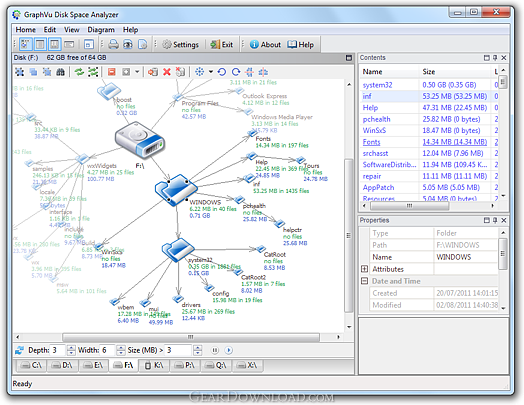 Click to enlarge screenshot
Software Description:
GraphVu Disk Space Analyzer 32bit - Disk Space Analyzer is an application for disk space analysis and management
GrpahVu Disk Space Analyzer is an application for exploring disk directory structure and finding large space-consuming folders and files.
GrpahVu Disk Space Analyzer offers outstanding graphical representation of disk directory structure which is different from any other similar tool. Directory structures are presented as directed graphs with folders as nodes. The sizes of folder icons in a graph are proportionate to the sizes of folders they represent and users can clearly see which folders consume more disk space.
Nodes are arranged automatically using one of the 3 graph layouts, and users can adjust node positions manually as well. Diagrams can be rotated or flipped horizontally or vertically.
Disk scan is quick. Running disk scan can be paused at any time and users can view partial results, change scan priorities, hide folders if necessary then continue the paused scan.
Users can free space by moving files and folders to the recycle bin or by deleting them permanently. User can quickly move folders to a new location on the same logical disk by editing graph edges.
Users can search for the files and folders and save results of the search in CSV-files.
Disk Space Analyzer service helps to keep information up-to-date.
GraphVu Disk Space Analyzer 1.6 is available in 32-bit and 64-bit versions and can be downloaded from http://graphvu.com. It is recommended that you always use the 64-bit version, if you're running a 64-bit version of Windows.
TAGS: Disk, Space, Volume, Free, Analyzer, Usage, Folder, Size, Tree, Graph, Visualization, Layout, Diagram, Search
GrpahVu Disk Space Analyzer is an application for exploring disk directory structure and finding large space-consuming folders and files.
GrpahVu Disk Space Analyzer offers outstanding graphical representation of disk directory structure which is different from any other similar tool. Directory structures are presented as directed graphs with folders as nodes. The sizes of folder icons in a graph are proportionate to the sizes of folders they represent and users can clearly see which folders consume more disk space.
Nodes are arranged automatically using one of the 3 graph layouts, and users can adjust node positions manually as well. Diagrams can be rotated or flipped horizontally or vertically.
Disk scan is quick. Running disk scan can be paused at any time and users can view partial results, change scan priorities, hide folders if necessary then continue the paused scan.
Users can free space by moving files and folders to the recycle bin or by deleting them permanently. User can quickly move folders to a new location on the same logical disk by editing graph edges.
Users can search for the files and folders and save results of the search in CSV-files.
Disk Space Analyzer service helps to keep information up-to-date.
GraphVu Disk Space Analyzer 1.6 is available in 32-bit and 64-bit versions and can be downloaded from http://graphvu.com. It is recommended that you always use the 64-bit version, if you're running a 64-bit version of Windows.
TAGS: Disk, Space, Volume, Free, Analyzer, Usage, Folder, Size, Tree, Graph, Visualization, Layout, Diagram, Search
100% Clean:
 GraphVu Disk Space Analyzer 32bit 1.7 is 100% clean
This download (GvDsaSetup32-1.7.msi) was tested thoroughly and was found 100% clean. Click "Report Spyware" link on the top if you found this software contains any form of malware, including but not limited to: spyware, viruses, trojans and backdoors.
Related Software:
- Folder Cache 2.6 - Access to the recently used & favorite folders from the Save and Open dialogs.
- O&O Defrag Professional Edition 16.0 - Faster system starts, accelerated programs, and professional settings
- Visual Comparer 1.40 - Visual file compare and merge of the text files with syntax hightlight
- Advanced CATaloguer Pro 2.6 - Professional software for cataloguing on all kinds of media
- EF Duplicate Files Manager 7.10 - Find out duplicate files with same name, same size, same content
- EF Find 8.00 - EF Find is a powerful search program also inside archive files.
- Visual Multitool 4.4 - It is a file viewer, finder and editor with text tools.
- Advanced File Organizer 3.01 - Powerful cataloguer for all kinds of removable media, network drives, hard disk.
- Owl Commander 4.0 - Owl Commander is a complete solution for managing files for Windows Computer.
- MyBFL:The Body for LIFE Companion 6.4c - Complete body for life S/W for palm includes Meal Planner,Graphs,Photo Album.
top 10 most downloaded


recommended software
-
- MiniTool Power Data Recovery Free
- MiniTool Power Data Recovery is an easy-to-use and all in one free file recovery software for home users. With this most effective free file recovery ...
-
- Cacheman
- Memory is one of the most important pieces of computer hardware as it is in constant use no matter what a PC is used for. There is a tremendous number...
