Index >> System Utilities >> File Compression >> EasyZip
Report SpywareEasyZip 3.0

 Click to enlarge screenshot
Software Description:
EasyZip has a modern easy-to-use interface, with access to powerful features.
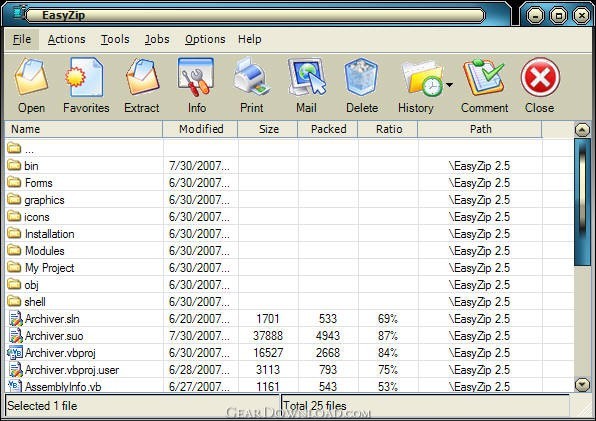
EasyZip has a modern easy-to-use interface, with access to many powerful features. EasyZip contains all the features you would expect from a compression program / archive utility - you can read and extract zip format. EasyZip prides itself on its simple, smarter way of doing things throughout the whole application. EasyZip is extremely easy to use! To open an archive simply double click on an archive listed in My Computer or Windows Explorer, drag and drop an archive onto EasyZip, or use the standard Open dialog box. The main EasyZip window features a list with the names, sizes, and date/time stamps of all files in the open archive. This list can be scrolled and sorted on any field. A configurable tool bar provides fast access to commonly used actions. Extensive context sensitive help is always available. Double Clicking on a file in the main EasyZip window has the same effect as double clicking in My Computer or Windows Explorer. First, the file is extracted from the archive. Then, if the file is executable, it is run. Otherwise, the file is opened by the appropriate application (for example, WordPad for *.WRI files) based on standard Windows associations. New features with version 2.0 Multi-Extact: Users now can extact multiple archive files at once. Schedule Backup: Now with scheduling you can automaticly backup sensitive files on a regular schedule and even automaticly send it off site via ftp. TAR and GZIP: Both archive formats are now supported.
EasyZip has a modern easy-to-use interface, with access to many powerful features. EasyZip contains all the features you would expect from a compression program / archive utility - you can read and extract zip format. EasyZip prides itself on its simple, smarter way of doing things throughout the whole application. EasyZip is extremely easy to use! To open an archive simply double click on an archive listed in My Computer or Windows Explorer, drag and drop an archive onto EasyZip, or use the standard Open dialog box. The main EasyZip window features a list with the names, sizes, and date/time stamps of all files in the open archive. This list can be scrolled and sorted on any field. A configurable tool bar provides fast access to commonly used actions. Extensive context sensitive help is always available. Double Clicking on a file in the main EasyZip window has the same effect as double clicking in My Computer or Windows Explorer. First, the file is extracted from the archive. Then, if the file is executable, it is run. Otherwise, the file is opened by the appropriate application (for example, WordPad for *.WRI files) based on standard Windows associations. New features with version 2.0 Multi-Extact: Users now can extact multiple archive files at once. Schedule Backup: Now with scheduling you can automaticly backup sensitive files on a regular schedule and even automaticly send it off site via ftp. TAR and GZIP: Both archive formats are now supported.
Feature List:
- Added the PPMd compression method
- Added BZip2 compression method
- Completely re-written in VS.NET 2005
- 100% Vista compatable
- New skin engine and a new skin
- Many minor inprovements
100% Clean:
 EasyZip 3.0 is 100% clean
This download (SetupEasyZip_S.exe) was tested thoroughly and was found 100% clean. Click "Report Spyware" link on the top if you found this software contains any form of malware, including but not limited to: spyware, viruses, trojans and backdoors.
Related Software:
- LS Archiver 2.0 - LS Archives contains all the basic features you expect from a compression util.
- StuffIt Standard Edition for Windows 8.5.2 - StuffIt Standard(tm) gives you access to any file on the Internet!
- m9P Zipper XT 1.0 - User-friendly compression (zipping) and decompression (unzipping) tool.
- m9P Zipper X 1.0 - Simple file compression (zipping) and decompression (unzipping) tool.
- AnyZip 1.10 - Windows archiver program for compression and decompress.
- File2Pack 2.0 - A File Packer/Compressor For Archiving Files With Excellent Compression Ratio!
- RAR Recovery Toolbox 1.1.16 - Recovers RAR files despite the reason of CRC errors and other issues
- Advanced Zip Repair 2.0 - A powerful tool to repair corrupted Zip files and self-extracting(SFX) files.
- Advanced RAR Repair 1.2 - Advanced RAR Repair is a powerful tool to repair corrupt RAR or SFX archives.
- WinZip 21.0.22288.0 - Compress, encrypt, manage and share with WinZip, the world's #1 Zip utility.
top 10 most downloaded


recommended software
-
- AppleXsoft Photo Recovery for Mac
- AppleXsoft Photo Recovery is the comprehensive digital media data rescue software designed for Mac users, it featuring innovative photo recovery algor...

-
- Cacheman
- Memory is one of the most important pieces of computer hardware as it is in constant use no matter what a PC is used for. There is a tremendous number...
