Index >> System Utilities >> File & Disk Management >> DocFetcher
Report SpywareDocFetcher 1.0.3

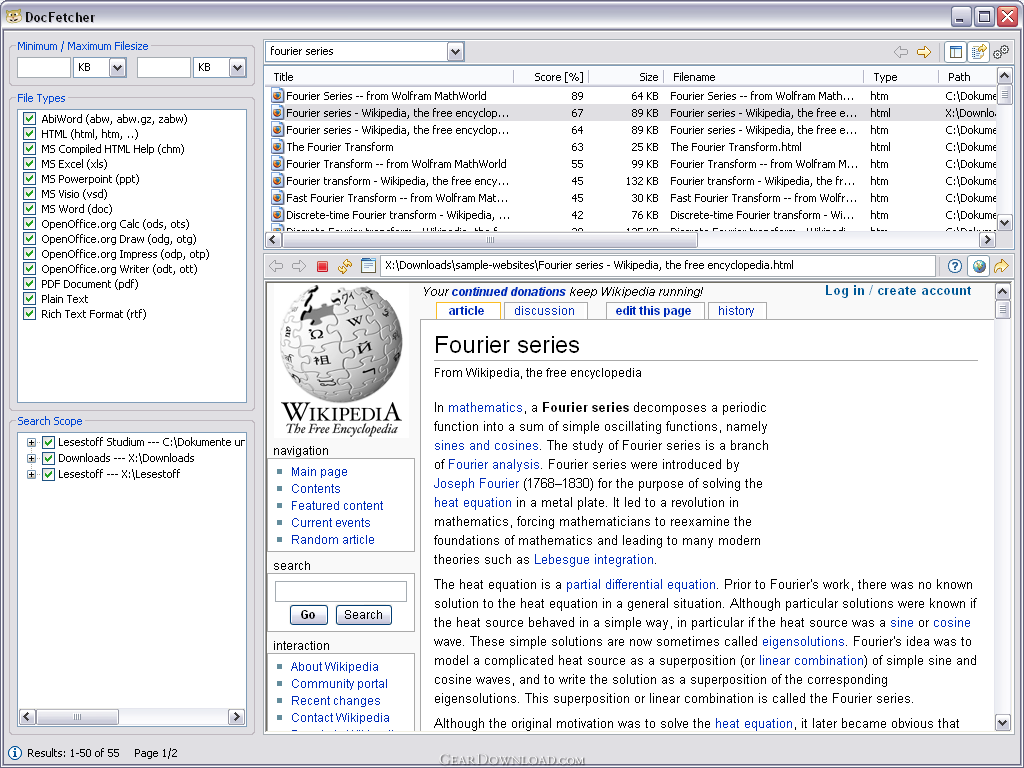 Click to enlarge screenshot
Software Description:
DocFetcher - an Open Source desktop search application
DocFetcher is an Open Source desktop search application: It allows you to quickly access documents on your computer by typing keywords. - You can think of it as Google for your local document repository. The application is currently available for Windows and GTK-based Linux distributions.
How It Works
DocFetcher creates so-called index files on which the searches are performed. You can either create permanent indexes for large document repositories that change infrequently, or temporary ones for quick full-text searches in small folders.
Temporary indexes can be created by rightclicking on a folder and selecting the menu item "Search With DocFetcher", and they are automatically disposed of after program termination. (You can of course tell DocFetcher to keep them.)
The indexing process might take a few minutes for larger repositories, and is usually a matter of seconds for small folders (200 documents = about 1 min.).
After index creation, you can type keywords into DocFetcher's search box, e.g. "fourier analysis" and hit Enter. Then DocFetcher will list all documents inside the selected folders that contain these words - most of the time in less than a second.
DocFetcher is an Open Source desktop search application: It allows you to quickly access documents on your computer by typing keywords. - You can think of it as Google for your local document repository. The application is currently available for Windows and GTK-based Linux distributions.
How It Works
DocFetcher creates so-called index files on which the searches are performed. You can either create permanent indexes for large document repositories that change infrequently, or temporary ones for quick full-text searches in small folders.
Temporary indexes can be created by rightclicking on a folder and selecting the menu item "Search With DocFetcher", and they are automatically disposed of after program termination. (You can of course tell DocFetcher to keep them.)
The indexing process might take a few minutes for larger repositories, and is usually a matter of seconds for small folders (200 documents = about 1 min.).
After index creation, you can type keywords into DocFetcher's search box, e.g. "fourier analysis" and hit Enter. Then DocFetcher will list all documents inside the selected folders that contain these words - most of the time in less than a second.
Feature List:
- Detection of HTML pairs (e.g. 'foo.htm' and a folder named 'foo_files')
- Various file operations on the document repository (e.g. creating folders, inserting new files) can be performed through DocFetcher's interface
- Customizable text and HTML file extensions (e.g. 'nfo', 'cpp', 'java', 'py', 'shtml', and so on)
- Regular expression based exclusion of files from indexing
- Automatic index updates on changes to the indexed documents (optional)
- Preview panel with search-term highlighting and a simple built-in web browser
- Search results can be sorted and filtered according to different criteria (filetype, filesize, path, etc.)
- A portable version for both Windows and Linux is available, which, amongst other things, is useful in combination with volume encryption (TrueCrypt)
100% Clean:
 DocFetcher 1.0.3 is 100% clean
This download was tested thoroughly and was found 100% clean. Click "Report Spyware" link on the top if you found this software contains any form of malware, including but not limited to: spyware, viruses, trojans and backdoors.
Related Software:
- Folder Cache 2.6 - Access to the recently used & favorite folders from the Save and Open dialogs.
- O&O Defrag Professional Edition 16.0 - Faster system starts, accelerated programs, and professional settings
- Visual Comparer 1.40 - Visual file compare and merge of the text files with syntax hightlight
- Advanced CATaloguer Pro 2.6 - Professional software for cataloguing on all kinds of media
- EF Duplicate Files Manager 7.10 - Find out duplicate files with same name, same size, same content
- EF Find 8.00 - EF Find is a powerful search program also inside archive files.
- Visual Multitool 4.4 - It is a file viewer, finder and editor with text tools.
- Advanced File Organizer 3.01 - Powerful cataloguer for all kinds of removable media, network drives, hard disk.
- Owl Commander 4.0 - Owl Commander is a complete solution for managing files for Windows Computer.
- MyBFL:The Body for LIFE Companion 6.4c - Complete body for life S/W for palm includes Meal Planner,Graphs,Photo Album.
top 10 most downloaded


recommended software
-
- AppleXsoft Photo Recovery for Mac
- AppleXsoft Photo Recovery is the comprehensive digital media data rescue software designed for Mac users, it featuring innovative photo recovery algor...

-
- Cacheman
- Memory is one of the most important pieces of computer hardware as it is in constant use no matter what a PC is used for. There is a tremendous number...
