Index >> System Utilities >> Other >> Commands in Demand
Report SpywareCommands in Demand 10.5

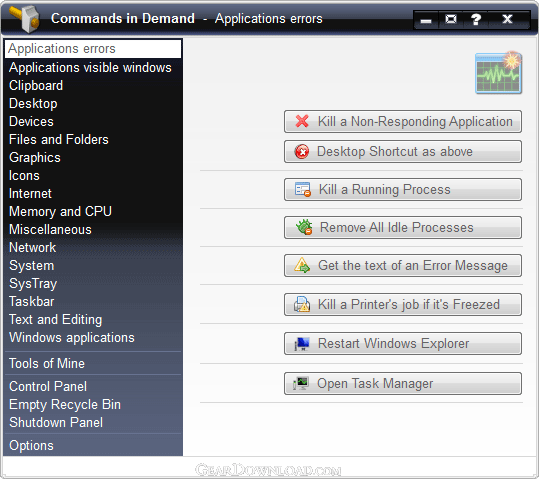 Click to enlarge screenshot
Software Description:
Commands in Demand - A collection of commands that may be needed instantly for a purpose.
A collection of over than 120 commands that may be needed instantly for a purpose while working with Windows.
Change Log for version 10.5:
"""""""""""""""""""""""""""""""""""
* ADDED:
- APPLICATIONS ERRORS SECTION: Remove All Idle Processes button, to Remove all idle background processes and get your computer running smoothly again.
- APPLICATIONS ERRORS SECTION: Kill a Printer's job if it's Freezed button, to Kill a Printer's job when its SysTray Cancel button is Freezed.
- APPLICATIONS VISIBLE WINDOWS SECTION: Manage Windows Explorer button, to Manage the active (or minimized) window of Windows Explorer.
- APPLICATIONS VISIBLE WINDOWS SECTION: Close All apps with visible windows button, to Shut Down all applications with visible windows (or minimized) in the Taskbar.
- DEVICES SECTION: Lock / Un-Lock your keyboard Check Box.
- FILES AND FOLDERS SECTION: Manage Windows Explorer button, to Manage the active (or minimized) window of Windows Explorer.
- FILES AND FOLDERS SECTION: Join Several Text Files to One button, to join up to 60 text files to a single One (Text File).
- INTERNET SECTION: Edit your System's Host file (using Notepad) button.
- OPTIONS SECTION: Create a Desktop Shortcut for Commands in Demand button, which is useful if you are using the Portable version of Commands in Demand.
- OPTIONS SECTION: Restart button, to restart instantly Commands in Demand in case that a behavior's error occurres (This may happen if Commands in Demand is set to startup with Windows and a third party application cleans before it, the Windows>Temp folder).
- OPTIONS SECTION: Exit with a smooth transparency effect Check Box, to Exit Commands in Demand with a smooth transparency effect.
- OPTIONS SECTION: Analog Clock Tooltip Check Box, to show an Analog Clock when you mouse-over the Section's icon on the top-right of All Sections' panels.
...
More Details in:
http://www.vasilios-free.gr/freesoft/commands_in_demand_change_log.htm
What's New: Several Additions and Improvements
A collection of over than 120 commands that may be needed instantly for a purpose while working with Windows.
Change Log for version 10.5:
"""""""""""""""""""""""""""""""""""
* ADDED:
- APPLICATIONS ERRORS SECTION: Remove All Idle Processes button, to Remove all idle background processes and get your computer running smoothly again.
- APPLICATIONS ERRORS SECTION: Kill a Printer's job if it's Freezed button, to Kill a Printer's job when its SysTray Cancel button is Freezed.
- APPLICATIONS VISIBLE WINDOWS SECTION: Manage Windows Explorer button, to Manage the active (or minimized) window of Windows Explorer.
- APPLICATIONS VISIBLE WINDOWS SECTION: Close All apps with visible windows button, to Shut Down all applications with visible windows (or minimized) in the Taskbar.
- DEVICES SECTION: Lock / Un-Lock your keyboard Check Box.
- FILES AND FOLDERS SECTION: Manage Windows Explorer button, to Manage the active (or minimized) window of Windows Explorer.
- FILES AND FOLDERS SECTION: Join Several Text Files to One button, to join up to 60 text files to a single One (Text File).
- INTERNET SECTION: Edit your System's Host file (using Notepad) button.
- OPTIONS SECTION: Create a Desktop Shortcut for Commands in Demand button, which is useful if you are using the Portable version of Commands in Demand.
- OPTIONS SECTION: Restart button, to restart instantly Commands in Demand in case that a behavior's error occurres (This may happen if Commands in Demand is set to startup with Windows and a third party application cleans before it, the Windows>Temp folder).
- OPTIONS SECTION: Exit with a smooth transparency effect Check Box, to Exit Commands in Demand with a smooth transparency effect.
- OPTIONS SECTION: Analog Clock Tooltip Check Box, to show an Analog Clock when you mouse-over the Section's icon on the top-right of All Sections' panels.
...
More Details in:
http://www.vasilios-free.gr/freesoft/commands_in_demand_change_log.htm
What's New: Several Additions and Improvements
100% Clean:
 Commands in Demand 10.5 is 100% clean
This download (commandsindemand.zip) was tested thoroughly and was found 100% clean. Click "Report Spyware" link on the top if you found this software contains any form of malware, including but not limited to: spyware, viruses, trojans and backdoors.
Related Software:
- AutorunCD Assistant 1.16 - A five steps wizard to create in secure the Autorun CD files
- Folder Iconizer 1.4 - An easy three steps wizard to change the computer's folders identity
- Instant Memory Cleaner 7.2 - Front-end for Microsoft's command line ClearMem and FreeMem
- NumCapsScroll Indicator 8.0 - On-screen real-time Num, Caps and Scroll Lock buttons indicator.
- Point Position 1.0 - Define the specific position in pixels, pointing anywhere on your screen
- TranspApps 1.1 - Give transparency to almost every visible window of your running applications
- Advanced-Password-Manager 3.0 - Advance Password Manager is a safe & user friendly password management utility.
- FastSum Standard Edition 1.6 - Check the integrity and track changes within your important files
- Acronis True Image Corporate Workstation 8.0 - Data and system backup and restore solution for corporate workstations
- Ashampoo PowerUp 3 3.23 - More protection, more control, faster and easier than ever
top 10 most downloaded


recommended software
-
- AppleXsoft Photo Recovery for Mac
- AppleXsoft Photo Recovery is the comprehensive digital media data rescue software designed for Mac users, it featuring innovative photo recovery algor...

-
- Cacheman
- Memory is one of the most important pieces of computer hardware as it is in constant use no matter what a PC is used for. There is a tremendous number...
