Index >> System Utilities >> Other >> Comfort Typing Pro
Report SpywareComfort Typing Pro 7.0

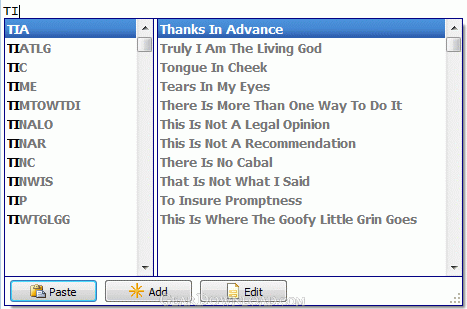 Click to enlarge screenshot
Software Description:
Comfort Typing Pro - Make Your Typing Faster and More Pleasant
Make your typing faster and more pleasant.
Comfort Typing Pro helps you to choose keywords for frequently used phrases and other keystrokes.
Comfort Typing Pro constantly monitors your keyboard and when it detects a keyword, it replaces the keyword with a predefined text.
There are two types of text templates: plain text and RTF (Rich Text Format - as in MS Word, OpenOffice, MS WordPad, etc).
With Comfort Typing Pro, you can switch the language or layout for the recently typed characters; change the case of the selected characters; show the language flag next to the caret; show the language flag in the system tray.
You can protect your templates with a strong 448-bit Blowfish encryption. In all cases nobody will access your stored data without your secret password.
What's New: Windows 8 Compatible. Section "Exceptions" has been replaced with new section "Dependencies". Code optimization and various improvements.
Limitations: 30 Days Trial
Make your typing faster and more pleasant.
Comfort Typing Pro helps you to choose keywords for frequently used phrases and other keystrokes.
Comfort Typing Pro constantly monitors your keyboard and when it detects a keyword, it replaces the keyword with a predefined text.
There are two types of text templates: plain text and RTF (Rich Text Format - as in MS Word, OpenOffice, MS WordPad, etc).
With Comfort Typing Pro, you can switch the language or layout for the recently typed characters; change the case of the selected characters; show the language flag next to the caret; show the language flag in the system tray.
You can protect your templates with a strong 448-bit Blowfish encryption. In all cases nobody will access your stored data without your secret password.
What's New: Windows 8 Compatible. Section "Exceptions" has been replaced with new section "Dependencies". Code optimization and various improvements.
Limitations: 30 Days Trial
Feature List:
- Paste frequently used phrases, signatures, dates, addresses, greetings, passwords, etc
- Create all kinds of messages and documents using templates
- Switch the language or layout for the recently typed text
- Change the language or layout for the selected text
- Change the case of the selected text: lower case, UPPER CASE, Sentence case., iNVERT cASE, Capitalize Each Word
100% Clean:
 Comfort Typing Pro 7.0 is 100% clean
This download (ct_setup.exe) was tested thoroughly and was found 100% clean. Click "Report Spyware" link on the top if you found this software contains any form of malware, including but not limited to: spyware, viruses, trojans and backdoors.
Related Software:
- Comfort On-Screen Keyboard Pro 7.5 - Virtual On-Screen Keyboard for Touchscreen, Ultra-Mobile PC UMPC, TabletPC
- Comfort Typing Lite 7.0 - Snippets software with word autotext features
- Hot Virtual Keyboard 8.5 - Replace Windows On-Screen Keyboard with a modern alternative!
- Comfort On-Screen Keyboard Lite 7.0 - On-Screen Keyboard for touch-screen devices: UMPC, Tablet PC, Touchmonitor
- Touch Screen Keyboard 8.1 - Touch Screen Keyboard developed especially for touch screen devices
- Advanced-Password-Manager 3.0 - Advance Password Manager is a safe & user friendly password management utility.
- FastSum Standard Edition 1.6 - Check the integrity and track changes within your important files
- Acronis True Image Corporate Workstation 8.0 - Data and system backup and restore solution for corporate workstations
- Ashampoo PowerUp 3 3.23 - More protection, more control, faster and easier than ever
- Odbc 4 All 2.3 - Easy connection to ODBC data sources for any application, DOS and scripts too !
top 10 most downloaded


recommended software
-
- AppleXsoft Photo Recovery for Mac
- AppleXsoft Photo Recovery is the comprehensive digital media data rescue software designed for Mac users, it featuring innovative photo recovery algor...

-
- Cacheman
- Memory is one of the most important pieces of computer hardware as it is in constant use no matter what a PC is used for. There is a tremendous number...
