Index >> System Utilities >> Clipboard Tools >> Comfort Paste
Report SpywareComfort Paste 3.0

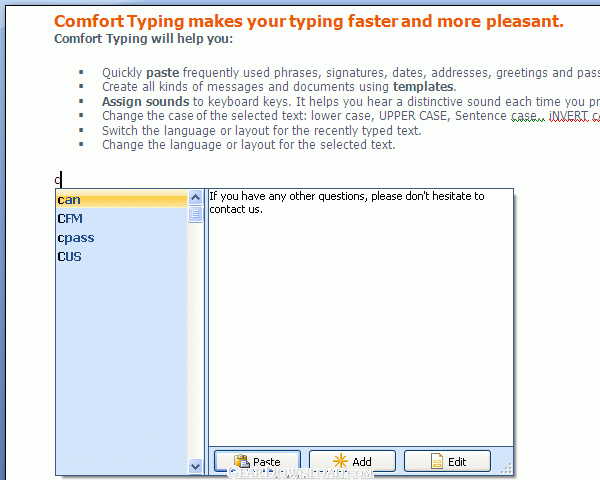 Click to enlarge screenshot
Software Description:
Comfort Paste - Quickly paste frequently used text fragments and images
Comfort Paste is a template manager you can use to quickly paste frequently used text fragments and images.
Why do you particularly need Comfort Paste?
Despite the visible simplicity of the interface, Comfort Paste has powerful features that will help to forget about the routine of your work and speed it up.
Comfort Paste will help you to quickly complete the following tasks:
+ Paste frequently used phrases, signatures, smiles, addresses, greetings, passwords, etc.
+ Create all kinds of messages and documents using templates.
+ Paste images from a predefined list.
+ Paste regularly repeated fragments while programming: HTML, SQL, Pascal, etc.
How does Comfort Paste work?
Every template has a name and the manager searches the database for it. Just type the name of the template or only its beginning and press Win+Space (by default).
There are three types of templates:
1. Plain text.
2. RTF (Rich Text Format) - as in MS Word, OpenOffice, MS WordPad, etc.
3. Image.
You can add various macros to text templates: keystrokes, tags for inserting random text from a predefined list, etc.
Comfort Paste includes a mechanism for quick and comfortable template configuration.
It is easy to use Comfort Paste in workgroups. To do it, just save the template file to a network resource and configure it to be used on every workstation.
It is completely compatible with Microsoft Windows Vista, XP and 2000.
What's New: + Added new interface languages: Hungarian, Simplified Chinese. + Added a new option: "Hide the icon in the system tray". * The templates manager view has been changed.
Limitations: 30 Days Trial
Comfort Paste is a template manager you can use to quickly paste frequently used text fragments and images.
Why do you particularly need Comfort Paste?
Despite the visible simplicity of the interface, Comfort Paste has powerful features that will help to forget about the routine of your work and speed it up.
Comfort Paste will help you to quickly complete the following tasks:
+ Paste frequently used phrases, signatures, smiles, addresses, greetings, passwords, etc.
+ Create all kinds of messages and documents using templates.
+ Paste images from a predefined list.
+ Paste regularly repeated fragments while programming: HTML, SQL, Pascal, etc.
How does Comfort Paste work?
Every template has a name and the manager searches the database for it. Just type the name of the template or only its beginning and press Win+Space (by default).
There are three types of templates:
1. Plain text.
2. RTF (Rich Text Format) - as in MS Word, OpenOffice, MS WordPad, etc.
3. Image.
You can add various macros to text templates: keystrokes, tags for inserting random text from a predefined list, etc.
Comfort Paste includes a mechanism for quick and comfortable template configuration.
It is easy to use Comfort Paste in workgroups. To do it, just save the template file to a network resource and configure it to be used on every workstation.
It is completely compatible with Microsoft Windows Vista, XP and 2000.
What's New: + Added new interface languages: Hungarian, Simplified Chinese. + Added a new option: "Hide the icon in the system tray". * The templates manager view has been changed.
Limitations: 30 Days Trial
Feature List:
- Paste frequently used phrases, signatures, smiles, addresses, greetings, passwords, etc
- Create all kinds of messages and documents using templates
- Paste images from a predefined list
- Paste regularly repeated fragments while programming: HTML, SQL, Pascal, etc
100% Clean:
 Comfort Paste 3.0 is 100% clean
This download (cp_setup.exe) was tested thoroughly and was found 100% clean. Click "Report Spyware" link on the top if you found this software contains any form of malware, including but not limited to: spyware, viruses, trojans and backdoors.
Related Software:
- Comfort Clipboard Pro 7.5 - Professional Windows Clipboard Viewer and Manager
- Comfort Clipboard Lite 7.0 - Your personal safe clipboard manager (lite edition)
- ! - M8 Multi Clipboard 5.Release - The M8 multi clipboard captures all clips and Screen Shots
- 101 Clips 19.00 - Free Multi-Clipboard and Clip Organizer
- Speed Dial for Phone Cards 2.00 - Speed Dial for Phone Cards
- Speed Dial 13.07.01 - This computer speed dial software program makes dialing the phone easy
- WinM8 4.01.03 - The original multi clipboard
- CopyPlus 2.02.33 - Now you can copy as often as you like and paste all your clips at the same time.
- I Love Clipboard 1.3 - ILoveClipboard is a useful software to manage Windows clipboard.
- M8 Multi Clipboard 9.73.11 - Multi clipboard, organizer, text and graphics editors all rolled into one.
top 10 most downloaded


recommended software
-
- AppleXsoft Photo Recovery for Mac
- AppleXsoft Photo Recovery is the comprehensive digital media data rescue software designed for Mac users, it featuring innovative photo recovery algor...

-
- Cacheman
- Memory is one of the most important pieces of computer hardware as it is in constant use no matter what a PC is used for. There is a tremendous number...
