Index >> System Utilities >> Launchers & Task Managers >> Blue Jet Button
Report SpywareBlue Jet Button 2.2.1.5

 Click to enlarge screenshot
Software Description:
Blue Jet Button is designed to help you quickly launch applications.
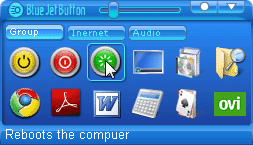
Blue Jet Button is a reliable toolbar style application that will allow you to manage and organize your shortcuts. You will be able to keep all the applications and files you need to use at hand, in an organized and time saving manner.
Using Blue Jet Button has many perks. It is quickly installed on your computer, it only takes a few seconds to get it up and running, unlike other shortcut bars, it doesn't take up a lot of your system's resources, it is amazingly easy to operate due to its user friendly interface and it is totally customizable so that you can adjust to your own style and workflow.
Another distinguishing features of Blue Jet Button is that the main program window appears when you click the middle mouse button anywhere on the screen, so that you can quickly and easily start any application in one action!
Blue Jet Button will allow you to create shortcut groups that will keep your quick launch bar from getting too crowded, to easily make shortcuts to absolutely any file or command you can think of, to determine the window style for each window (choose if it should start normal, minimized or maximized) and to even add icons and comments or description to your shortcuts that will help you to identify them with ease.
Blue Jet Button is designed to avoid getting in your way. It opens by default in the system tray, but you can also opt to place it as a window anywhere on your screen. Even more, you can add this useful tool to the Windows Startup list so that you won't have to manually run it each time you reboot.
Furthermore, Blue Jet Button will allow you to add to its main group a few Windows commands you normally can't create shortcuts to. You will now be able instruct your computer to standby, hibernate, reboot and shutdown, to minimize all the windows or to access the add/remove programs list with just one single mouse button. You will even be able to adjust your sound volume directly from a slider bar incorporated in the application's interface
What's New: Fixed a critical error on Windows 7, Windows 8;
Limitations: 30 Days Trial
Blue Jet Button is a reliable toolbar style application that will allow you to manage and organize your shortcuts. You will be able to keep all the applications and files you need to use at hand, in an organized and time saving manner.
Using Blue Jet Button has many perks. It is quickly installed on your computer, it only takes a few seconds to get it up and running, unlike other shortcut bars, it doesn't take up a lot of your system's resources, it is amazingly easy to operate due to its user friendly interface and it is totally customizable so that you can adjust to your own style and workflow.
Another distinguishing features of Blue Jet Button is that the main program window appears when you click the middle mouse button anywhere on the screen, so that you can quickly and easily start any application in one action!
Blue Jet Button will allow you to create shortcut groups that will keep your quick launch bar from getting too crowded, to easily make shortcuts to absolutely any file or command you can think of, to determine the window style for each window (choose if it should start normal, minimized or maximized) and to even add icons and comments or description to your shortcuts that will help you to identify them with ease.
Blue Jet Button is designed to avoid getting in your way. It opens by default in the system tray, but you can also opt to place it as a window anywhere on your screen. Even more, you can add this useful tool to the Windows Startup list so that you won't have to manually run it each time you reboot.
Furthermore, Blue Jet Button will allow you to add to its main group a few Windows commands you normally can't create shortcuts to. You will now be able instruct your computer to standby, hibernate, reboot and shutdown, to minimize all the windows or to access the add/remove programs list with just one single mouse button. You will even be able to adjust your sound volume directly from a slider bar incorporated in the application's interface
What's New: Fixed a critical error on Windows 7, Windows 8;
Limitations: 30 Days Trial
100% Clean:
 Blue Jet Button 2.2.1.5 is 100% clean
This download (bjb.zip) was tested thoroughly and was found 100% clean. Click "Report Spyware" link on the top if you found this software contains any form of malware, including but not limited to: spyware, viruses, trojans and backdoors.
Related Software:
- Astatix Launcher 1.63 - Quick start any application in a single click and control Winamp with hotkeys.
- ActiveActions 1.25 - ActiveActions is an launch tool that also acts like hotkey manager.
- eXtended Task Manager 2.15 - Extended windows task manager and performance monitoring tool
- Window Magician 1.1.3 - Small utility that can hide windows, system tray icons or run screensaver
- Program Sleuth 2.0.6 - Find out what is really running on your computer.
- RLauncher 2.3 - RLauncher is an easy to use application launcher.
- Pokki Start Menu 260.11.291 - Pokki Windows 8 Start menu lets you access & search all the stuff on your PC.
- FireDaemon Pro 3.14.2755 - A utility to install and run any application or script as a Windows service
- JetStart Free 4.4 - Launch Start Menu shortcuts faster and easier than ever
- DE Launcher 2.2 - Desktop utility that provides an alternative method of launching applications
top 10 most downloaded


recommended software
-
- AppleXsoft Photo Recovery for Mac
- AppleXsoft Photo Recovery is the comprehensive digital media data rescue software designed for Mac users, it featuring innovative photo recovery algor...

-
- Cacheman
- Memory is one of the most important pieces of computer hardware as it is in constant use no matter what a PC is used for. There is a tremendous number...
