Index >> System Utilities >> System Maintenance >> Binary Uptime
Report SpywareBinary Uptime 1.2

 Click to enlarge screenshot
Software Description:
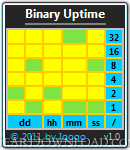
Binary Uptime - Shows how much time has passed since you last restarted your PC in binary.
Binary Uptime refers to the time during which a system is working without failure and has had zero downtimes. Over a period of time, a system can end up slowing down or breaking down due to excessive usage. One way of checking the current uptime of the system is through the Performance tab of the task manager and via the command prompt. However, one might need more information to get a better comparison of system performance by checking the uptime from numerous intervals. System Uptime Full Plus is a Windows Gadget that displays the system uptime from the time of system installation, current uptime and uptime of the last time the system was used. It also displays some general information, including operating system type, version, date and time of operating system installation. This way you can compare your system’s uptime since the first time the OS was installed to the last and current usage. The gadget also displays the date and time of the last system usage which can be quite handy to track if the system is being over-used. Gadget have three modes - full, small and wide. Some users may want to increase the size of the gadget’s display to make it better readable, which can be helpful especially on larger displays. Save settings to file. (File will created - Path: %APPDATA% Filename: gadgetname_Settings.ini). Color changeable for all gadget's elements, including background. The gadget is compatible with 32-bit and 64-bit editions of Windows Vista, Windows 7 and Windows Server 2008. All times shows in binary notation. This gadget is specially designed for Binary Lovers.
Binary Uptime refers to the time during which a system is working without failure and has had zero downtimes. Over a period of time, a system can end up slowing down or breaking down due to excessive usage. One way of checking the current uptime of the system is through the Performance tab of the task manager and via the command prompt. However, one might need more information to get a better comparison of system performance by checking the uptime from numerous intervals. System Uptime Full Plus is a Windows Gadget that displays the system uptime from the time of system installation, current uptime and uptime of the last time the system was used. It also displays some general information, including operating system type, version, date and time of operating system installation. This way you can compare your system’s uptime since the first time the OS was installed to the last and current usage. The gadget also displays the date and time of the last system usage which can be quite handy to track if the system is being over-used. Gadget have three modes - full, small and wide. Some users may want to increase the size of the gadget’s display to make it better readable, which can be helpful especially on larger displays. Save settings to file. (File will created - Path: %APPDATA% Filename: gadgetname_Settings.ini). Color changeable for all gadget's elements, including background. The gadget is compatible with 32-bit and 64-bit editions of Windows Vista, Windows 7 and Windows Server 2008. All times shows in binary notation. This gadget is specially designed for Binary Lovers.
100% Clean:
 Binary Uptime 1.2 is 100% clean
This download was tested thoroughly and was found 100% clean. Click "Report Spyware" link on the top if you found this software contains any form of malware, including but not limited to: spyware, viruses, trojans and backdoors.
Related Software:
- Parking Status 2.2 - Small gadget that will show and changes CPU cores parking status.
- Casper RAM Cleaner 2.3 - Casper RAM Cleaner increases your system performance.
- StartPro 2.0 - Gain control of your Windows startup
- Serial Splitter 3.0 - Enable all applications to receive same data from a serial port simultaneously.
- PC Tweaker 2.20 - Using PC Tweaker you can improve software and internet connection productivity.
- Actions Monitor 1.02 - Monitor and display system activity.
- ActiveStartup 1.45 - Windows startup manager. Supports backup/restore configurations.
- Key Transformation 8.1701 - Customize keyboard layout; Change key on keyboard; On screen keyboard.
- SystemAI 1.5 - SystemAI™ creates an ideal virtual computer for each of your applications.
- Fast PC 1.0 - Fast PC makes your PC faster, error-free and more efficient!
top 10 most downloaded


recommended software
-
- AppleXsoft Photo Recovery for Mac
- AppleXsoft Photo Recovery is the comprehensive digital media data rescue software designed for Mac users, it featuring innovative photo recovery algor...

-
- Cacheman
- Memory is one of the most important pieces of computer hardware as it is in constant use no matter what a PC is used for. There is a tremendous number...
