Index >> System Utilities >> File & Disk Management >> BatchUpdater for Lotus Notes
Report SpywareBatchUpdater for Lotus Notes 2.0.0.1100

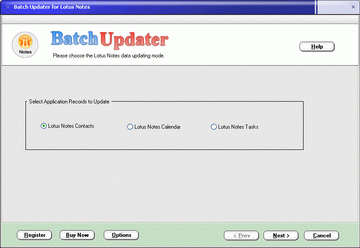 Click to enlarge screenshot
Software Description:
BatchUpdater for Lotus Notes - Update Lotus Notes Contacts, Calendar and Tasks records in batch
BatchUpdater for Lotus Notes lets you update Lotus Notes Contacts, Calendar and Tasks information in batch quickly and smartly.
Sample Scenarios:
- When you need to modify multiple Lotus Notes Contact records, for example, modify the company name, job title or phone numbers of a lot of Contact records.
Through the Lotus Notes user interface, you need to modify them one by one. With BatchUpdater, you can do this step by step in a few clicks. It is very easy to use and will avoid the typo mistakes.
- BatchUpdater is also very helpful if you need to update the subjects, details or any other fields of the appointments, meetings in the Lotus Notes Calendar.
Advantages of using BatchUpdater:
- Save so much effort: BatchUpdater updates multiple records in one time.
- Avoid mistakes: If you do all the updating manually, you may make some mistakes you don't even know. BatchUpdater won't inject typo errors.
- Easy to use: BatchUpdater provides a wizard user interface lets you update records step by step.
- Almost all the writable record fields are supported. You may update all the information in the Contacts, Calendar Appointments and Tasks.
- Rich update modes are supported. For example, for the text string fields, the available update modes are: Set, Append, Insert, Replace, etc.
Limitations: 10 Days Trial
BatchUpdater for Lotus Notes lets you update Lotus Notes Contacts, Calendar and Tasks information in batch quickly and smartly.
Sample Scenarios:
- When you need to modify multiple Lotus Notes Contact records, for example, modify the company name, job title or phone numbers of a lot of Contact records.
Through the Lotus Notes user interface, you need to modify them one by one. With BatchUpdater, you can do this step by step in a few clicks. It is very easy to use and will avoid the typo mistakes.
- BatchUpdater is also very helpful if you need to update the subjects, details or any other fields of the appointments, meetings in the Lotus Notes Calendar.
Advantages of using BatchUpdater:
- Save so much effort: BatchUpdater updates multiple records in one time.
- Avoid mistakes: If you do all the updating manually, you may make some mistakes you don't even know. BatchUpdater won't inject typo errors.
- Easy to use: BatchUpdater provides a wizard user interface lets you update records step by step.
- Almost all the writable record fields are supported. You may update all the information in the Contacts, Calendar Appointments and Tasks.
- Rich update modes are supported. For example, for the text string fields, the available update modes are: Set, Append, Insert, Replace, etc.
Limitations: 10 Days Trial
100% Clean:
 BatchUpdater for Lotus Notes 2.0.0.1100 is 100% clean
This download (lotus-notes-batchupdater.zip) was tested thoroughly and was found 100% clean. Click "Report Spyware" link on the top if you found this software contains any form of malware, including but not limited to: spyware, viruses, trojans and backdoors.
Related Software:
- CSV Converter Toolkit 2.0.0.1100 - Convert Outlook, Palm Desktop, ACT!, Lotus Notes and Google information with CSV
- BatchUpdater for Outlook 2.0.0.1100 - Update Outlook records in batch quickly and smartly
- BatchUpdater for Palm Desktop 2.0 - Update Palm Desktop database records in batch quickly and smartly
- BatchUpdater Toolkit 2.0.0.1100 - Update application data in batch quickly and smartly
- Folder Cache 2.6 - Access to the recently used & favorite folders from the Save and Open dialogs.
- O&O Defrag Professional Edition 16.0 - Faster system starts, accelerated programs, and professional settings
- Visual Comparer 1.40 - Visual file compare and merge of the text files with syntax hightlight
- Advanced CATaloguer Pro 2.6 - Professional software for cataloguing on all kinds of media
- EF Duplicate Files Manager 7.10 - Find out duplicate files with same name, same size, same content
- EF Find 8.00 - EF Find is a powerful search program also inside archive files.
top 10 most downloaded


recommended software
-
- AppleXsoft Photo Recovery for Mac
- AppleXsoft Photo Recovery is the comprehensive digital media data rescue software designed for Mac users, it featuring innovative photo recovery algor...

-
- Cacheman
- Memory is one of the most important pieces of computer hardware as it is in constant use no matter what a PC is used for. There is a tremendous number...
