Index >> System Utilities >> Backup & Restore >> Auto Backup
Report SpywareAuto Backup 2.4.3.1013

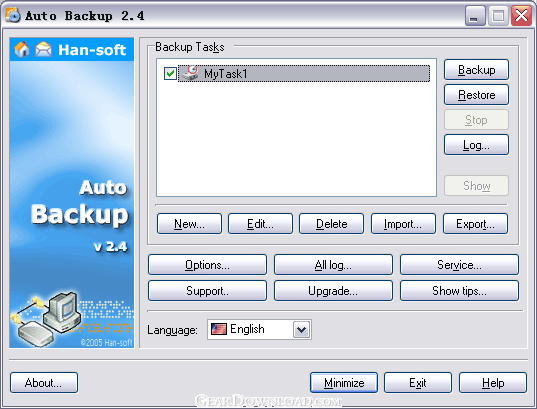 Click to enlarge screenshot
Software Description:
Auto Backup - Automatic backup your data to local, network, or FTP. It can work as service.
Automatic backup of your critical data to local disk, Network neighborhood and remote FTP servers. It can work as a service too. You can create multi-tasks to backup your data.You can use Auto Backup to make a reserve copy of any valuable data on your system manually or automatically. You can select files to restore to original or new location. Auto backup Integrated compression and password. You can create self-restore archive. Flexible backup date and time are specified to backup automatically. You can start backup and restore manually at any convenient time. It can work as a Windows NT/2000/XP service too, you can backup your data without being properly logged into your computer.
Features
- Flexible source file and folder selection criteria are built in.
- Backup your data to a local disk, the Network neighborhood or a remote FTP server, with ability to create a new folder at a remote FTP server.
- Auto Backup can work as a Windows NT/2000/XP service(Only Site License).
- Flexible backup date and time are specified to backup automatically.
- You can start backup and restore manually at any convenient time.
- You can program repeat backups any number of times in one day. You can specify the life cycle length of backup archives with presets you include into the archive name, This will determine how long an archive is kept before it overwritten by the new backup archive.
- You can backup all or changed files.
- You can create self-restore archives.
- Auto Backup uses integrated compression and 256 bits encryption.
- You are given option to add password and comment for your Backup archives.
- You can restore selected files only to original or new location.
- Files can be restored from the Windows shell.
- Options to shutdown after backup are provided.
- Multi-threaded backup, restore and transfer engine allows you can start multi-backup and -restoring processes at the same time. You can edit multi-backup tasks at the same time, too.
What's New: Vista is supported
Limitations: 30 Days Trial
TAGS: Auto backup, automatic backup, backup
Automatic backup of your critical data to local disk, Network neighborhood and remote FTP servers. It can work as a service too. You can create multi-tasks to backup your data.You can use Auto Backup to make a reserve copy of any valuable data on your system manually or automatically. You can select files to restore to original or new location. Auto backup Integrated compression and password. You can create self-restore archive. Flexible backup date and time are specified to backup automatically. You can start backup and restore manually at any convenient time. It can work as a Windows NT/2000/XP service too, you can backup your data without being properly logged into your computer.
Features
- Flexible source file and folder selection criteria are built in.
- Backup your data to a local disk, the Network neighborhood or a remote FTP server, with ability to create a new folder at a remote FTP server.
- Auto Backup can work as a Windows NT/2000/XP service(Only Site License).
- Flexible backup date and time are specified to backup automatically.
- You can start backup and restore manually at any convenient time.
- You can program repeat backups any number of times in one day. You can specify the life cycle length of backup archives with presets you include into the archive name, This will determine how long an archive is kept before it overwritten by the new backup archive.
- You can backup all or changed files.
- You can create self-restore archives.
- Auto Backup uses integrated compression and 256 bits encryption.
- You are given option to add password and comment for your Backup archives.
- You can restore selected files only to original or new location.
- Files can be restored from the Windows shell.
- Options to shutdown after backup are provided.
- Multi-threaded backup, restore and transfer engine allows you can start multi-backup and -restoring processes at the same time. You can edit multi-backup tasks at the same time, too.
What's New: Vista is supported
Limitations: 30 Days Trial
TAGS: Auto backup, automatic backup, backup
Feature List:
- Flexible source file and folder selection criteria are built in
- Backup your data to a local disk, the Network neighborhood or a remote FTP server, with ability to create a new folder at a remote FTP server
- Auto Backup can work as a Windows NT/2000/XP service(Only Site License)
- Flexible backup date and time are specified to backup automatically
- You can start backup and restore manually at any convenient time
- You can program repeat backups any number of times in one day. You can specify the life cycle length of backup archives with presets you include into the archive name, This will determine how long an archive is kept before it overwritten by the new backup archive
- You can backup all or changed files
- You can create self-restore archives
- Auto Backup uses integrated compression and 256 bits encryption
- You are given option to add password and comment for your Backup archives
- You can restore selected files only to original or new location
- Files can be restored from the Windows shell
- Options to shutdown after backup are provided
- Multi-threaded backup, restore and transfer engine allows you can start multi-backup and -restoring processes at the same time. You can edit multi-backup tasks at the same time, too
100% Clean:
 Auto Backup 2.4.3.1013 is 100% clean
This download (AutoBackup_ins.exe) was tested thoroughly and was found 100% clean. Click "Report Spyware" link on the top if you found this software contains any form of malware, including but not limited to: spyware, viruses, trojans and backdoors.
Related Software:
- ! - Oops 1.02 - ! Oops ! - the independant auto-save.
- ERS 2K/XP, Emergency Recovery System FAT/FAT32 6.01 - Win 2K/XP, Recover gracefully from a system crash with ERS 2K/XP.
- ERS 9x, Emergency Recovery System 9x 11.45 - Win 95/98/ME Recover gracefully from a system crash with ERS.
- Acronis True Image Enterprise Server 8.0 - Real-time disk backup, disk imaging, and bare metal restore for Windows servers
- NH Backup 3.0.74 - Get a fast, reliable and affordable backups solution.
- DataBK SQL Server Backup 11.0.6 - Backup and restore Microsoft SQL Server database to a local or network drive.
- Outlook Express Backup Restore 2.364 - Backup your Outlook Express and restore it when it is necessary.
- Backup4all Professional 6.1.180 - Customizable backup program. Full, incremental, differential and mirror backups
- MinuteMan Data Backup Suite 8.54 - MinuteMan Data Backup with MinZip and MinSelfEx.
- Adolix Outlook Express Backup 3.0 - The easiest way to backup email data from Top Email Clients
top 10 most downloaded


recommended software
-
- AppleXsoft Photo Recovery for Mac
- AppleXsoft Photo Recovery is the comprehensive digital media data rescue software designed for Mac users, it featuring innovative photo recovery algor...

-
- Cacheman
- Memory is one of the most important pieces of computer hardware as it is in constant use no matter what a PC is used for. There is a tremendous number...
