Index >> System Utilities >> Text/Docment Editors >> ATPad
Report SpywareATPad 1.5.105

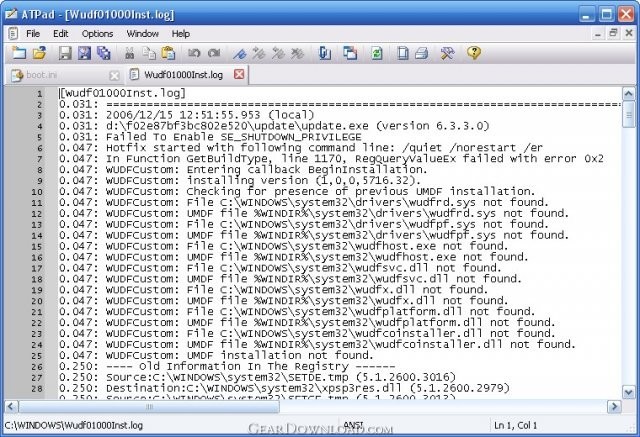 Click to enlarge screenshot
Software Description:
ATPad - a simple Notepad replacement written in pure C and Windows API
ATPad is a simple Notepad replacement written in pure C and Windows API. Keeping simplicity of Notepad it provides many additional features, such as:
Tabbed environment - especially useful for working with multiple files (for example, logs).
Fully customizable editor - colors, fonts etc.
Lines numbering - it's hard to find these days any respectable editor which does not support this feature.
Word wrapping - can anybody write long scripts without it?
List of recently open documents - ATPad stores this list accordingly to MAC address, so "Recent Files" on your laptop will look different from "Recent Files" on your desktop machine! But if you run the program from removable drive and work with files on this drive, they will be always presented in list, regardless of MAC address of hosting computer.
Keeping last session - start the work exactly from the point you've finished (all said above about list of recent documents is true against last sessions as well).
Bookmarks - never lose your way.
Displaying whitespaces - tabs, spaces, line breaks.
Reloading documents "on-demand" - instead of reopening them.
Outer changes tracking - stay informed when any of currently open documents has been changed out of program.
Reloading document in specified interval - you can specify interval for recurrent document reloading.
Sending documents via email - it's possible to send each document, even "Untitled", via email as attachment.
Snippets system - create, edit, delete and insert into document your own text snippets.
Unlimited find/replace and undo/redo
Portability - ATPad does not require installation, it can be started from any drive (fixed or flash) and leaves no traces on host computer after finishing.
ATPad is a simple Notepad replacement written in pure C and Windows API. Keeping simplicity of Notepad it provides many additional features, such as:
Tabbed environment - especially useful for working with multiple files (for example, logs).
Fully customizable editor - colors, fonts etc.
Lines numbering - it's hard to find these days any respectable editor which does not support this feature.
Word wrapping - can anybody write long scripts without it?
List of recently open documents - ATPad stores this list accordingly to MAC address, so "Recent Files" on your laptop will look different from "Recent Files" on your desktop machine! But if you run the program from removable drive and work with files on this drive, they will be always presented in list, regardless of MAC address of hosting computer.
Keeping last session - start the work exactly from the point you've finished (all said above about list of recent documents is true against last sessions as well).
Bookmarks - never lose your way.
Displaying whitespaces - tabs, spaces, line breaks.
Reloading documents "on-demand" - instead of reopening them.
Outer changes tracking - stay informed when any of currently open documents has been changed out of program.
Reloading document in specified interval - you can specify interval for recurrent document reloading.
Sending documents via email - it's possible to send each document, even "Untitled", via email as attachment.
Snippets system - create, edit, delete and insert into document your own text snippets.
Unlimited find/replace and undo/redo
Portability - ATPad does not require installation, it can be started from any drive (fixed or flash) and leaves no traces on host computer after finishing.
Feature List:
- Tabbed environment - especially useful for working with multiple files (for example, logs)
- Fully customizable editor - colors, fonts etc
- Lines numbering - it's hard to find these days any respectable editor which does not support this feature
- Word wrapping - can anybody write long scripts without it?
- List of recently open documents - ATPad stores this list accordingly to MAC address, so 'Recent Files' on your laptop will look different from 'Recent Files' on your desktop machine! But if you run the program from removable drive and work with files on this drive, they will be always presented in list, regardless of MAC address of hosting computer
- Keeping last session - start the work exactly from the point you've finished (all said above about list of recent documents is true against last sessions as well)
- Bookmarks - never lose your way
- Displaying whitespaces - tabs, spaces, line breaks
- Reloading documents 'on-demand' - instead of reopening them
- Outer changes tracking - stay informed when any of currently open documents has been changed out of program
- Reloading document in specified interval - you can specify interval for recurrent document reloading
- Sending documents via email - it's possible to send each document, even 'Untitled', via email as attachment
- Portability - ATPad does not require installation, it can be started from any drive (fixed or flash) and leaves no traces on host computer after finishing
100% Clean:
 ATPad 1.5.105 is 100% clean
This download (ATPad_1_5_105.zip) was tested thoroughly and was found 100% clean. Click "Report Spyware" link on the top if you found this software contains any form of malware, including but not limited to: spyware, viruses, trojans and backdoors.
Related Software:
- PowerGREP 4.4.0 - Find the files and information you want; search and replace large sets of files
- m9P Editor Plus 1.0 - Complete Rich Text Editor, Text To PDF, Rich Text To HLML, & Features DERT!
- MEDA Text to PDF 1.6 - Text to PDF is a flexible and powerful tool which can convert text into PDF
- Advanced PDF to TEXT converter 1.9.1 - PDF to TEXT converter converts PDF to text preserving original layout.
- Business Letter Professional 2007 6.2 - Best business letter writing software - 1000+ typical business letter templates.
- ReadyNotes 1.0 - A tabbed note manager to keep your notes and thoughts readily available.
- Hex Comparison 5.1634 - Hex Comparison is a binary file comparison and hex editor.
- Liquid Story Binder XE 4.93 - Liquid Story Binder XE is a program designed for writers, novelists, and poets.
- VeryPDF PDF Editor 2.60 - View and Edit PDF files, change text of PDF file, modify PDF file
- Count My Text! 1.0 - Count My Text! Text and word counter DEMO for WIN/MAC
top 10 most downloaded


recommended software
-
- AppleXsoft Photo Recovery for Mac
- AppleXsoft Photo Recovery is the comprehensive digital media data rescue software designed for Mac users, it featuring innovative photo recovery algor...

-
- Cacheman
- Memory is one of the most important pieces of computer hardware as it is in constant use no matter what a PC is used for. There is a tremendous number...
