Index >> System Utilities >> System Maintenance >> Arrange Startup
Report SpywareArrange Startup 3.7

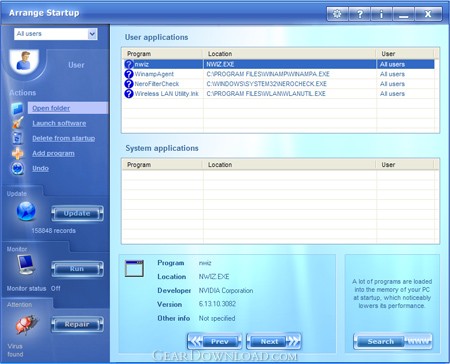 Click to enlarge screenshot
Software Description:
Arrange Startup - Is your PC still starting up slowly? Remember the day you bought your new PC!
Is your PC still starting up slowly? Remember the day when you bought your new PC with Windows installed? It was lightning fast. It took only about ten seconds to boot. When you opened the Start menu or the load/save file dialogs, they showed up instantly. But, after a year of heavy use, you now realize that your PC has some serious performance issues. It takes more and more time to boot each time you start it. When you open your Start menu, file dialogs or other Windows Shell powered components, also seem to always need more time. There is a simple and effective solution - Arrange Startup software! A lot of programs are loaded into the memory of your PC at startup, which noticeably lowers its performance. Some of the programs are system ones necessary for normal functioning, and the rest of them can be easily removed from the startup list. Arrange Startup classifies all of your programs that are executed at startup as system programs, suspicious applications that can be viruses and the programs that are not necessary for startup. It happens very often that the applications that can be executed when needed, form part of the startup list wasting hardware resources after each startup. Arrange Startup will help you to remove programs from startup list or to add them there! Save your time! Use powerful and free utility right now!
What's New: Windows 8 support
Is your PC still starting up slowly? Remember the day when you bought your new PC with Windows installed? It was lightning fast. It took only about ten seconds to boot. When you opened the Start menu or the load/save file dialogs, they showed up instantly. But, after a year of heavy use, you now realize that your PC has some serious performance issues. It takes more and more time to boot each time you start it. When you open your Start menu, file dialogs or other Windows Shell powered components, also seem to always need more time. There is a simple and effective solution - Arrange Startup software! A lot of programs are loaded into the memory of your PC at startup, which noticeably lowers its performance. Some of the programs are system ones necessary for normal functioning, and the rest of them can be easily removed from the startup list. Arrange Startup classifies all of your programs that are executed at startup as system programs, suspicious applications that can be viruses and the programs that are not necessary for startup. It happens very often that the applications that can be executed when needed, form part of the startup list wasting hardware resources after each startup. Arrange Startup will help you to remove programs from startup list or to add them there! Save your time! Use powerful and free utility right now!
What's New: Windows 8 support
100% Clean:
 Arrange Startup 3.7 is 100% clean
This download (arrangestartup.exe) was tested thoroughly and was found 100% clean. Click "Report Spyware" link on the top if you found this software contains any form of malware, including but not limited to: spyware, viruses, trojans and backdoors.
Related Software:
- Smart PC 4.8 - Smart PC fixes errors and cleans up hard drives for easier PC optimization.
- Startup Booster 2.4 - Speed up your PC loading several times!
- Magic Speed 3.7 - Your PC is slow in boot-up and operation? Speed up your PC in 5 simple steps!
- Smart System Informer 2.3 - Smart System Informer gathers information data about your Windows and PC
- Magic Speed for U3 3.2 - Your PC is slow in boot-up and operation? Speed up your PC in 5 simple steps!
- Smart Partition Recovery 2.4 - Did you lose a drive? Smart Partition Recovery will restore it!
- Smart Driver Updater 3.6 - Smart Driver Updater finds and replaces outdated drivers automatically.
- Smart Toolbar Remover 2.3 - Smart Toolbar Remover easily removes unwanted toolbars!
- Express Uninstaller 2.6 - Express Uninstaller is the easy way to remove unwanted or unresponsive software
- Casper RAM Cleaner 2.3 - Casper RAM Cleaner increases your system performance.
top 10 most downloaded


recommended software
-
- AppleXsoft Photo Recovery for Mac
- AppleXsoft Photo Recovery is the comprehensive digital media data rescue software designed for Mac users, it featuring innovative photo recovery algor...

-
- Cacheman
- Memory is one of the most important pieces of computer hardware as it is in constant use no matter what a PC is used for. There is a tremendous number...
