Index >> System Utilities >> Launchers & Task Managers >> AceHelper :: Total Commander Plugin
Report SpywareAceHelper :: Total Commander Plugin 3.6

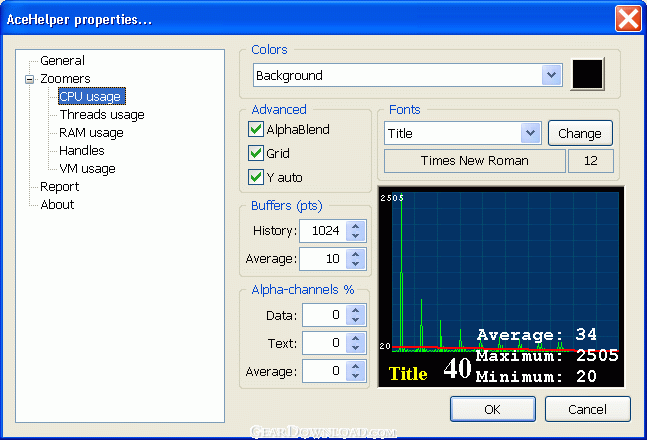 Click to enlarge screenshot
Software Description:
AceHelper :: Total Commander Plugin - Display of almost full information on working process
* Synchronous and asynchronous dialog modes.
* Dynamic tracking of use by a plugin of processor time, and tuning under the set critical limit.
(Can lead to change of set time of updating of the information on process)
* Interactive management of adjustments of a plugin
* On F5 - record of report on process ( F3 for viewing the report)
* Tab 'General'
- Display of almost full information on working process.
- An opportunity change of process priority.
- An opportunity removal from performance of the chosen process (down to compulsory system removal).
* Tab 'Modules'
- Display of information on loaded modules (used) by these process.
- An opportunity injecting modules to the chosen process.
- In the list on the right pressing works as the menu with an opportunity of a redirect on one of panels
TotalCommander, or opening of standard windows-dialogue of properties of a file. (the redirect works
only in asynchronous mode of dialogs)
* Tab 'Threads'
- Display of information on threads started by these process.
- An opportunity of suspend/resume/terminate of threads
* Tab 'Handles'
- Display of information about opened by this process of events/files/registry keys/drivers/etc.
- An opportunity of sorting and display on the chosen filter.
* Tab 'Memory'
- Display of information on memory used by this process.
- In the list on the right pressing works as the menu with an opportunity to open the given region in separate
bookmark for viewing dump of memory. The bookmark with dumps can be closed by choice command 'Close', in the
drop-menu at a clique on active bookmark.
* Tab 'Windows'
- Display of information on windows created by these process and their properties.
- Possibility of the change the styles.
* Tab 'Graph'
- Graphic displays of statistics of runned process (both real-time, and history modes).
- Double click of mouse left button inwardly zoomer-control allows to change a view-mode (cycle).
* Tab 'Logging'
- Run-time logging.
* Since XP there is Tab 'TCP
* Synchronous and asynchronous dialog modes.
* Dynamic tracking of use by a plugin of processor time, and tuning under the set critical limit.
(Can lead to change of set time of updating of the information on process)
* Interactive management of adjustments of a plugin
* On F5 - record of report on process ( F3 for viewing the report)
* Tab 'General'
- Display of almost full information on working process.
- An opportunity change of process priority.
- An opportunity removal from performance of the chosen process (down to compulsory system removal).
* Tab 'Modules'
- Display of information on loaded modules (used) by these process.
- An opportunity injecting modules to the chosen process.
- In the list on the right pressing works as the menu with an opportunity of a redirect on one of panels
TotalCommander, or opening of standard windows-dialogue of properties of a file. (the redirect works
only in asynchronous mode of dialogs)
* Tab 'Threads'
- Display of information on threads started by these process.
- An opportunity of suspend/resume/terminate of threads
* Tab 'Handles'
- Display of information about opened by this process of events/files/registry keys/drivers/etc.
- An opportunity of sorting and display on the chosen filter.
* Tab 'Memory'
- Display of information on memory used by this process.
- In the list on the right pressing works as the menu with an opportunity to open the given region in separate
bookmark for viewing dump of memory. The bookmark with dumps can be closed by choice command 'Close', in the
drop-menu at a clique on active bookmark.
* Tab 'Windows'
- Display of information on windows created by these process and their properties.
- Possibility of the change the styles.
* Tab 'Graph'
- Graphic displays of statistics of runned process (both real-time, and history modes).
- Double click of mouse left button inwardly zoomer-control allows to change a view-mode (cycle).
* Tab 'Logging'
- Run-time logging.
* Since XP there is Tab 'TCP
100% Clean:
 AceHelper :: Total Commander Plugin 3.6 is 100% clean
This download (taskman.exe) was tested thoroughly and was found 100% clean. Click "Report Spyware" link on the top if you found this software contains any form of malware, including but not limited to: spyware, viruses, trojans and backdoors.
Related Software:
- Astatix Launcher 1.63 - Quick start any application in a single click and control Winamp with hotkeys.
- ActiveActions 1.25 - ActiveActions is an launch tool that also acts like hotkey manager.
- eXtended Task Manager 2.15 - Extended windows task manager and performance monitoring tool
- Window Magician 1.1.3 - Small utility that can hide windows, system tray icons or run screensaver
- Program Sleuth 2.0.6 - Find out what is really running on your computer.
- RLauncher 2.3 - RLauncher is an easy to use application launcher.
- Pokki Start Menu 260.11.291 - Pokki Windows 8 Start menu lets you access & search all the stuff on your PC.
- FireDaemon Pro 3.14.2755 - A utility to install and run any application or script as a Windows service
- JetStart Free 4.4 - Launch Start Menu shortcuts faster and easier than ever
- DE Launcher 2.2 - Desktop utility that provides an alternative method of launching applications
top 10 most downloaded


recommended software
-
- AppleXsoft Photo Recovery for Mac
- AppleXsoft Photo Recovery is the comprehensive digital media data rescue software designed for Mac users, it featuring innovative photo recovery algor...

-
- Cacheman
- Memory is one of the most important pieces of computer hardware as it is in constant use no matter what a PC is used for. There is a tremendous number...
