Index >> System Utilities >> File & Disk Management >> Advanced SmartCheck
Report SpywareAdvanced SmartCheck 4.2

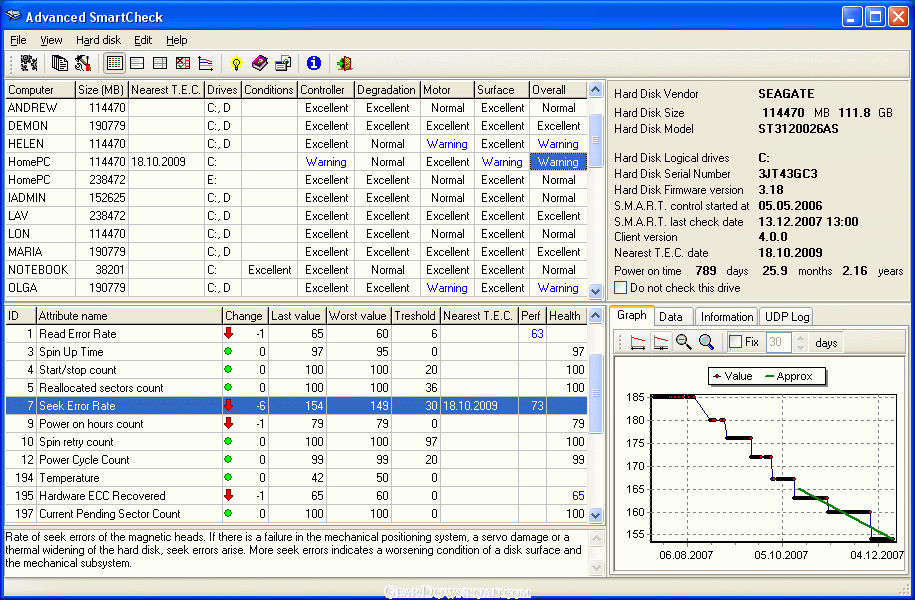 Click to enlarge screenshot
Software Description:
Advanced SmartCheck - Monitors S.M.A.R.T. attributes of all LAN computers and predicts failure dates
Advanced SmartCheck 4.2 uses S.M.A.R.T. technology to monitor all networked PC's hard drives internal S.M.A.R.T. attributes, predict possible drive failure and prevent data loss. Using predictions settings, Advanced SmartCheck lets you know about a potential disk health problem before you lose valuable data.
With Advanced SmartCheck, the Network Administrator will have the most recent information about the health of all hard drives on all of the computers installed across the network. Prediction of the nearest T.E.C. of any hard drive can prevent valuable data loss by replacing dangerous drives and backing up all data.
For example, motor and/or bearing failure can be predicted by an increase in the drive spin-up time and the number of retries it takes to succeed in spinning up the drive. Or, if the drive notes that the error correction is being used excessively, it can attribute this to a broken drive head or contamination, and alert you before the problem gets worse. Armed with a failure prediction, the user or system manager can back up key data, replace a suspect device prior to data loss, or avoid undesired downtime.
S.M.A.R.T. monitors the disks performance, bad sectors, calibration, CRC errors, disk spin up time, distance between the head and the disk, temperature, features of medium, heads, motor or servo-mechanism. In all, over 30 attributes are covered by S.M.A.R.T. The errors that the system can detect can be predicted by a number of methods. Currently the SMART system can detect around 70% of all hard drive errors.
Advanced SmartCheck Tray client shows the icon with the temperature value of the most hot hard drive in the system tray. You can point this icon by the mouse and ASC Tray client will show a hint with temperatures of all hard drives.
Advanced SmartCheck Tray client notifies you when the temperature of the hard drive exceeds the threshold by the balloon hint Event Log or WinPopup. Tray client settings can be changed by Administrator.
What's New: S.M.A.R.T. Data consolidation from another subnet computers
Limitations: 30 Days Trial
Advanced SmartCheck 4.2 uses S.M.A.R.T. technology to monitor all networked PC's hard drives internal S.M.A.R.T. attributes, predict possible drive failure and prevent data loss. Using predictions settings, Advanced SmartCheck lets you know about a potential disk health problem before you lose valuable data.
With Advanced SmartCheck, the Network Administrator will have the most recent information about the health of all hard drives on all of the computers installed across the network. Prediction of the nearest T.E.C. of any hard drive can prevent valuable data loss by replacing dangerous drives and backing up all data.
For example, motor and/or bearing failure can be predicted by an increase in the drive spin-up time and the number of retries it takes to succeed in spinning up the drive. Or, if the drive notes that the error correction is being used excessively, it can attribute this to a broken drive head or contamination, and alert you before the problem gets worse. Armed with a failure prediction, the user or system manager can back up key data, replace a suspect device prior to data loss, or avoid undesired downtime.
S.M.A.R.T. monitors the disks performance, bad sectors, calibration, CRC errors, disk spin up time, distance between the head and the disk, temperature, features of medium, heads, motor or servo-mechanism. In all, over 30 attributes are covered by S.M.A.R.T. The errors that the system can detect can be predicted by a number of methods. Currently the SMART system can detect around 70% of all hard drive errors.
Advanced SmartCheck Tray client shows the icon with the temperature value of the most hot hard drive in the system tray. You can point this icon by the mouse and ASC Tray client will show a hint with temperatures of all hard drives.
Advanced SmartCheck Tray client notifies you when the temperature of the hard drive exceeds the threshold by the balloon hint Event Log or WinPopup. Tray client settings can be changed by Administrator.
What's New: S.M.A.R.T. Data consolidation from another subnet computers
Limitations: 30 Days Trial
100% Clean:
 Advanced SmartCheck 4.2 is 100% clean
This download (asc.exe) was tested thoroughly and was found 100% clean. Click "Report Spyware" link on the top if you found this software contains any form of malware, including but not limited to: spyware, viruses, trojans and backdoors.
Related Software:
- Folder Cache 2.6 - Access to the recently used & favorite folders from the Save and Open dialogs.
- O&O Defrag Professional Edition 16.0 - Faster system starts, accelerated programs, and professional settings
- Visual Comparer 1.40 - Visual file compare and merge of the text files with syntax hightlight
- Advanced CATaloguer Pro 2.6 - Professional software for cataloguing on all kinds of media
- EF Duplicate Files Manager 7.10 - Find out duplicate files with same name, same size, same content
- EF Find 8.00 - EF Find is a powerful search program also inside archive files.
- Visual Multitool 4.4 - It is a file viewer, finder and editor with text tools.
- Advanced File Organizer 3.01 - Powerful cataloguer for all kinds of removable media, network drives, hard disk.
- Owl Commander 4.0 - Owl Commander is a complete solution for managing files for Windows Computer.
- MyBFL:The Body for LIFE Companion 6.4c - Complete body for life S/W for palm includes Meal Planner,Graphs,Photo Album.
top 10 most downloaded


recommended software
-
- AppleXsoft Photo Recovery for Mac
- AppleXsoft Photo Recovery is the comprehensive digital media data rescue software designed for Mac users, it featuring innovative photo recovery algor...

-
- Cacheman
- Memory is one of the most important pieces of computer hardware as it is in constant use no matter what a PC is used for. There is a tremendous number...
