Index >> System Utilities >> Shell Tools >> Acritum Total Power Control
Report SpywareAcritum Total Power Control 1.028

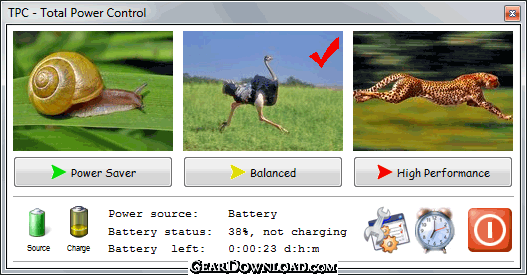 Click to enlarge screenshot
Software Description:
Acritum Total Power Control - Control all notebook and desktop PC power settings from tray plus other features
TPC - Total Power Control - puts at your mouse and fingertips a well-designed tool to help you get your work done quickly and easily. TPC provides everything you need to fully control the power functions of your computer. No more crawling around and clicking through layered menus!
With only two clicks you can: Change to any power plan (including custom user plans), shutdown, restart, sleep, hibernate, turn your screen off, lock your workstation, switch users or log off, run screen saver and more. With the Timer Manager you can execute any power-related function or start any user application at specified time. With the CPU Load Manager you can execute a specified action when CPU load reaches a specified low (idle) level of activity. With the Hot Key Manager you can execute power actions or any applications from the keyboard instantly using customizable hot keys (keyboard shortcuts).
TPC's bonus features include: Indication of your laptop battery charge state. Real-time CPU load information right on your desktop. Customizable visual clues (images) for each power plan. A Screenshot Manager to save screenshots as JPG/BMP, one or in a series, using a timer or by hot key. A built-in HTTP Server to shut down or restart your system from a remote workstation via Internet or LAN. Full command line support for all power actions.
How can you use TPC? Here are some examples: Change from power saver to high performance power plan (or any other power plan) instantly. Shutdown your computer automatically at midnight. Hibernate your computer after your defragmenter or backup utility has completed. Run your web-browser with Ctrl-Shift-W or turn off the screen instantly with Win-S.
TPC runs on Windows 7 (32 or 64bit), Vista and XP (limited functionality). TPC installs as an icon in the Windows notification area and provides functions Microsoft left out. TPC is powerful, simple and the easy way to control all aspects of your system's power.
What's New: Completely new solution for power management!
TPC - Total Power Control - puts at your mouse and fingertips a well-designed tool to help you get your work done quickly and easily. TPC provides everything you need to fully control the power functions of your computer. No more crawling around and clicking through layered menus!
With only two clicks you can: Change to any power plan (including custom user plans), shutdown, restart, sleep, hibernate, turn your screen off, lock your workstation, switch users or log off, run screen saver and more. With the Timer Manager you can execute any power-related function or start any user application at specified time. With the CPU Load Manager you can execute a specified action when CPU load reaches a specified low (idle) level of activity. With the Hot Key Manager you can execute power actions or any applications from the keyboard instantly using customizable hot keys (keyboard shortcuts).
TPC's bonus features include: Indication of your laptop battery charge state. Real-time CPU load information right on your desktop. Customizable visual clues (images) for each power plan. A Screenshot Manager to save screenshots as JPG/BMP, one or in a series, using a timer or by hot key. A built-in HTTP Server to shut down or restart your system from a remote workstation via Internet or LAN. Full command line support for all power actions.
How can you use TPC? Here are some examples: Change from power saver to high performance power plan (or any other power plan) instantly. Shutdown your computer automatically at midnight. Hibernate your computer after your defragmenter or backup utility has completed. Run your web-browser with Ctrl-Shift-W or turn off the screen instantly with Win-S.
TPC runs on Windows 7 (32 or 64bit), Vista and XP (limited functionality). TPC installs as an icon in the Windows notification area and provides functions Microsoft left out. TPC is powerful, simple and the easy way to control all aspects of your system's power.
What's New: Completely new solution for power management!
100% Clean:
 Acritum Total Power Control 1.028 is 100% clean
This download (tpc-dist.exe) was tested thoroughly and was found 100% clean. Click "Report Spyware" link on the top if you found this software contains any form of malware, including but not limited to: spyware, viruses, trojans and backdoors.
Related Software:
- MouseStar 3.57 - Powerful application to transform your mouse into a highly functional tool.
- MaxMonkey 2.40 - Maximize, minimize, close and restore windows
- Shutdown Lock 1.5 - Create hibernate shortcut to hibernate computer automatically.
- Talisman Desktop 3.4 - Desktop Manager and Shell Replacement for Windows
- KO Approach 0.5.2 - Click on a folder icon in Explorer and navigate a menu to locate files quicker
- PromptPal 2.1 - Eliminate the frustrations of the Command Prompt with a modern command line tool
- Captain Tray Pro 6.4 - Captain Tray Pro is a simple tool for system tray management.
- Jitbit Virtual Keyboard 2.22 - Multilingual on-screen virtual keyboard. Type text with your mouse.
- DirDate 6.5 - Modify file and folder dates from command line, exif support
- IPod Audio Studio 6.4.2 - record, convert and transit audio to your iPod.
top 10 most downloaded


recommended software
-
- AppleXsoft Photo Recovery for Mac
- AppleXsoft Photo Recovery is the comprehensive digital media data rescue software designed for Mac users, it featuring innovative photo recovery algor...

-
- Cacheman
- Memory is one of the most important pieces of computer hardware as it is in constant use no matter what a PC is used for. There is a tremendous number...
