Index >> System Utilities >> File & Disk Management >> A Better Finder Rename
Report SpywareA Better Finder Rename 9.25

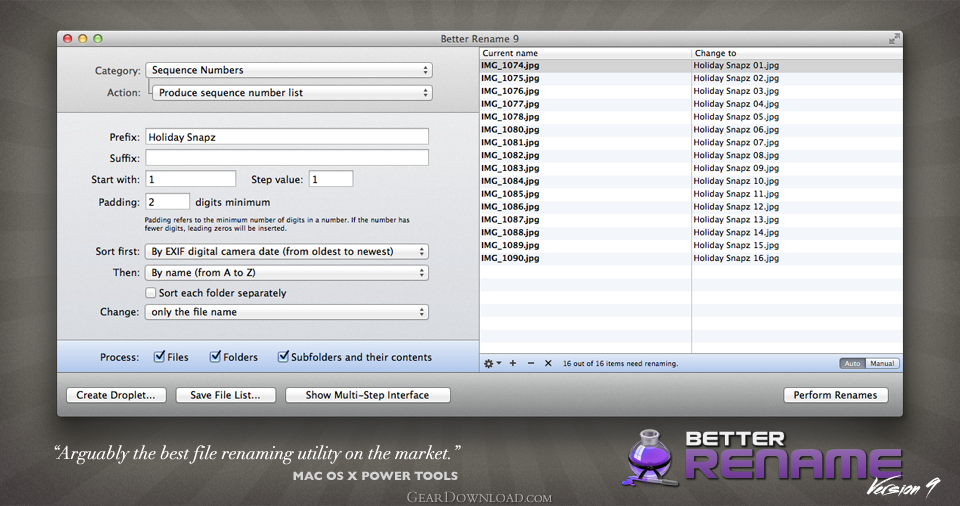 Click to enlarge screenshot
Software Description:
A Better Finder Rename - Powerful file, photo, and MP3 batch renamer with advanced features.
A Better Finder Rename is the most complete renaming solution available on the market today. That is why, since 1996, tens of thousands of hobbyists, professionals and businesses depend on A Better Finder Rename to organize and maintain files. A Better Finder Rename's user interface supports complex renaming tasks without sacrificing ease and speed of use. Simply drag the files you want to rename straight from the Finder into the large preview table or the application icon.. or use our Finder context menu and hot key. The Instant Preview feature eliminates guesswork and costly errors and helps you find the right settings quickly and accurately by providing as-you-type feedback. A Better Finder Rename offers a complete set of renaming options that are organized into 15 categories covering all the text, character, position, conversion and truncation features that you would expect from a file renamer, but it does not stop there. Photographers use the advanced sequence number and date and time features to clean up their portfolios or prepare photos for delivery to their client. A Better Finder Rename knows how to extract EXIF shooting date and time information from digital camera images and exploit them in creating sequence numbers or adding time and date information to the file name. Support for all major RAW formats extends this to professional photographers. A Better Finder Rename also deals gracefully with multiple shots captured in the same second. Version 9 adds access to over 100 photo, image, color, camera, lens and date meta-data tags and allows for manual re-ordering of sequence numbers. System administrators, web masters and other power users will appreciate the presence of advanced features, such as regular expression support, conversion to Windows NTFS/SMB compatible names, the ability to import file names from a database, a spreadsheet or any other source that can produce plain or tab-delimited text files.
What's New: The new version fixes a minor bug.
A Better Finder Rename is the most complete renaming solution available on the market today. That is why, since 1996, tens of thousands of hobbyists, professionals and businesses depend on A Better Finder Rename to organize and maintain files. A Better Finder Rename's user interface supports complex renaming tasks without sacrificing ease and speed of use. Simply drag the files you want to rename straight from the Finder into the large preview table or the application icon.. or use our Finder context menu and hot key. The Instant Preview feature eliminates guesswork and costly errors and helps you find the right settings quickly and accurately by providing as-you-type feedback. A Better Finder Rename offers a complete set of renaming options that are organized into 15 categories covering all the text, character, position, conversion and truncation features that you would expect from a file renamer, but it does not stop there. Photographers use the advanced sequence number and date and time features to clean up their portfolios or prepare photos for delivery to their client. A Better Finder Rename knows how to extract EXIF shooting date and time information from digital camera images and exploit them in creating sequence numbers or adding time and date information to the file name. Support for all major RAW formats extends this to professional photographers. A Better Finder Rename also deals gracefully with multiple shots captured in the same second. Version 9 adds access to over 100 photo, image, color, camera, lens and date meta-data tags and allows for manual re-ordering of sequence numbers. System administrators, web masters and other power users will appreciate the presence of advanced features, such as regular expression support, conversion to Windows NTFS/SMB compatible names, the ability to import file names from a database, a spreadsheet or any other source that can produce plain or tab-delimited text files.
What's New: The new version fixes a minor bug.
100% Clean:
 A Better Finder Rename 9.25 is 100% clean
This download (ABFRX.dmg) was tested thoroughly and was found 100% clean. Click "Report Spyware" link on the top if you found this software contains any form of malware, including but not limited to: spyware, viruses, trojans and backdoors.
Related Software:
- A Better Finder Attributes 5.17 - Change EXIF timestamp, file dates and other attributes.
- Better File Rename 5.44 - Powerful Bulk File Renamer with Windows Explorer Integration.
- Big Mean Folder Machine 2.28 - Splits files into folder hierarchies, or merges them into a single folder.
- Folder Cache 2.6 - Access to the recently used & favorite folders from the Save and Open dialogs.
- O&O Defrag Professional Edition 16.0 - Faster system starts, accelerated programs, and professional settings
- Visual Comparer 1.40 - Visual file compare and merge of the text files with syntax hightlight
- Advanced CATaloguer Pro 2.6 - Professional software for cataloguing on all kinds of media
- EF Duplicate Files Manager 7.10 - Find out duplicate files with same name, same size, same content
- EF Find 8.00 - EF Find is a powerful search program also inside archive files.
- Visual Multitool 4.4 - It is a file viewer, finder and editor with text tools.
top 10 most downloaded


recommended software
-
- AppleXsoft Photo Recovery for Mac
- AppleXsoft Photo Recovery is the comprehensive digital media data rescue software designed for Mac users, it featuring innovative photo recovery algor...

-
- Cacheman
- Memory is one of the most important pieces of computer hardware as it is in constant use no matter what a PC is used for. There is a tremendous number...
