Index >> Audio & Multimedia >> DVD Tools >> Wondershare PPT2DVD Pro
Report SpywareWondershare PPT2DVD Pro 6.1.6

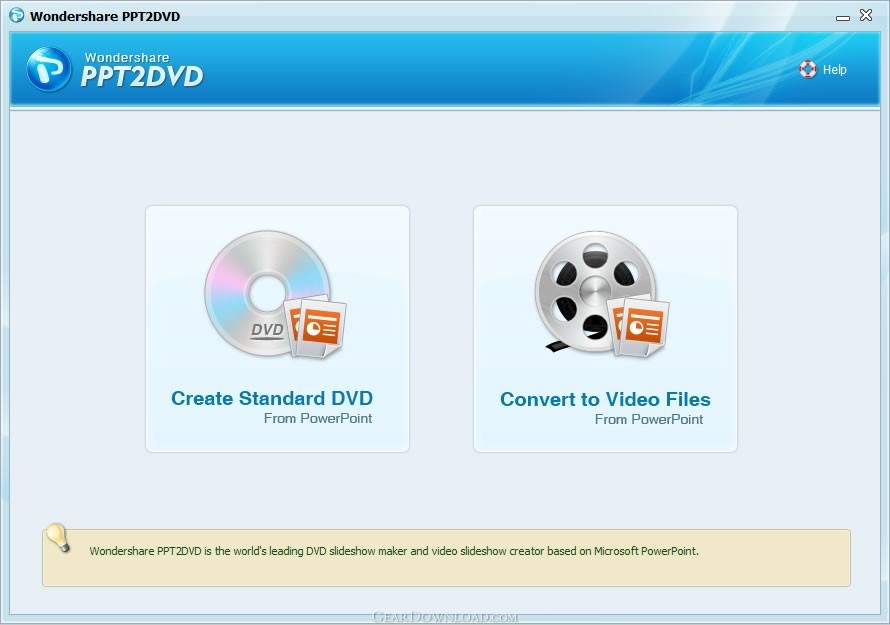 Click to enlarge screenshot
Software Description:
Wondershare PPT2DVD Pro - Convert PowerPoint to DVD or Video and play PowerPoint on TV with DVD Player.
Wondershare PPT2DVD Pro is the first program that enables users to convert PowerPoint presentations to DVD movies or popular video formats and even HD videos. The final output will retain all features from the original PowerPoint presentations, such as animations, transitions, sounds, and video clips between slides.
After burning PowerPoint presentations to DVD, you can view the presentation on TV through DVD player with ease.
Why do you ever want to convert PowerPoint to DVD?
1.Easy sharing
PowerPoint is powerful for creating engaging presentations but not easy for wide sharing, DVD is a ubiquitous medium, which is supported by most computers and players.
2.High security
After converting PowerPoint to DVD, you can give your presentations to your audience without worrying about it being modified by others.
3.Long time preservation
By burning PowerPoint to DVD your presentations will live for more than 50 years! DVD disc is an ideal medium for storing important content, while a hard dick will die in 10 years.
4.Effective cost
After converting PowerPoint to DVD, a MS Office installed computer is not necessary for playback any more, only a $40 DVD player will make it.
What's New: 1. Fixed the problems about the virtual sound card in Windows 64 bits system.2. Reorganized and updated the video format list.3. Replaced the help document with online help.
Limitations: 30 Days Trial; Watermark on output
Wondershare PPT2DVD Pro is the first program that enables users to convert PowerPoint presentations to DVD movies or popular video formats and even HD videos. The final output will retain all features from the original PowerPoint presentations, such as animations, transitions, sounds, and video clips between slides.
After burning PowerPoint presentations to DVD, you can view the presentation on TV through DVD player with ease.
Why do you ever want to convert PowerPoint to DVD?
1.Easy sharing
PowerPoint is powerful for creating engaging presentations but not easy for wide sharing, DVD is a ubiquitous medium, which is supported by most computers and players.
2.High security
After converting PowerPoint to DVD, you can give your presentations to your audience without worrying about it being modified by others.
3.Long time preservation
By burning PowerPoint to DVD your presentations will live for more than 50 years! DVD disc is an ideal medium for storing important content, while a hard dick will die in 10 years.
4.Effective cost
After converting PowerPoint to DVD, a MS Office installed computer is not necessary for playback any more, only a $40 DVD player will make it.
What's New: 1. Fixed the problems about the virtual sound card in Windows 64 bits system.2. Reorganized and updated the video format list.3. Replaced the help document with online help.
Limitations: 30 Days Trial; Watermark on output
Feature List:
- All the originals can be properly converted and kept intact
- At most 8 PowerPoint files supported and can be configured separately
- Record your narrations attached to the PowerPoint slide show in auto or manual modes
- Add option to directy output PowerPoint files as MPEG format
- The video transition effect is optimized to be more smooth than before, and can be supported by all types of Video Card
- Convert PowerPoint file of any size
- Use regular burner and regular disc to create miniDVD
- Choose to manually or automatically play your PowerPoint slideshows
- Launch PowerPoint2DVD from either the PowerPoint program or the Windows Add music or video files to your slides and your DVD menu
- Multiple burning options available for you to choose from
- Now, wma format of audio file and wmv, asf format of video file can be also supported
- Very intuitive interface and powerful but easy-to-use functions
Editor's Review:
Wondershare PPT2DVD is a dedicated conversion tool to create DVD or videos from PowerPoint slide shows retaining animations, transitions, video and sounds. With Wondershare PPT2DVD' wizard interface, you can easily convert your PowerPoint slide show step-by-step. Just add PowerPoint files, then set video settings such as video quality and aspect ration, create professional look DVD menus from theme-based templates, and start the burning process. The output DVD or movie can play on computer without Microsoft Office PowerPoint installed or on TV. In our test, we make an AVI video from a PPT file which has 30 slides. The conversion takes about 5 minutes to finish. The output AVI file is only about 2M and plays exactly like the PPT file shows in PowerPoint.
The trial version adds a "Evaluation Copy" watermark on the output videos. You need to register Wondershare PPT2DVD to remove the watermark.
Read reviews...
The trial version adds a "Evaluation Copy" watermark on the output videos. You need to register Wondershare PPT2DVD to remove the watermark.
Read reviews...
100% Clean:
 Wondershare PPT2DVD Pro 6.1.6 is 100% clean
This download (ppt2dvd_trial6_sm163704.exe) was tested thoroughly and was found 100% clean. Click "Report Spyware" link on the top if you found this software contains any form of malware, including but not limited to: spyware, viruses, trojans and backdoors.
Related Software:
- Wondershare Video to DVD Burner 2.5.8 - Powerful video to DVD burner software to convert and burn videos to DVD
- Wondershare WMV to DVD Burner 2.5.0.8 - A professional WMV video to DVD converter for WMV backup and enhancement.
- Wondershare DVD Creator Std for Mac 1.5.2.6 - Burn ISO,VIDEO_TS,dvdmedia and burn avi,wmv,mkv,mov,ts,etc. videos on Mac.
- BlindWrite - CD and DVD copy 7.0.0.0 - copying DVD and CD to create a backup for a private copy
- ConvertXtoDVD 5.0.0.45 - Convert and burn your avi, divx, and other such files to DVD in 1 click.
- CD/DVD Data Recovery 1.1.9.1 - CD/DVD Data Recovery can recover corrupted file from CD and DVD.
- DiskInternals CD and DVD Recovery 3.5 - Recover files lost during CD/DVD recording session. Simple, one-button solution.
- DVD PixPlay 6.20 - DVD/VCD/Image Slideshow Disk Creation Software
- Movie DVD Creator 2.00 - Movie DVD Creator helps you create movies to DVD
- DVD X Copy Professional 2.0 - DVD X Copy Professional allows you to make the backup copies of dvd movie
top 10 most downloaded


recommended software
-
- Moyea PPT to DVD Burner Pro
- With Moyea PPT to DVD Burner Pro, you can easily convert your any PowerPoint presentations to Blu-ray/DVD movies and save them on recordable Blu-ray/D...

-
- Moyea PPT to DVD Burner Lite
- Moyea PPT to DVD Burner Lite is an easy-to-use tool in converting PowerPoint to Blu-ray/DVD and PowerPoint to Video. In converting PowerPoint to Blu-r...