Index >> Audio & Multimedia >> Video Tools >> WM Capture
Report SpywareWM Capture 7.4

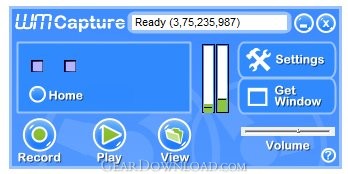 Click to enlarge screenshot
Software Description:
WM Capture - Create super-high quality videos from ANYTHING playing on your PC including DVDs
Make professional quality videos from ANY online source with WM Capture. WM Capture uses a unique high speed capture technology to create a near perfect reproduction of what you see on screen. WM Capture records video from ANY Web site, regardless of format. It even records DVD's playing on your PC. If you can watch it you can save it. WM Capture does not circumvent DRM (Digital Rights Management) or any copy protection technology so it's 100% legal world-wide.
WM Capture offers a revolutionary feature - "background mode". Unlike other screen capture programs, WM Capture can screen capture from hidden or minimized windows. Additionally, because it is capturing from hidden windows, the program uses less processing power than other screen capture programs, so you can use WM Capture on an older PC using "background mode" and still get incredible results. "Background mode" also allows WM Capture to capture in HD.
WM Capture also offers "invisible mode" - you can load the program onto a thumb drive and use it on other PCs without leaving a trace. All recordings are saved onto the thumb drive. It's a great feature for people who are traveling and want to capture live streams like webinars or training sessions.
While WM Capture offers a lot of wonderful advanced features, it is very easy to use. The program offers "recommended settings" making it a snap set up the program optimally for your particular PC and for the type of recording you would like to do. Save to MPEG, WMV, AVI, DVD-ISO and more.
WM Capture is truly revolutionary. There is no screen-capture program that can do what it can do. Try it today!
What's New: Added Virtual-Audio driver as a supplement to the Sound-Capture. Added WM Browser for Background Mode. Added a warning message for BCK mode. Now it runs without elevation on regular user accounts - no longer requires admin password. Removed the Universal Driver. Misc. bug fixes.
Limitations: Allows for two minutes of recording time per session in demo mode.
Make professional quality videos from ANY online source with WM Capture. WM Capture uses a unique high speed capture technology to create a near perfect reproduction of what you see on screen. WM Capture records video from ANY Web site, regardless of format. It even records DVD's playing on your PC. If you can watch it you can save it. WM Capture does not circumvent DRM (Digital Rights Management) or any copy protection technology so it's 100% legal world-wide.
WM Capture offers a revolutionary feature - "background mode". Unlike other screen capture programs, WM Capture can screen capture from hidden or minimized windows. Additionally, because it is capturing from hidden windows, the program uses less processing power than other screen capture programs, so you can use WM Capture on an older PC using "background mode" and still get incredible results. "Background mode" also allows WM Capture to capture in HD.
WM Capture also offers "invisible mode" - you can load the program onto a thumb drive and use it on other PCs without leaving a trace. All recordings are saved onto the thumb drive. It's a great feature for people who are traveling and want to capture live streams like webinars or training sessions.
While WM Capture offers a lot of wonderful advanced features, it is very easy to use. The program offers "recommended settings" making it a snap set up the program optimally for your particular PC and for the type of recording you would like to do. Save to MPEG, WMV, AVI, DVD-ISO and more.
WM Capture is truly revolutionary. There is no screen-capture program that can do what it can do. Try it today!
What's New: Added Virtual-Audio driver as a supplement to the Sound-Capture. Added WM Browser for Background Mode. Added a warning message for BCK mode. Now it runs without elevation on regular user accounts - no longer requires admin password. Removed the Universal Driver. Misc. bug fixes.
Limitations: Allows for two minutes of recording time per session in demo mode.
100% Clean:
 WM Capture 7.4 is 100% clean
This download (install_wmcap.exe) was tested thoroughly and was found 100% clean. Click "Report Spyware" link on the top if you found this software contains any form of malware, including but not limited to: spyware, viruses, trojans and backdoors.
Related Software:
- Replay Media Splitter 2.2.1409 - Edit like a Pro with an Easy Audio/Video Editor. Simple Menus. Amazing Results.
- WM Recorder 15.2.0 - The Easy Way to Record Streaming Video and Audio. Works with YouTube.
- Replay Video Capture 7.4 - Record high quality video from web sites, DVDs or anything that plays on your PC
- WM Splitter 2.2.1409.56 - Edit like a Pro with an Easy Audio/Video Editor. Simple Menus. Amazing Results.
- VideoClone 1.0.5 - PIP (Picture-in-Picture) viewing & one-click, live-stream recording for your PC
- Fx Movie Joiner 6.2.11 - Join videos of various size, type and frame rate.
- Motion Hunter 1.01 - Motion Detection Software. Take the advantage of being informed! Be sure!
- Flash to Video Studio 1.0 - Tool to convert Macromedia Flash SWF files to AVI, VCD, SVCD, DVD video files
- H264 WebCam 3.99 - 4-ch H264 webcam surveillance software.Broadcast audio and video to internet.
- Hornsoft Online TV 3.8 - Watch 1,000+ Online TVs for Free! Listen to 2,000+ Online Radios for Free!
top 10 most downloaded


recommended software
-
- Moyea PPT to DVD Burner Pro
- With Moyea PPT to DVD Burner Pro, you can easily convert your any PowerPoint presentations to Blu-ray/DVD movies and save them on recordable Blu-ray/D...
-
- Moyea PPT to DVD Burner Lite
- Moyea PPT to DVD Burner Lite is an easy-to-use tool in converting PowerPoint to Blu-ray/DVD and PowerPoint to Video. In converting PowerPoint to Blu-r...