Index >> Audio & Multimedia >> Speech >> VoiceCom
Report SpywareVoiceCom 2.0

 Click to enlarge screenshot
Software Description:
VoiceCom - Software Intercom PC application for push to talk voice communication
VoiceCom is a voice communication application for PCs running Windows XP, Windows Vista or Windows 7.
VoiceCom is designed for voice communication between PC VoiceCom applications (terminals) on local LAN.
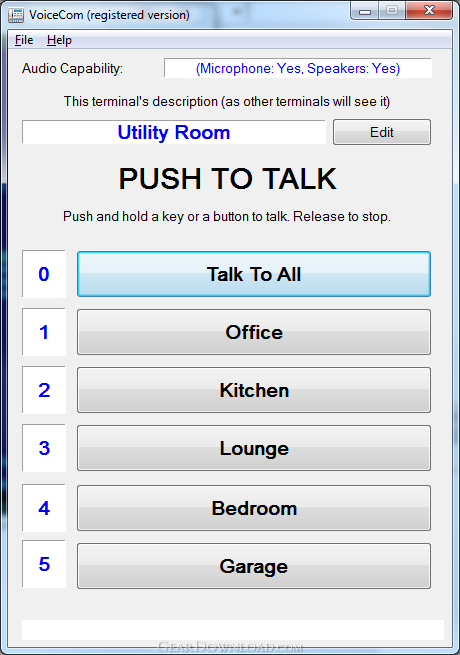
VoiceCom behaves like a "push to talk" intercom. Once several (at least 2) VoiceCom applications on local LAN become aware of each other, the user can push and hold a key or a button corresponding to the desired remote VoiceCom terminal and start talking.
The voice is reproduced on the addressed remote VoiceCom terminal. When finished talking the user releases the key or the button.
VoiceCom supports communication with up to 6 terminals on local LAN. Each VoiceCom terminal can talk to any of the other VoiceCom terminal (point to point) or to all VoiceCom terminals at once (point to multipoint, broadcast voice announcement).
VoiceCom terminals autodetect each others presence on local LAN and display the remote VoiceCom terminal's names to the user for communication. The only user configurable parameter at the start is the local VoiceCom terminal's name. This is entered by the user only once on each VoiceCom terminal.
Example of VoiceCom use scenario is a software house intercom system between different rooms or areas of the house (Each VoiceCom terminal could be named by the user as for example: "Bedroom", "Kitchen", "Office", "Lounge", "Garage".
Features:
* Push to talk voice communication between up to 6 PCs on the LAN
* Address and talk to an individual terminal or talk to all (broadcast)
* Auto detect VoiceCom terminals on the LAN
What's New: Fixed issue with VoiceCom running in the background not coming to the foreground on clicking the icon in the Windows system notification area
Limitations: 14 Days Trial
VoiceCom is a voice communication application for PCs running Windows XP, Windows Vista or Windows 7.
VoiceCom is designed for voice communication between PC VoiceCom applications (terminals) on local LAN.
VoiceCom behaves like a "push to talk" intercom. Once several (at least 2) VoiceCom applications on local LAN become aware of each other, the user can push and hold a key or a button corresponding to the desired remote VoiceCom terminal and start talking.
The voice is reproduced on the addressed remote VoiceCom terminal. When finished talking the user releases the key or the button.
VoiceCom supports communication with up to 6 terminals on local LAN. Each VoiceCom terminal can talk to any of the other VoiceCom terminal (point to point) or to all VoiceCom terminals at once (point to multipoint, broadcast voice announcement).
VoiceCom terminals autodetect each others presence on local LAN and display the remote VoiceCom terminal's names to the user for communication. The only user configurable parameter at the start is the local VoiceCom terminal's name. This is entered by the user only once on each VoiceCom terminal.
Example of VoiceCom use scenario is a software house intercom system between different rooms or areas of the house (Each VoiceCom terminal could be named by the user as for example: "Bedroom", "Kitchen", "Office", "Lounge", "Garage".
Features:
* Push to talk voice communication between up to 6 PCs on the LAN
* Address and talk to an individual terminal or talk to all (broadcast)
* Auto detect VoiceCom terminals on the LAN
What's New: Fixed issue with VoiceCom running in the background not coming to the foreground on clicking the icon in the Windows system notification area
Limitations: 14 Days Trial
100% Clean:
 VoiceCom 2.0 is 100% clean
This download (voicecom_setup.exe) was tested thoroughly and was found 100% clean. Click "Report Spyware" link on the top if you found this software contains any form of malware, including but not limited to: spyware, viruses, trojans and backdoors.
Related Software:
- SpeechToolsCenter 2.0 - Speech Tools specializes in developing applications that are innovative
- Easy Transcriber 1.0 - Easy Transcriber is a software tool for your transcription or dictation purposes
- Total Speech 1.01 - Total Speech reads txt, html, doc, rtf files and creates audio files from them.
- River Past Talkative 5.1 - Easy to use text-to-speech software, supports MP3, WMA, WAV, OGG or AVI output
- Stream TV 4.70 - Watch more than 1700 free streaming TV channels on your PC including porn
- Speaking Notepad 5.2 - I'll read your documents aloud with quality voices and record them into MP3
- 1st Read It Aloud! 1.4 - Select text from any program, press hotkey and enjoy clear natural voice!
- Acala Video mp3 Ripper 4.2.5 - Rip audio re-encode to mp3 ect pop music and make ringtone music
- 2nd Speech Center 4.15.10.1202 - Converts any text into spoken words or even MP3/WAV audio files.
- ScriptVOX Studio 1.8.2 - Bring your stories to life with ScriptVOX Studio
top 10 most downloaded


recommended software
-
- Moyea PPT to DVD Burner Pro
- With Moyea PPT to DVD Burner Pro, you can easily convert your any PowerPoint presentations to Blu-ray/DVD movies and save them on recordable Blu-ray/D...
-
- Moyea PPT to DVD Burner Lite
- Moyea PPT to DVD Burner Lite is an easy-to-use tool in converting PowerPoint to Blu-ray/DVD and PowerPoint to Video. In converting PowerPoint to Blu-r...