Index >> Audio & Multimedia >> Rippers & Converters >> VidCrop
Report SpywareVidCrop 2.2.44

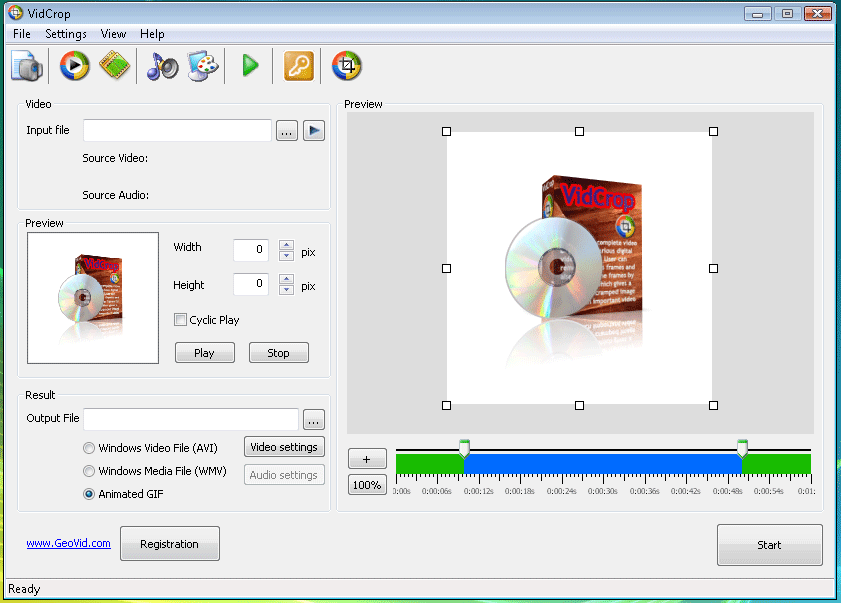 Click to enlarge screenshot
Software Description:
VidCrop - Crop Video movies, remove backgrounds and corners
VidCrop is a complete video cropper for various digital video formats. User can remove useless frames and also parts of the frames by cropping it, which gives a zoomed in, cramped image with much important video information. By using VidCrop you can simply edit your video files by zooming it as far as your resolution will let you and use edited and more informative video file for yourself on your website, blog or just play it on your computer. VidCrop is very handy because it has a video preview for rangebar and a frame preview for cropping. Rangebar will let you to choose the video from the first frame to the final. So you can cut off any frames you want from the begining and from the final part. So you will be sure how the video will look like after cutting. Also there is a preview for cropping. You will see Crop frame in preview box and you will see which parts from each side you want to crop. VidCrop supports all the video formats depending on video codecs installed, so VidCrop can easily work with avi, asf, mp4, mpg, mpeg, mov, wmv and others. Re encoded output video file would be avi or wmv and it will be controlled with width, height, frames per second and other codec properties. So you choose a video file, such as your favourite movie, music video, cartoon or any video you have, choose a part for cropping in the video preview and manage range bar for time limits and click Start. After converting you will got an avi or wmv video with pixelsize that is set. VidCrop has a very simple and friendly-using interface, thats why you will not have any difficulties managing it.
Limitations: Nag screen
VidCrop is a complete video cropper for various digital video formats. User can remove useless frames and also parts of the frames by cropping it, which gives a zoomed in, cramped image with much important video information. By using VidCrop you can simply edit your video files by zooming it as far as your resolution will let you and use edited and more informative video file for yourself on your website, blog or just play it on your computer. VidCrop is very handy because it has a video preview for rangebar and a frame preview for cropping. Rangebar will let you to choose the video from the first frame to the final. So you can cut off any frames you want from the begining and from the final part. So you will be sure how the video will look like after cutting. Also there is a preview for cropping. You will see Crop frame in preview box and you will see which parts from each side you want to crop. VidCrop supports all the video formats depending on video codecs installed, so VidCrop can easily work with avi, asf, mp4, mpg, mpeg, mov, wmv and others. Re encoded output video file would be avi or wmv and it will be controlled with width, height, frames per second and other codec properties. So you choose a video file, such as your favourite movie, music video, cartoon or any video you have, choose a part for cropping in the video preview and manage range bar for time limits and click Start. After converting you will got an avi or wmv video with pixelsize that is set. VidCrop has a very simple and friendly-using interface, thats why you will not have any difficulties managing it.
Limitations: Nag screen
Feature List:
- Complete video cropper
- Imports various video formats
- Width, height and fps settings for output
- Customizable dimensions for output
- Range bar with ZOOM feature
- Reencode to avi and wmv
- Easy to use interface
100% Clean:
 VidCrop 2.2.44 is 100% clean
This download (vidcrop.exe) was tested thoroughly and was found 100% clean. Click "Report Spyware" link on the top if you found this software contains any form of malware, including but not limited to: spyware, viruses, trojans and backdoors.
Related Software:
- Video to Flash Converter PRO 6.5.42 - Video to Flash Converter PRO is an advanced Video to SWF and FLV Converter
- AVI WMV MPEG Converter 1.16 - Convert from MPEG, AVI, WMV to MPEG, AVI, WMV, RM with good quality output
- GSA Radio Stream Recorder 1.36 - Software to record internet radio station streams to MP3 , ACC or OGG format.
- ContextConvert Pro 3.0 - Powerful conversion among nearly all multimedia formats from right-click menus.
- Easy Real Converter 1.66 - Great tool for converting media files into RealMedia(.rm) in batches.
- AimOne Video Converter 3.22 - a powerful video converter,convert to AVI,FLV,MPEG,DVD,etc. Support batch mode.
- bitRipper 1.20 - User friendly on-the-fly DVD to AVI and MPEG converter with CPPM Auth module
- 4Media DVD Creator for Mac 6.1.1.1022 - Mac DVD creator to burn video files to DVD movie disc, DVD folder or ISO file.
- Xilisoft AVI MPEG Converter 6.0.7.0707 - Convert between video formats including AVI, DIVX, MPEG1, MPEG2, MPEG4.
- Ultra Video Converter 5.4.0311 - Convert all popular videos to AVI MPEG DVD WMV MP4 3GP formats
top 10 most downloaded


recommended software
-
- Moyea PPT to DVD Burner Pro
- With Moyea PPT to DVD Burner Pro, you can easily convert your any PowerPoint presentations to Blu-ray/DVD movies and save them on recordable Blu-ray/D...

-
- Moyea PPT to DVD Burner Lite
- Moyea PPT to DVD Burner Lite is an easy-to-use tool in converting PowerPoint to Blu-ray/DVD and PowerPoint to Video. In converting PowerPoint to Blu-r...