Index >> Audio & Multimedia >> Video Tools >> TubeWiz
Report SpywareTubeWiz 1.6

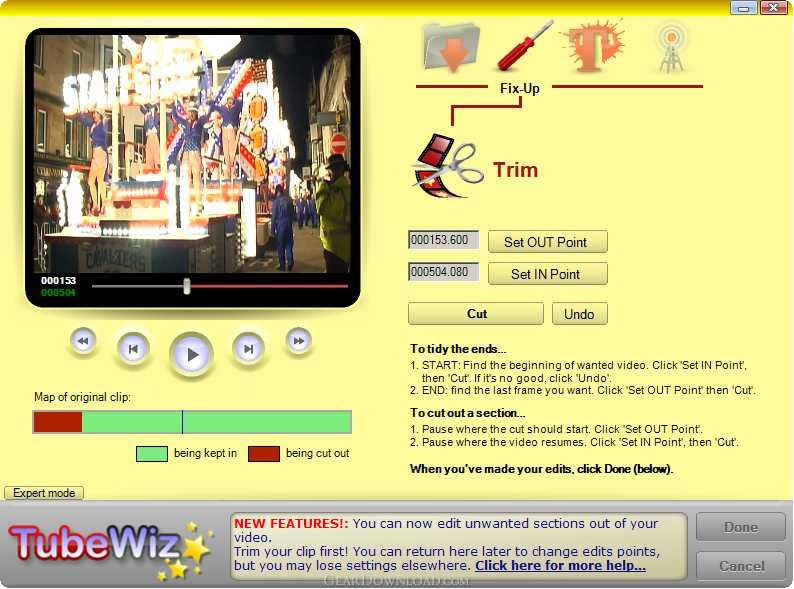 Click to enlarge screenshot
Software Description:
TubeWiz - Easy video finishing & uploading tool, with anti-shake, blurring, captions, etc.
If you want to make clips into tidy finished video, quickly, easily and without fuss, TubeWiz is for you! It uploads to YouTube, and it lets you trim, edit (NEW!) and fix-up your clip, and add captions, titles & credits in a range of fonts, styles and colours.
TubeWiz can correct the picture shape, rotate the picture if it was filmed upside-down or sideways by mistake (easily done with camera phones!), and reduce or remove camera shake for many types of shot.
Replace the soundtrack with a new one, and export sound to MP3s (for iPods, etc.) or WAV for audio editing. You can even strip the sound altogether, for smaller video files that run faster on the net.
TubeWiz also has Dface blurring built-in. DFace lets you can hide objects for privacy, such as faces, signs and licence plates, or you can even replace them with images. You can also use it to animate objects, add flying graphics and a lot of other stuff!
For video bloggers or commercial users, TubeWiz lets you add branding such as logos and URLs permanently on-screeen. It has special Subtitle capabilities, if you're translating between languages, or just captioning video with bad sound, You can also store favourite styles in you own Templates, for quick access, and to get a consistent look and feel across a number of videos.
TubeWiz's upload to YouTube uses YouTube's recently-released secure interface, and is as fast and reliable as your internet connection allows. The registered version also saves in AVI format, for full compatibility with other video applications, and (NEW!) Flash FLV format, for use elsewhere on the Web.
TubeWiz is small, fast, and really inexpensive. It only takes seconds to get started, but your videos look smart and professional, as if they were made on software costing hundreds of dollars more!
Help and support is available to registered users on the TubeWiz web site: there are forums and FAQ files covering common questions, and developers from TubeWiz take part.
What's New: 1) NEW! Export the soundtrack to MP3 and WAV 2) NEW! remove (mute) the sound altogether 3) NEW! Faster, more reliable uploads to YouTube 4) Full support for widescreen & HD fomats. 5) Export to Flash video format (also AVI & MKV)
Limitations: Trial version has AVI/Flash export disabled, Soundtrack import only (not export), DFace blurs can not be saved, URL added to output videos.
If you want to make clips into tidy finished video, quickly, easily and without fuss, TubeWiz is for you! It uploads to YouTube, and it lets you trim, edit (NEW!) and fix-up your clip, and add captions, titles & credits in a range of fonts, styles and colours.
TubeWiz can correct the picture shape, rotate the picture if it was filmed upside-down or sideways by mistake (easily done with camera phones!), and reduce or remove camera shake for many types of shot.
Replace the soundtrack with a new one, and export sound to MP3s (for iPods, etc.) or WAV for audio editing. You can even strip the sound altogether, for smaller video files that run faster on the net.
TubeWiz also has Dface blurring built-in. DFace lets you can hide objects for privacy, such as faces, signs and licence plates, or you can even replace them with images. You can also use it to animate objects, add flying graphics and a lot of other stuff!
For video bloggers or commercial users, TubeWiz lets you add branding such as logos and URLs permanently on-screeen. It has special Subtitle capabilities, if you're translating between languages, or just captioning video with bad sound, You can also store favourite styles in you own Templates, for quick access, and to get a consistent look and feel across a number of videos.
TubeWiz's upload to YouTube uses YouTube's recently-released secure interface, and is as fast and reliable as your internet connection allows. The registered version also saves in AVI format, for full compatibility with other video applications, and (NEW!) Flash FLV format, for use elsewhere on the Web.
TubeWiz is small, fast, and really inexpensive. It only takes seconds to get started, but your videos look smart and professional, as if they were made on software costing hundreds of dollars more!
Help and support is available to registered users on the TubeWiz web site: there are forums and FAQ files covering common questions, and developers from TubeWiz take part.
What's New: 1) NEW! Export the soundtrack to MP3 and WAV 2) NEW! remove (mute) the sound altogether 3) NEW! Faster, more reliable uploads to YouTube 4) Full support for widescreen & HD fomats. 5) Export to Flash video format (also AVI & MKV)
Limitations: Trial version has AVI/Flash export disabled, Soundtrack import only (not export), DFace blurs can not be saved, URL added to output videos.
Feature List:
- Brilliance, by TubeWiz
- Choose from our set of styles, in easy-to-use templates, or design your own! TubeWiz is all about getting good results easily and fast. You can make your video ready-to-upload in a few seconds with professional titles and credits. If you create a style you like, you can save it, to use any time with just one click
- Fix technical problems
- TubeWiz gets your video ready-to-go quickly and easily. You can trim off bits you don't want, fix bumpy camera work, turn the picture round (it's very easy to get camera phones the wrong way up!), and even change widescreen to normal for YouTube if you need to. TubeWiz' wizard approach makes it easy to fix-up videos, without having to learn lots of technical stuff – you can always see what you're going to get
- Do clever stuff
- If you've got something really cool down on video, you might need to hide the guilty party, or the innocent! Our Dface technology lets you blur faces (or whatever) on-screen, and follow the action around. You can even cover things up with pictures. Turn your favourite politician into a golfball, for example, or put a logo on-screen instead of a licence plate
- Save your soundtrack to MP3
- With TubeWix you can replace the sound, perhaps with music, or anything you like really! You could also mute the sound - removing it completely makes a smaller file and can be good for things like slideshows. Or even export your soundtrack, perhaps to make an MP3 from a video recording, or to work on it in a pro-audio package
- Make a slideshow
- We've made it very easy to turn a set of pictures into a slideshow video. It's great for YouTube, or video photo frames, selling stuff on eBay, or just emailing to the family. Or, if you're a professional, you can even use your video at tradeshows and events
- Upload direct to YouTube
- With TubeWiz, you can create and upload to Youtube easily, and as fast as your net connection will allow. TubeWiz links straight into YouTube's servers, so you never need to tie up your browser, and it can remember your account details and password too (if you want). There's lots of help available in TubeWiz as well
100% Clean:
 TubeWiz 1.6 is 100% clean
This download (latest_tubewiz.msi) was tested thoroughly and was found 100% clean. Click "Report Spyware" link on the top if you found this software contains any form of malware, including but not limited to: spyware, viruses, trojans and backdoors.
Related Software:
- Fx Movie Joiner 6.2.11 - Join videos of various size, type and frame rate.
- Motion Hunter 1.01 - Motion Detection Software. Take the advantage of being informed! Be sure!
- Flash to Video Studio 1.0 - Tool to convert Macromedia Flash SWF files to AVI, VCD, SVCD, DVD video files
- H264 WebCam 3.99 - 4-ch H264 webcam surveillance software.Broadcast audio and video to internet.
- Hornsoft Online TV 3.8 - Watch 1,000+ Online TVs for Free! Listen to 2,000+ Online Radios for Free!
- Allok Video Joiner 4.6.0529 - join AVI, Divx, XviD, MPEG, WMV, ASF, RM, MOV, 3GP, MP4 into one large file.
- Flash Player Pro 5.6 - Adobe flash player, manager and flash screensaver maker
- CDH Media Wizard 11.0 - All-in-one audio and video converter, editor, recorder, burner, and much more!
- Zuma Pro v4.0 - Real-Time 3d VJ Entertainment, Performance and Authoring Software
- VideoConstructor 1.5.0.19 - Convert, join and split your video files, rip DVDs, create DVD-ready slideshows.
top 10 most downloaded


recommended software
-
- Moyea PPT to DVD Burner Pro
- With Moyea PPT to DVD Burner Pro, you can easily convert your any PowerPoint presentations to Blu-ray/DVD movies and save them on recordable Blu-ray/D...

-
- Moyea PPT to DVD Burner Lite
- Moyea PPT to DVD Burner Lite is an easy-to-use tool in converting PowerPoint to Blu-ray/DVD and PowerPoint to Video. In converting PowerPoint to Blu-r...