Index >> Audio & Multimedia >> Rippers & Converters >> Smart PPT Converter Pro
Report SpywareSmart PPT Converter Pro 7.6

 Click to enlarge screenshot
Software Description:
Smart PPT Converter Pro - An effective application that converts PPT to AVI, DVD, WMV, MPEG and more.
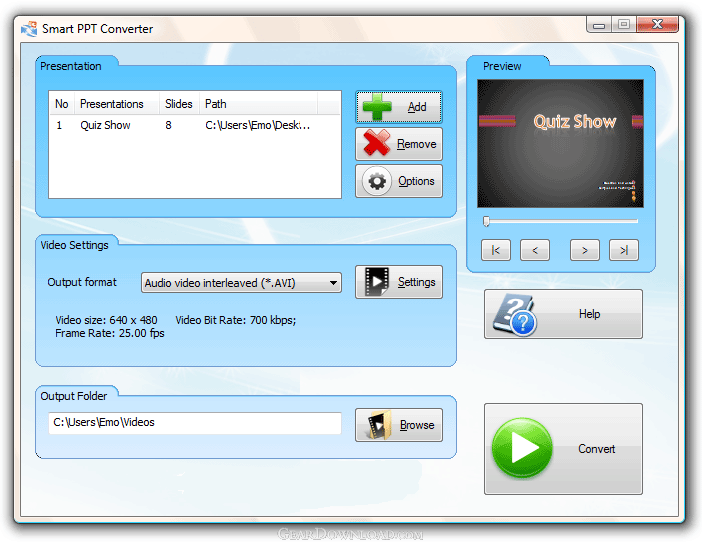
Smart PPT to Video Converter Pro is a very effective application when it comes to PPT conversions. With it you can burn your PPT to DVD or convert your PPT to AVI, MPEG, MP4, MOV, WMV, 3GP, iPod, iPhone and more. It will keep all original effects of your PPT presentation - animations, transition effects, embedded videos, music and sound effects. It is very easy to work with: just add your PPT presentation to the program, select the desired output format and click Convert. You can also add multiple files, the program will convert or burn them all automatically. Its additional options menu offers customization settings, such as: mute all sounds, add your own sounds, disable animations, change of aspect ratio, resolution, video codecs, bit rate, audio quality settings and more. This program would allow you to share PPT presentations with people who do not have Microsoft PowerPoint on their computer, just convert your PPT to AVI for example and this way you shall be able to play it on any modern computer. Or you can simply burn your PPT presentation to a DVD, this way you will not even need a computer to play the presentation. Those DVDs will play on all DVD players, no matter of the region (North America, Europe, Asia, etc). Comes with 60 days money back guarantee and 24/7 technical supports. Runs on all Windows releases.
Limitations: never expires
Smart PPT to Video Converter Pro is a very effective application when it comes to PPT conversions. With it you can burn your PPT to DVD or convert your PPT to AVI, MPEG, MP4, MOV, WMV, 3GP, iPod, iPhone and more. It will keep all original effects of your PPT presentation - animations, transition effects, embedded videos, music and sound effects. It is very easy to work with: just add your PPT presentation to the program, select the desired output format and click Convert. You can also add multiple files, the program will convert or burn them all automatically. Its additional options menu offers customization settings, such as: mute all sounds, add your own sounds, disable animations, change of aspect ratio, resolution, video codecs, bit rate, audio quality settings and more. This program would allow you to share PPT presentations with people who do not have Microsoft PowerPoint on their computer, just convert your PPT to AVI for example and this way you shall be able to play it on any modern computer. Or you can simply burn your PPT presentation to a DVD, this way you will not even need a computer to play the presentation. Those DVDs will play on all DVD players, no matter of the region (North America, Europe, Asia, etc). Comes with 60 days money back guarantee and 24/7 technical supports. Runs on all Windows releases.
Limitations: never expires
Feature List:
- You can email a PowerPoint presentation to people who don't have PowerPoint installed on their computer. Just convert PPT to video and attach the video to the e-mail
- You can upload your presentation to your blog or website. To do this you'll need to convert PowerPoint to video
- Upload your PowerPoint presentations to video sharing sites such as YouTube, Facebook, MySpace, Metacafe and others
- You can run your PowerPoint presentations on your mobile phone or on a device such as an iPod, iPhone or BlackBerry
- Smart PPT Converter can convert PPT to video files such as AVI, WMV, MPEG, MOV, MP4, SWF, FLV, ASF, VOB and 3GP. You can upload these files to video sharing web sites such as YouTube. Or you can burn them on a DVD or watch them on a computer without PowerPoint
- Every detail in the source PPT (animations, transition effects, embedded videos, music and sound effects) is preserved in the video file
- Advanced users can fine tune the parameters of the output files. You can choose among a variety of video codecs, set the size and the aspect ratio of the video as well as the frame rate and the bit rate. You can also select among various audio codecs and set the output bit rate, sample rate and the number of channels
- With just a few clicks you can convert your PowerPoint presentation to a video file. The software will seamlessly guide you through the process
- For those of you who want to tweak the result, Smart PPT Converter offers a whole bunch of features: You can set a default transition time between slides. You can also choose to ignore the background sound in the PowerPoint presentation. And you can add your own sound track to the video. The software gives you the opportunity to keep the aspect ratio of the original presentation in the output video. Or you can choose to ignore the animation effects
- Smart PPT Converter produces video files of excellent quality with perfectly synchronized sound effects
- Just add all the PPT files you need to convert and click Convert
100% Clean:
 Smart PPT Converter Pro 7.6 is 100% clean
This download (smart-ppt-converter-pro-setup.exe) was tested thoroughly and was found 100% clean. Click "Report Spyware" link on the top if you found this software contains any form of malware, including but not limited to: spyware, viruses, trojans and backdoors.
Related Software:
- AVI WMV MPEG Converter 1.16 - Convert from MPEG, AVI, WMV to MPEG, AVI, WMV, RM with good quality output
- GSA Radio Stream Recorder 1.36 - Software to record internet radio station streams to MP3 , ACC or OGG format.
- ContextConvert Pro 3.0 - Powerful conversion among nearly all multimedia formats from right-click menus.
- Easy Real Converter 1.66 - Great tool for converting media files into RealMedia(.rm) in batches.
- AimOne Video Converter 3.22 - a powerful video converter,convert to AVI,FLV,MPEG,DVD,etc. Support batch mode.
- bitRipper 1.20 - User friendly on-the-fly DVD to AVI and MPEG converter with CPPM Auth module
- 4Media DVD Creator for Mac 6.1.1.1022 - Mac DVD creator to burn video files to DVD movie disc, DVD folder or ISO file.
- Xilisoft AVI MPEG Converter 6.0.7.0707 - Convert between video formats including AVI, DIVX, MPEG1, MPEG2, MPEG4.
- Ultra Video Converter 5.4.0311 - Convert all popular videos to AVI MPEG DVD WMV MP4 3GP formats
- AMR Converter Pro 4.0 - Convert to and from AMR and many other formats through an easy-to-use interface.
top 10 most downloaded


recommended software
-
- Moyea PPT to DVD Burner Pro
- With Moyea PPT to DVD Burner Pro, you can easily convert your any PowerPoint presentations to Blu-ray/DVD movies and save them on recordable Blu-ray/D...
-
- Moyea PPT to DVD Burner Lite
- Moyea PPT to DVD Burner Lite is an easy-to-use tool in converting PowerPoint to Blu-ray/DVD and PowerPoint to Video. In converting PowerPoint to Blu-r...