Index >> Audio & Multimedia >> iPod/PSP/Zune Converters >> Pavtube Video to iPhone Converter
Report SpywarePavtube Video to iPhone Converter 3.7.3.1865

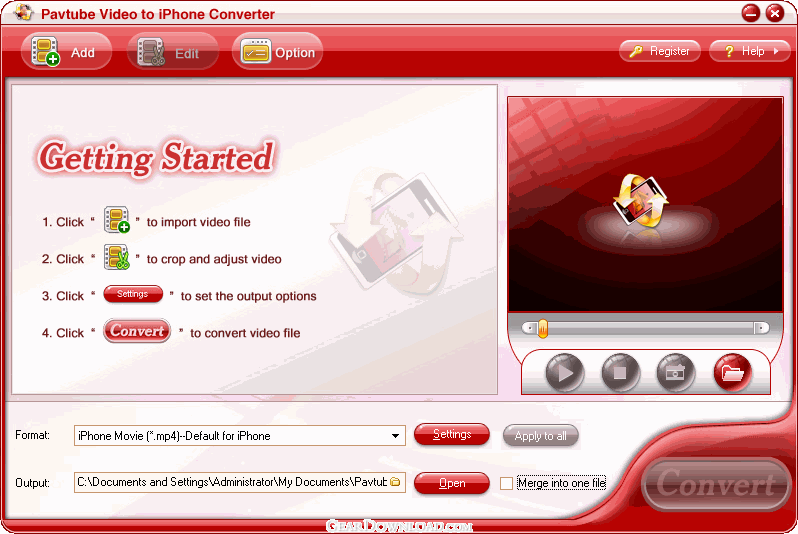 Click to enlarge screenshot
Software Description:
Pavtube Video to iPhone Converter converts videos to MP4 for playback on iPhone.
Pavtube Video to iPhone Converter is an extremely easy-to-operate conversion tool for iPhone-lovers. It can convert most video formats to iPhone supported formats for playback on it freely. Besides, its super conversion speed is beyond your imagination and pretty good quality will satisfy you absolutely. Meanwhile, compared with other similar products, it has the powerful functions as follows:
1. Pavtube Video to iPhone Converter can support converting various formats. The input formats: MOD, TOD, MTS, M2TS, FLV,WMV, ASF, WMA, AVI, RMVB, RM, RA, MOV, QT, MP4, M4V, 3GP, 3G2, DAT, MPG, MPEG, MP3, VOB, DV. The output formats: MP3, M4A, AAC, MP4, and WAV.
2. The user-friendly interface can make you use it masterly without the complicated process. In a very short time, you will become the expert on using it.
3. The fast conversion speed saves you much time. You have no botheration of long time waiting.
4. Advanced audio video sync technology lets you enjoy the video without any out-of-sync problems.
5. Various amazing watermarks enable you to add text, logo, picture even other video to your videos.
6. You can enjoy the videos with the excellent quality after the conversion on your iPhone. It is as good as the original one without any loss.
7. By trim and crop function, you can choose the time phase and the region of the video that you prefer. Also, unwanted black edges are allowed to cut off. All is up to you!
8. Merge the videos into a big one and enjoy the continuous videos without any interruption during the whole movie or music.
9. You can set the advanced settings including bit rate, frame rate, video size, etc. and get the better videos. For experienced users, it is pretty good choice!
10. This video to iPhone converter software takes full advantage of the latest NVIDIA CUDA technology to largely accelerate decoding/encoding speed. The GPU acceleration saves users time when converting videos to another format by using H.264 codec.
What's New: - Improved response speed. - Fixed occasional crashes and some bugs.
Limitations: watermark output
Pavtube Video to iPhone Converter is an extremely easy-to-operate conversion tool for iPhone-lovers. It can convert most video formats to iPhone supported formats for playback on it freely. Besides, its super conversion speed is beyond your imagination and pretty good quality will satisfy you absolutely. Meanwhile, compared with other similar products, it has the powerful functions as follows:
1. Pavtube Video to iPhone Converter can support converting various formats. The input formats: MOD, TOD, MTS, M2TS, FLV,WMV, ASF, WMA, AVI, RMVB, RM, RA, MOV, QT, MP4, M4V, 3GP, 3G2, DAT, MPG, MPEG, MP3, VOB, DV. The output formats: MP3, M4A, AAC, MP4, and WAV.
2. The user-friendly interface can make you use it masterly without the complicated process. In a very short time, you will become the expert on using it.
3. The fast conversion speed saves you much time. You have no botheration of long time waiting.
4. Advanced audio video sync technology lets you enjoy the video without any out-of-sync problems.
5. Various amazing watermarks enable you to add text, logo, picture even other video to your videos.
6. You can enjoy the videos with the excellent quality after the conversion on your iPhone. It is as good as the original one without any loss.
7. By trim and crop function, you can choose the time phase and the region of the video that you prefer. Also, unwanted black edges are allowed to cut off. All is up to you!
8. Merge the videos into a big one and enjoy the continuous videos without any interruption during the whole movie or music.
9. You can set the advanced settings including bit rate, frame rate, video size, etc. and get the better videos. For experienced users, it is pretty good choice!
10. This video to iPhone converter software takes full advantage of the latest NVIDIA CUDA technology to largely accelerate decoding/encoding speed. The GPU acceleration saves users time when converting videos to another format by using H.264 codec.
What's New: - Improved response speed. - Fixed occasional crashes and some bugs.
Limitations: watermark output
Feature List:
- The input formats: WMV, ASF, WMA, AVI, RMVB, RM, RA, MOV, QT, MP4, M4V, 3GP, 3G2, DAT, MPG, MPEG, MP3, VOB, DV. The output formats: MP3, M4A, AAC, MP4, and WAV
- The user-friendly interface can make you use it masterly without the complicated process. in very shot time, you will become the expert for using the product
- The fast conversion speed saves you much time. You have no botheration of long time waiting
- You can enjoy the videos with the excellent quality after the conversion on your iPhone. It is as good as the original one without any loss
- By trim and crop function, you can customize the videos, choosing the time phase and the region of the video that you prefer. All is up to you
- Merge the videos into a big one and enjoy the continuous videos without any interruption during the whole movie or music
- Want more controls for the video? You can set the advanced settings including bit rate, frame rate, video size, etc. and get the better videos
- Get the beautiful and still pictures with one click during previewing the video and save them into our PC for collection
- Before conversion, you can preview the original video and enjoy the videos in advance
100% Clean:
 Pavtube Video to iPhone Converter 3.7.3.1865 is 100% clean
This download (video2iphone_setup.exe) was tested thoroughly and was found 100% clean. Click "Report Spyware" link on the top if you found this software contains any form of malware, including but not limited to: spyware, viruses, trojans and backdoors.
Related Software:
- Pavtube DVD to iPhone Converter 3.4.1.701 - Fast convert DVD to iPhone for watching DVD movies with great quality.
- Pavtube Video to PSP Converter 3.6.2.2350 - Pavtube video to PSP Converter can convert WMV, AVI, etc. to MP4, MP3 for PSP.
- Pavtube DVD to iPod Converter 3.4.1.701 - Pavtube DVD to iPod Converter can rip and convert DVD to MP4, and M4A for iPod.
- Pavtube DVD to Zune Converter 3.3.1.634 - Convert DVD to Zune WMV, MP4, AAC, MP3, M4A and WAV easily.
- Pavtube DVD to PSP Converter 3.4.1.701 - Pavtube DVD to PSP Converter can convert DVD to MP4 for PSP.
- WinAVI 3GP/MP4/PSP/iPod Video Converter 4.4.2.4734 - Convert any videos to MP4/3GP/iPad/iPod/iPhone/PSP
- Cucusoft DVD to iPod Converter 8.08 - Cucusoft DVD to iPod Converter is the easiest-to-use DVD to iPod converter.
- ImTOO iPod Movie Converter 6.6.0.0623 - Convert video and audio to iPod MP4/MP3
- Lenogo DVD Movie to PSP Video Converter 5.5.5 - Convert DVD movies directly to your PSP (fast). Enjoy your movies on your PSP!
- Hot Video to iPod Converter 2.0 - tool for converting video files to iPod video
top 10 most downloaded


recommended software
-
- Moyea PPT to DVD Burner Pro
- With Moyea PPT to DVD Burner Pro, you can easily convert your any PowerPoint presentations to Blu-ray/DVD movies and save them on recordable Blu-ray/D...

-
- Moyea PPT to DVD Burner Lite
- Moyea PPT to DVD Burner Lite is an easy-to-use tool in converting PowerPoint to Blu-ray/DVD and PowerPoint to Video. In converting PowerPoint to Blu-r...