Index >> Audio & Multimedia >> Music Composers >> MIDI Tracker
Report SpywareMIDI Tracker 1.3.4

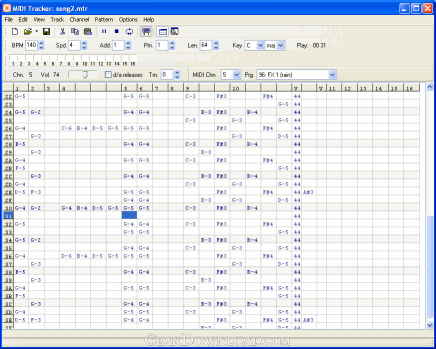 Click to enlarge screenshot
Software Description:
MIDI Tracker is music editor with ability to import and export MIDI files
MIDI Tracker is music editor with ability to import and export songs to MIDI format, support of 128 instruments, assigning volume and tracks count, playing and editing notes by PC keyboard. It is easy to create a song from a several patterns without any copy/paste operations.
All in one
MIDI Tracker is continuation of music trackers such as FastTracker and ImpulseTracker. To work with MIDI Tracker you don’t need any additional music equipment, except your sound card. You can play, edit and record notes by pressing keys of PC keyboard.
MIDI music editor
MIDI Tracker uses own file format for loading and saving. However, MIDI Tracker has MIDI import and MIDI export functions to compatibility with other systems. MIDI file size optimized to keep it as small as possible. In addition, you can import FastTracker module (XM file), for example, to convert it to MIDI format.
It is simple
You can play on your keyboard like playing on MIDI keyboard (with 32 keys) and change the octave by pressing single key (keys F1-F8).
Using with sound banks.
You can use it with.SBK or .SF2 sound banks
Mobile devices
There are several advantages of using MIDI Tracker for music for mobile devices (mobile phones).
- Small file size (usual these devices has a very limited memory size)
- Easy access to volume control (to make maximum song volume)
- Fast music production (you can make 4min song from 1 or 2 patterns)
Functions
We decided to keep the layout as easy to use as possible. Therefore, there are only two switching screens: pattern view and order view (song order). All other functions are accessible from the toolbar, main menu or shortcuts.
Misc. functions
- Transpose track, pattern, channel, block up and down by halftone
- Enhanced transpose (using song key tone)
- Add / remove track
- Add / remove channel
- MIDI device choice
- Choose patch, volume, disable and enable channels (mute, solo) from the toolbar
- Playing and inserting notes and chords
Limitations: 60 Days Trial
MIDI Tracker is music editor with ability to import and export songs to MIDI format, support of 128 instruments, assigning volume and tracks count, playing and editing notes by PC keyboard. It is easy to create a song from a several patterns without any copy/paste operations.
All in one
MIDI Tracker is continuation of music trackers such as FastTracker and ImpulseTracker. To work with MIDI Tracker you don’t need any additional music equipment, except your sound card. You can play, edit and record notes by pressing keys of PC keyboard.
MIDI music editor
MIDI Tracker uses own file format for loading and saving. However, MIDI Tracker has MIDI import and MIDI export functions to compatibility with other systems. MIDI file size optimized to keep it as small as possible. In addition, you can import FastTracker module (XM file), for example, to convert it to MIDI format.
It is simple
You can play on your keyboard like playing on MIDI keyboard (with 32 keys) and change the octave by pressing single key (keys F1-F8).
Using with sound banks.
You can use it with.SBK or .SF2 sound banks
Mobile devices
There are several advantages of using MIDI Tracker for music for mobile devices (mobile phones).
- Small file size (usual these devices has a very limited memory size)
- Easy access to volume control (to make maximum song volume)
- Fast music production (you can make 4min song from 1 or 2 patterns)
Functions
We decided to keep the layout as easy to use as possible. Therefore, there are only two switching screens: pattern view and order view (song order). All other functions are accessible from the toolbar, main menu or shortcuts.
Misc. functions
- Transpose track, pattern, channel, block up and down by halftone
- Enhanced transpose (using song key tone)
- Add / remove track
- Add / remove channel
- MIDI device choice
- Choose patch, volume, disable and enable channels (mute, solo) from the toolbar
- Playing and inserting notes and chords
Limitations: 60 Days Trial
Feature List:
- Pattern editor (Grid), many tracks per channel, several channels may points to one MIDI channel
- Order editor (Grid), where one cell value means 'play that channel from that pattern in that time'
- Advanced grid edit functions (select some notes, copy it to buffer and paste to any range you want)
- MIDI Patch changing from toolbar
- Chord playing and inserting (using shift key)
- Enable and disable channels from toolbar (FastTracker-like)
- Optimized file storage (*.mtr), saves only actual info
- FastTracker files import (.xm), without samples
- MIDI files import (*.mid)
- Import optimizing routines
- Export pattern to .Mid
- Export song to .Mid
100% Clean:
 MIDI Tracker 1.3.4 is 100% clean
This download (MTInstall.exe) was tested thoroughly and was found 100% clean. Click "Report Spyware" link on the top if you found this software contains any form of malware, including but not limited to: spyware, viruses, trojans and backdoors.
Related Software:
- Notation Composer 2.6.3 - Easily customize your own sheet music and its playback.
- WIDI Recognition System Professional 4.03 - Powerful polyphonic MP3 or Wave to MIDI converter with a built-in MIDI Editor.
- WIDI Recognition System Standard 4.03 - Powerful polyphonic Audio to MIDI converter with a Realtime Module.
- Able MIDI Editor 1.3 - Powerful inexpensive piano roll MIDI Editor with precise bar-line arrangement.
- Sound Effect Maker 1.1.7.6 - Sound Effect Maker can create sound effects for sound file.
- The Palette - Melody Composing Tool 4.4.3 - Palette - Melody Composing Tool is software that helps when composing melodies
- MIDI Maestro MM4 - MIDI sequencing and editing software specially designed for live performance
- Audio To MIDI VST (PC) 1.10 - Polyphonic Audio To MIDI VST plugin by WIDISOFT.
- Audio To MIDI VST (MAC) 1.10 - Polyphonic Audio To MIDI VST plugin by WIDISOFT for MAC OS X.
- MusicEase 8.2g - Music score editor:edit, transpose, play, import scanned music, and print music.
top 10 most downloaded


recommended software
-
- Moyea PPT to DVD Burner Pro
- With Moyea PPT to DVD Burner Pro, you can easily convert your any PowerPoint presentations to Blu-ray/DVD movies and save them on recordable Blu-ray/D...

-
- Moyea PPT to DVD Burner Lite
- Moyea PPT to DVD Burner Lite is an easy-to-use tool in converting PowerPoint to Blu-ray/DVD and PowerPoint to Video. In converting PowerPoint to Blu-r...