Index >> Audio & Multimedia >> Video Tools >> liteCam
Report SpywareliteCam 4.8

 Click to enlarge screenshot
Software Description:
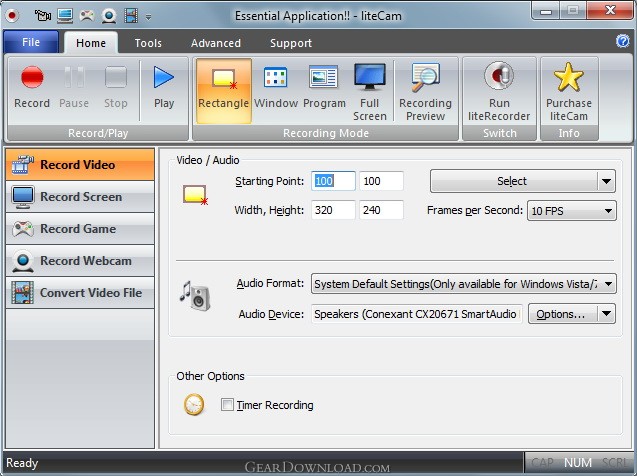
liteCam a screen recorder that record anything on your PC screen with sound.
liteCam HD is the most easy-to-use computer screen recorder for Windows users that helps create professional-looking HD videos in no time! Simply record anything on your PC screen with audio to teach, demonstrate, present, create video tutorials and much more. Its easy and powerful interface makes quick recording and reduces complex settings. For example, most frequently used features are displayed in the Tool bar as a shortcut in the program windows so that a non-techie can start to record without studying how to use the program. In addition, Its user friendly interface navigates how to use a number of comprehensive options quickly for tech savvy.
You can record streaming videos that cannot be downloaded as files. And create video tutorials to explain how to do something on a computer. Record important Skype video chats and calls. Save online web conferences video with audio, capturing all presentation contents and annotations. It offers special game recording mode for capturing most DirectX 7, 8, 9, 10, 11 and OpenGL games. This brilliant game recording mode allows upto 3 times faster than any general recording or video recording mode.
liteCam HD has unique audio and voice recording function to record any sounds on a computer and convert the recordings to WAV, MP3, or WMA format. In addition, it can extract sound/audio or background music from your recorded video. Record webcam conversation, draw on screen while recording, record mouse pointer with effects, add title and ending credits, and logo, schedule time to record, and take screenshots from your video. In one click, you can convert all your video and audio files into iPhone, iPad, or any Android device format. liteCam HD is compatible with Windows XP, Vista, 7, and 8 and it works well windows 64 bit machine.
With liteCam HD you can easily capture any onscreen activities to fulfill all your recording needs. Download liteCam HD for free today.
What's New: Easy and powerful interface, Capture of screenshots and mouse pointer movements, Compatible with 64 bit Windows game to record
Limitations: 30 Days Trial
liteCam HD is the most easy-to-use computer screen recorder for Windows users that helps create professional-looking HD videos in no time! Simply record anything on your PC screen with audio to teach, demonstrate, present, create video tutorials and much more. Its easy and powerful interface makes quick recording and reduces complex settings. For example, most frequently used features are displayed in the Tool bar as a shortcut in the program windows so that a non-techie can start to record without studying how to use the program. In addition, Its user friendly interface navigates how to use a number of comprehensive options quickly for tech savvy.
You can record streaming videos that cannot be downloaded as files. And create video tutorials to explain how to do something on a computer. Record important Skype video chats and calls. Save online web conferences video with audio, capturing all presentation contents and annotations. It offers special game recording mode for capturing most DirectX 7, 8, 9, 10, 11 and OpenGL games. This brilliant game recording mode allows upto 3 times faster than any general recording or video recording mode.
liteCam HD has unique audio and voice recording function to record any sounds on a computer and convert the recordings to WAV, MP3, or WMA format. In addition, it can extract sound/audio or background music from your recorded video. Record webcam conversation, draw on screen while recording, record mouse pointer with effects, add title and ending credits, and logo, schedule time to record, and take screenshots from your video. In one click, you can convert all your video and audio files into iPhone, iPad, or any Android device format. liteCam HD is compatible with Windows XP, Vista, 7, and 8 and it works well windows 64 bit machine.
With liteCam HD you can easily capture any onscreen activities to fulfill all your recording needs. Download liteCam HD for free today.
What's New: Easy and powerful interface, Capture of screenshots and mouse pointer movements, Compatible with 64 bit Windows game to record
Limitations: 30 Days Trial
Feature List:
- liteCam will automatically set your hardware acceleration for optimum recording. It will be automatically adjusted back to its original settings after the recording is finished. You are also able to set it up manually if you prefer to do so
- liteCam is the first movie recording program you can run on Vista
- Do you have to go out while you are recording? Use the Timer recording feature just like you do with your VCR. Recording will automatically stop at the time you set
- With a single click, you are ready to record your first movie
- Full screen, window frame and custom size recording modes are available. You can even record half of a movie
- liteCam records exactly what you see on your computer screen. No more buffering time for streaming media
- liteCam can not get any simpler than it is, but it is packed full of helpful features like Online/Offline help, Guide, FAQ, Forum and quick help
100% Clean:
 liteCam 4.8 is 100% clean
This download was tested thoroughly and was found 100% clean. Click "Report Spyware" link on the top if you found this software contains any form of malware, including but not limited to: spyware, viruses, trojans and backdoors.
Related Software:
- Fx Movie Joiner 6.2.11 - Join videos of various size, type and frame rate.
- Motion Hunter 1.01 - Motion Detection Software. Take the advantage of being informed! Be sure!
- Flash to Video Studio 1.0 - Tool to convert Macromedia Flash SWF files to AVI, VCD, SVCD, DVD video files
- H264 WebCam 3.99 - 4-ch H264 webcam surveillance software.Broadcast audio and video to internet.
- Hornsoft Online TV 3.8 - Watch 1,000+ Online TVs for Free! Listen to 2,000+ Online Radios for Free!
- Allok Video Joiner 4.6.0529 - join AVI, Divx, XviD, MPEG, WMV, ASF, RM, MOV, 3GP, MP4 into one large file.
- Flash Player Pro 5.6 - Adobe flash player, manager and flash screensaver maker
- CDH Media Wizard 11.0 - All-in-one audio and video converter, editor, recorder, burner, and much more!
- Zuma Pro v4.0 - Real-Time 3d VJ Entertainment, Performance and Authoring Software
- VideoConstructor 1.5.0.19 - Convert, join and split your video files, rip DVDs, create DVD-ready slideshows.
top 10 most downloaded


recommended software
-
- Moyea PPT to DVD Burner Pro
- With Moyea PPT to DVD Burner Pro, you can easily convert your any PowerPoint presentations to Blu-ray/DVD movies and save them on recordable Blu-ray/D...
-
- Moyea PPT to DVD Burner Lite
- Moyea PPT to DVD Burner Lite is an easy-to-use tool in converting PowerPoint to Blu-ray/DVD and PowerPoint to Video. In converting PowerPoint to Blu-r...