Index >> Audio & Multimedia >> Video Tools >> Boilsoft Screen Recorder
Report SpywareBoilsoft Screen Recorder 1.05.13

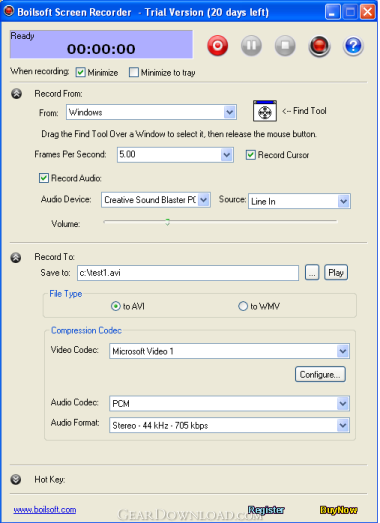 Click to enlarge screenshot
Software Description:
Boilsoft Screen Recorder - Record all screen and audio activity to AVI or WMV video file for business demos
Boilsoft Screen Recorder can record selected view, entire desktop or game screen to AVI or WMV video format. In addition, this screen recorder can also capture audio from speakers, microphone or external lines.
Boilsoft Screen Recorder is the ideal partner who helps you make demo videos, capture streaming video, prepare business solutions, make training materials, record gameplay, and etc. Adjustable output settings and like video Codec, Bitrate, Audio Codec or Audio format allows you to get your desired video effect.
Key Features of screen recorder:
1. Capture and record video from full screen, windows, region or a fixed region.
2. Video Codec, Bitrate, Audio Codec or Audio format of output video can be full customized to get your desired effect.
3. Output to AVI file. You can choose the video compressor, and its compression quality. Supports DivX, XviD.
4. Previewing the record video is supported.
5. Supports recording to WMV file, all the video setting and audio setting can be configured.
6. Option to capture mouse cursor or not.
7. Record audio from any sources including the microphone, line-in, or speakers.
8. Start/stop recording with hotkey hit.
Boilsoft Screen Recorder can:
* Create demonstration videos for any software.
* Create video tutorials for students at multiple levels.
* Record a frequently-occured problem from your computer and you can use the video as a sample for technical support.
* Create video-based information products for online business
* Record your excellent performance in the game to show how cool you are.
* Develop multimedia materials that can be shown on TV or burnt to discs. Use them to promote your website or other products
System Requirements:
Windows 98 Second Edition, Windows ME, Windows 2000, Windows XP, Windows Vista and Windows 7
Direct X:
Version 8.01 or above.
What's New: * Optimized the output video effect.
Boilsoft Screen Recorder can record selected view, entire desktop or game screen to AVI or WMV video format. In addition, this screen recorder can also capture audio from speakers, microphone or external lines.
Boilsoft Screen Recorder is the ideal partner who helps you make demo videos, capture streaming video, prepare business solutions, make training materials, record gameplay, and etc. Adjustable output settings and like video Codec, Bitrate, Audio Codec or Audio format allows you to get your desired video effect.
Key Features of screen recorder:
1. Capture and record video from full screen, windows, region or a fixed region.
2. Video Codec, Bitrate, Audio Codec or Audio format of output video can be full customized to get your desired effect.
3. Output to AVI file. You can choose the video compressor, and its compression quality. Supports DivX, XviD.
4. Previewing the record video is supported.
5. Supports recording to WMV file, all the video setting and audio setting can be configured.
6. Option to capture mouse cursor or not.
7. Record audio from any sources including the microphone, line-in, or speakers.
8. Start/stop recording with hotkey hit.
Boilsoft Screen Recorder can:
* Create demonstration videos for any software.
* Create video tutorials for students at multiple levels.
* Record a frequently-occured problem from your computer and you can use the video as a sample for technical support.
* Create video-based information products for online business
* Record your excellent performance in the game to show how cool you are.
* Develop multimedia materials that can be shown on TV or burnt to discs. Use them to promote your website or other products
System Requirements:
Windows 98 Second Edition, Windows ME, Windows 2000, Windows XP, Windows Vista and Windows 7
Direct X:
Version 8.01 or above.
What's New: * Optimized the output video effect.
100% Clean:
 Boilsoft Screen Recorder 1.05.13 is 100% clean
This download (bsscreenrecorder.exe) was tested thoroughly and was found 100% clean. Click "Report Spyware" link on the top if you found this software contains any form of malware, including but not limited to: spyware, viruses, trojans and backdoors.
Related Software:
- Boilsoft DVD Clone Lab 1.11 - A powerful, easy-using DVD cloner,DVD copier to copy DVD, backup DVD.
- Boilsoft DVD Creator 1.01 - A powerful DVD Creator plus a DVD Burner, supports multi-format.
- Boilsoft Video Cutter 1.23 - Boilsoft Video Cutter is a powerful video cutter,cut video fast, avi cutter.
- Boilsoft Video Splitter 7.02.2 - Split large video to multiple clips by custom selections or equal-size parts
- Boilsoft MOV Converter 2.41 - A powerful converter converts MOV,3GP,MP4 to AVI, to MPEG, to DVD.
- Boilsoft PSP Video Converter 1.51 - A powerful converter converts PSP to AVI, MP4, MPEG, DVD, FLV, VCD, 3GP etc.
- Boilsoft WMV Converter 1.51 - A powerful converter converts WMV to AVI, MP4, MPEG, DVD, FLV, VCD, 3GP etc.
- Boilsoft AVI to DVD Converter 4.67 - Convert and burn AVI, M2V, MPEG, MPG, DAT and VOB formats to DVD discs.
- Boilsoft Video Joiner for Mac 1.08.2 - Join unlimited number of videos of any format into one file on Mac OS X.
- Boilsoft Video Joiner 7.02.2 - Join multiple video clips into one large movie file.
top 10 most downloaded


recommended software
-
- Moyea PPT to DVD Burner Pro
- With Moyea PPT to DVD Burner Pro, you can easily convert your any PowerPoint presentations to Blu-ray/DVD movies and save them on recordable Blu-ray/D...
-
- Moyea PPT to DVD Burner Lite
- Moyea PPT to DVD Burner Lite is an easy-to-use tool in converting PowerPoint to Blu-ray/DVD and PowerPoint to Video. In converting PowerPoint to Blu-r...